A JDBC example to show you how to connect to a Oracle database with a JDBC driver.
Tested with:
- Java 8
- Oracle database 19c
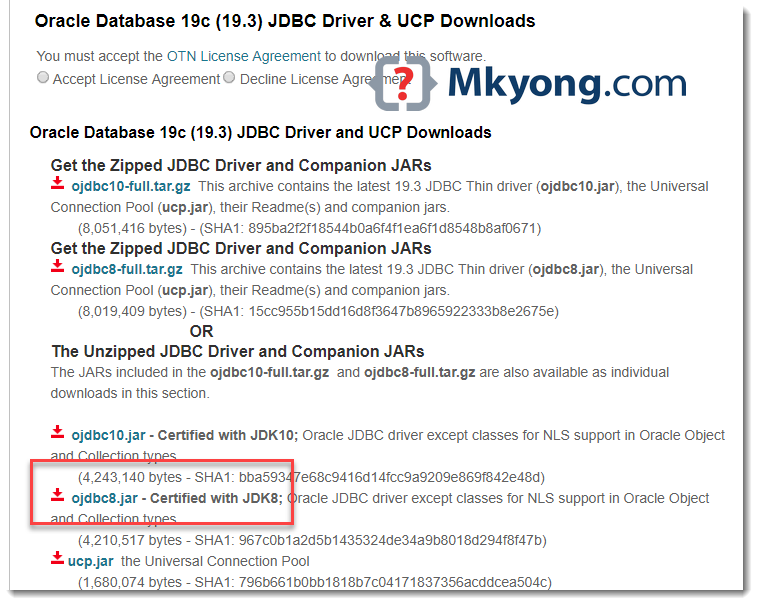
- Oracle JDBC driver for Java 8,
ojdbc8.jar
1. Download Oracle JDBC Driver
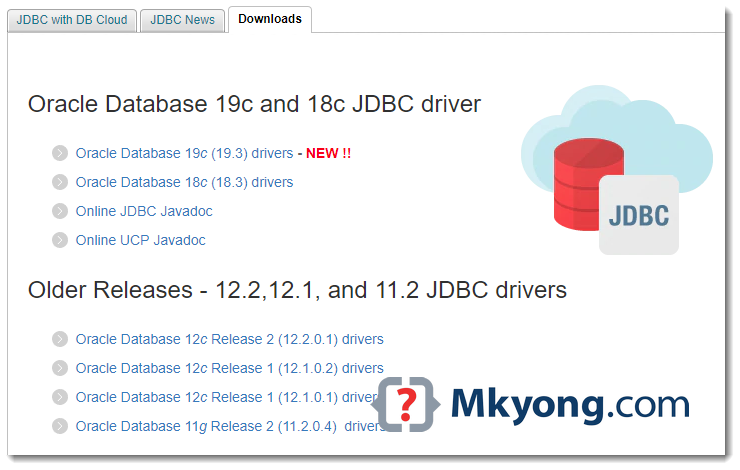
Visit Oracle database website and download the Oracle JDBC Driver.
2. JDBC Connection
Note
Find your Oracle SID in
Find your Oracle SID in
{ORACLE_HOME}/network/admin/tnsnames.ora to avoid the popular ORA-12505, TNS:listener does not currently know of SID
2.1 Make a connection to the Oracle database.
JDBCExample.java
import java.sql.Connection;
import java.sql.DriverManager;
import java.sql.SQLException;

public class JDBCExample {

    public static void main(String[] args) {

        // https://docs.oracle.com/javase/8/docs/api/java/sql/package-summary.html#package.description
        // auto java.sql.Driver discovery -- no longer need to load a java.sql.Driver class via Class.forName

        // register JDBC driver, optional since java 1.6
        /*try {
            Class.forName("oracle.jdbc.driver.OracleDriver");
        } catch (ClassNotFoundException e) {
            e.printStackTrace();
        }*/

		// Oracle SID = orcl , find yours in tnsname.ora
        try (Connection conn = DriverManager.getConnection(
                "jdbc:oracle:thin:@localhost:1521:orcl", "system", "Password123")) {

            if (conn != null) {
                System.out.println("Connected to the database!");
            } else {
                System.out.println("Failed to make connection!");
            }

        } catch (SQLException e) {
            System.err.format("SQL State: %s\n%s", e.getSQLState(), e.getMessage());
        } catch (Exception e) {
            e.printStackTrace();
        }

    }
}
Compile and run:
C:\test> javac JDBCExample.java

C:\test> java JDBCExample
SQL State: 08001
No suitable driver found for jdbc:oracle:thin:@localhost:1521:orcl
2.2 Assume ojdbc8.jar and JDBCExample.java are stored in c:\test together. Define a -cp option to load everything together:
> java -cp "c:\test\ojdbc8.jar;c:\test" JDBCExample
Connected to the database!
3. Maven Project
3.1 Sorry, due to Oracle license restriction, the Oracle JDBC driver is NOT available in the Maven central repository. Follow this guide to add it – How to add Oracle JDBC driver in your Maven local repository
3.2 Alternatively, defined a system scope to find the .jar file with a specified system path.
pom.xml
	<dependency>
		<groupId>com.oracle</groupId>
		<artifactId>ojdbc</artifactId>
		<version>8</version>
		<scope>system</scope>
		<systemPath>d:/projects/ojdbc8.jar</systemPath>
	</dependency>
Download Source Code
$ git clone https://github.com/mkyong/java-jdbc.git

Excellent tutorial, which should change if I use JDK 11
https://mvnrepository.com/artifact/com.oracle.database.jdbc/ojdbc8/21.3.0.0
Driver in maven now
Life saver, thanks, upgraded to 19c, and suddenly my connection did not work. Did not realise no longer need to load the driver and also the conn string changed from /SID to :SID.
Is it possible to save the connection string/user name/password into a file, similar to application.properties and read them back in the program? Thanks!
I’m getting following error:
Exception in thread “main” java.lang.VerifyError: Bad return type
Exception Details:
Location:
oracle/jdbc/driver/T4C8TTIBlob.createTemporaryLob(Ljava/sql/Connection;ZI)Loracle/sql/Datum; @152: areturn
Reason:
Type ‘oracle/sql/BLOB’ (current frame, stack[0]) is not assignable to ‘oracle/sql/Datum’ (from method signature)
thanks:)
Hi mkyong,
I used ojdbc8.jar to get database status but it suddenly stopped working for oracle 9i one day. Now, it is working with ojdbc14.jar. What could be the reasons?
I had this error 🙁
Oracle JDBC Driver Registered!
Exception in thread “main” java.lang.NullPointerException
at oracle.net.jndi.JndiAttrs.getAttrs(JndiAttrs.java:215)
at oracle.net.resolver.AddrResolution.(AddrResolution.java:237)
at oracle.net.ns.NSProtocol.connect(NSProtocol.java:233)
at oracle.jdbc.driver.T4CConnection.connect(T4CConnection.java:1438)
at oracle.jdbc.driver.T4CConnection.logon(T4CConnection.java:518)
at oracle.jdbc.driver.PhysicalConnection.connect(PhysicalConnection.java:688)
at oracle.jdbc.driver.T4CDriverExtension.getConnection(T4CDriverExtension.java:39)
at oracle.jdbc.driver.OracleDriver.connect(OracleDriver.java:691)
at java.sql.DriverManager.getConnection(Unknown Source)
at java.sql.DriverManager.getConnection(Unknown Source)
at OracleJDBCExample.main(OracleJDBCExample.java:29)
Can you please help?
Hello!
I’m constantly getting NullPointerException at string “connection = DriverManager.getConnection(…”. Checked everything (url, sid, login, password) and still get this exception. Could you please advise what could be the problem?
Stack is given below:
Exception in thread “main” java.lang.NullPointerException
at java.base/java.lang.String.(String.java:250)
at oracle.sql.CharacterSet.AL32UTF8ToString(CharacterSet.java:1517)
at oracle.jdbc.driver.DBConversion.CharBytesToString(DBConversion.java:589)
at oracle.jdbc.driver.DBConversion.CharBytesToString(DBConversion.java:542)
at oracle.jdbc.driver.T4CTTIoauthenticate.receiveOauth(T4CTTIoauthenticate.java:816)
at oracle.jdbc.driver.T4CConnection.logon(T4CConnection.java:362)
at oracle.jdbc.driver.PhysicalConnection.(PhysicalConnection.java:414)
at oracle.jdbc.driver.T4CConnection.(T4CConnection.java:165)
at oracle.jdbc.driver.T4CDriverExtension.getConnection(T4CDriverExtension.java:35)
at oracle.jdbc.driver.OracleDriver.connect(OracleDriver.java:801)
at java.sql/java.sql.DriverManager.getConnection(DriverManager.java:677)
at java.sql/java.sql.DriverManager.getConnection(DriverManager.java:228)
at testBaseConnection.main(testBaseConnection.java:21)
Thank you in advance!
Found reason. It was ojdbc driver, it was ojdbc14, when instruction clearly stated to use ojdbc 6 or 7.
Thank you for this instruction.
Thanks. Worked in the first attempt.
How jdbc register driver will work if static blocks are not getting executed?
thanks
Where is your Oracle JDBC Driver?
Very easy and success!
Thank you.
Hello Mkyong!
First I had the “ORA-12505, TNS:listener does not currently know of SID given in connect descriptor” problem.
Then I replaced the “xe” by the correct “service name” that was in the tnsnames.ora
Thanks for the example, it worked fine for me!
Check
tnsname.orato find your Oracle SID for the connection.https://www.mkyong.com/jdbc/ora-12505-tnslistener-does-not-currently-know-of-sid-given-in-connect-descriptor/
Hi Mkyong
Can you please guide me how to use TNSNAMES.ORA file Java JDBC Connection example above?
Regards
-Haris
Very simple and easy to understand!
Thank you!
i’m having a question for this code….
if we want to connect to Oracle 11g database,
from what you just wrote on the code above,…
it says : “org.postgresql.Driver” -> why we wrote postgresql instead of Oracle 11g?
Very useful. Thank you! Simple, working, clear.
If we create multiple instance of the connection class which includes same URL, Username and password. When we close the connection, will all connections created using same username and password will also be closed?
Wow – I’m impressed that noone before me found out that in the complete example there is no closing of the connection using the connection.close(); as described in the first example…
Four years….
Thank’s a lot. I have done it.
Thanks for easy to imbibe page.
Please guide,
is it possible to create a persistent Database connection and use it for all database access for all sessions in web application as separate connection may cause exhausting number of processes in oracle.
How can we specify the address of Jdbc
my jdbc is located in oracle
please give me reply
thanks it worked !
here is is my output
run:
——– Oracle JDBC Connection Testing ——
Oracle JDBC Driver Registered!
You made it, take control your database now!
BUILD SUCCESSFUL (total time: 0 seconds)
hi, above code was useful to get connection. thanks
Thanks, it’s very nice tutor.
But why using “PostgreSQL” driver for Oracle connection?
>>
Class.forName(“org.postgresql.Driver”);
//…
>>
Sorry, typo, fixed.
i’m trying to connect oracle database by ojdbc14.jar where should i save it and how to run this..;;
bcause i’m finding a error that is claasnotfound..
pls help me..
right click on computer and go to properties and go to advanced system settings and go to environment variables and click on new
and variable name classpath and in variable path E:oracleproduct10.2.0db_1jdbclibojdbc14.jar;
then prss ok its connected to database
Nice simple post for quick reference!
Thanks a tonnnne Mr.Mkyong. I never thought oracle odbc connectivity would be this simple.. Thanks again..:-)
That’s JDBC, not ODBC. I know, “OJDBC” confuses me some times also 🙂
Thank You! I was looking for something simple to get me going and this did it!
1)where i can find driver classname–
i.e, oracle.jdbc.driver.OracleDriver
2)where i can get url
iam waiting for ur reply
I am getting following error:
C:\oracle\product>java -cp C:\oracle\product\11.2.0\client_1\jdbc\lib\ojdbc6.jar;C:\oracle\product\11.2.0\client_1\jdbc\lib oraclejdbc
Error: Could not find or load main class oraclejdbc
plz explain in detail
Assume everything in
c:\testjava -cp "c:\test\ojdbc8.jar;c:\test" JDBCExampleDid you mean to reference org.postgresql.Driver in the very first snippet?
C:\Users\Sarveshwar\Desktop>javac OracleJDBC.java
C:\Users\Sarveshwar\Desktop>java OracleJDBC
——– Oracle JDBC Connection Testing ——
Where is your Oracle JDBC Driver?
java.lang.ClassNotFoundException: oracle.jdbc.driver.OracleDriver
at java.net.URLClassLoader$1.run(Unknown Source)
at java.net.URLClassLoader$1.run(Unknown Source)
at java.security.AccessController.doPrivileged(Native Method)
at java.net.URLClassLoader.findClass(Unknown Source)
at java.lang.ClassLoader.loadClass(Unknown Source)
at sun.misc.Launcher$AppClassLoader.loadClass(Unknown Source)
at java.lang.ClassLoader.loadClass(Unknown Source)
at java.lang.Class.forName0(Native Method)
at java.lang.Class.forName(Unknown Source)
at OracleJDBC.main(OracleJDBC.java:13)
JDBC is present in Oracle(11g) or Java? please specify the address of JDBC.
may i have the link of ‘any software/flat form for Java editor along with JDBC connector?
when i try your first command
i am getting an error – access denied
please reply as soon as possible
thank you
how to connect java to oracle 10g with netbeans ?
Thanks a lot ….
hello,
how can i implement a class so that other classes can use it for database connection?
thanks you
it’s working ..Thank u pal….
Perfect! Thank you.
is there anyone..who knows the solution for this problem..
actly i m trying to connect jdbc with oracle..
..
but i m unable to run this..
i m getting this msg
C:\Users\OBAID\workspace\checking\src\org>java check
Exception in thread “main” java.lang.UnsupportedClassVersionError: check (Unsupp
orted major.minor version 51.0)
at java.lang.ClassLoader.defineClass0(Native Method)
at java.lang.ClassLoader.defineClass(Unknown Source)
at java.security.SecureClassLoader.defineClass(Unknown Source)
at java.net.URLClassLoader.defineClass(Unknown Source)
at java.net.URLClassLoader.access$100(Unknown Source)
at java.net.URLClassLoader$1.run(Unknown Source)
at java.security.AccessController.doPrivileged(Native Method)
at java.net.URLClassLoader.findClass(Unknown Source)
at java.lang.ClassLoader.loadClass(Unknown Source)
at sun.misc.Launcher$AppClassLoader.loadClass(Unknown Source)
at java.lang.ClassLoader.loadClass(Unknown Source)
at java.lang.ClassLoader.loadClassInternal(Unknown Source)
C:\Users\OBAID\workspace\checking\src\org>
liked ur code for jdbc connection test
i got error got minus one form a read call
jdk 1.6 oracle 10.2.0.1.0 ojdbc6.jar
please tell me the sollution what is the problem !! what am doing in this error ? reply me !!!!!
D:\JAVA>javac simple.java
D:\JAVA>java OracleJDBC
——– Oracle JDBC Connection Testing ——
Where is your Oracle JDBC Driver?
java.lang.ClassNotFoundException: oracle.jdbc.driver.OracleDriver
at java.net.URLClassLoader$1.run(URLClassLoader.java:200)
at java.security.AccessController.doPrivileged(Native Method)
at java.net.URLClassLoader.findClass(URLClassLoader.java:188)
at java.lang.ClassLoader.loadClass(ClassLoader.java:306)
at sun.misc.Launcher$AppClassLoader.loadClass(Launcher.java:268)
at java.lang.ClassLoader.loadClass(ClassLoader.java:251)
at java.lang.ClassLoader.loadClassInternal(ClassLoader.java:319)
at java.lang.Class.forName0(Native Method)
at java.lang.Class.forName(Class.java:164)
at OracleJDBC.main(simple.java:13)
same problem am getting
Where is your Oracle JDBC Driver?
Your project needs to reference this file. Right click the project name, and find properties, in there find something like External Libraries, or JARs.
Good luck.
sry, it needs to reference the ojdbc.jar file.. google for that and download it from oracle. its the libraries of classes you’re using, such as Connection, Statement, DriverManager.
also guys… its awkward that you ask this, when its the first thing in the instructions:
#1. Download Oracle JDBC Driver
Get Oracle JDBC driver here – ojdbcxxx.jar
he even gives you a link. scroll to the Top of the page you’re reading this on.
hi Java gurus
I think you should use the oracle class instead of the postgresql class.
Change this:
Class.forName("org.postgresql.Driver");to this:
Class.forName("oracle.jdbc.driver.OracleDriver");Wish u a Happy New Year for mkyong and all the java programmers in this blog .i like this code for jdbc connection
pre lang=”language”>
Hello, not sure if this answers the question you are having or if this has already been answered but this might help others. It appears that the format for the connection string is now different for newer versions of Oracle. I have tested that this works on 11.X of Oracle.
So instead of this
Try… This instead. Note the ‘/’ at the end instead of the ‘:’
very nice mykong in the above example
connection = DriverManager.getConnection(“jdbc:oracle:thin:@localhost:1521:mkyong”, username”,”password”);
what is mykong after the port number is t the database or the service please reply me…
commant fait le connection de java avec oracle
Class.forName(“org.postgresql.Driver”);
mr.yong can u change it to Class.forName(“oracle.jdbc.driver.OracleDriver”);
Thanks for sharing this. How can I measure the time elapsed for establishing the connection? When I use your script, sometimes it comes right back saying all good and sometimes it takes from 20-60 seconds or more.
Thanks.
Thanks for this. I really like your blog, it helps me with all my java questions!
Keep on posting!
Class.forName(“org.postgresql.Driver”);
wrong wrong wrong wrong
Thanks for sharing! Easy to use!
Rainer
Hi yong,
earlier i have seen lot many java programs under java miscellaneous. now i am unable to find where they are. plz shere me the link of those programs location.
Thanks,
Salmon
Sorry for your lost, Here you go https://mkyong.com/category/java/
FYI, all links are available at footer “All Available Tutorials”
I get following error:
C:\oracle\product>java -cp C:\oracle\product\11.2.0\client_1\jdbc\lib\ojdbc6.jar;C:\oracle\product\11.2.0\client_1\jdbc\lib oraclejdbc
Error: Could not find or load main class oraclejdbc
Hi Vishal,
Your class ‘oraclejdbc’ does not provide a public static main methods.
The JVM cannot find it.
how can this be fixed.I also get the same error.
i am using oracle 12c enterprise edition. ojdbc8.jar is used to compile and exceute.
please help