In Java, the OutputStreamWriter accepts a charset to encode the character streams into byte streams. We can pass a StandardCharsets.UTF_8 into the OutputStreamWriter constructor to write data to a UTF-8 file.
  try (FileOutputStream fos = new FileOutputStream(file);
       OutputStreamWriter osw = new OutputStreamWriter(fos, StandardCharsets.UTF_8);
       BufferedWriter writer = new BufferedWriter(osw)) {

      writer.append(line);

  }
In Java 7+, many File I/O and NIO writers start to accept charset as an argument, making write data to a UTF-8 file very easy, for examples:
  // Java 7
  Files.write(path, lines, StandardCharsets.UTF_8);

  // Java 8
  Files.newBufferedWriter(path) // default UTF-8

  // Java 11
  new FileWriter(new File(fileName), StandardCharsets.UTF_8);
1. Write to UTF-8 file
This example shows a few ways to write some Chinese characters to a UTF-8 file.
UnicodeWrite.java
package com.mkyong.io.howto;

import java.io.*;
import java.nio.charset.StandardCharsets;
import java.nio.file.Files;
import java.nio.file.Path;
import java.nio.file.Paths;
import java.util.Arrays;
import java.util.List;

public class UnicodeWrite {

    public static void main(String[] args) {

        String fileName = "c:\\temp\\test.txt";
        List<String> lines = Arrays.asList("line 1", "line 2", "line 3", "你好,世界");

        writeUnicodeJava7(fileName, lines);
        //writeUnicodeJava8(fileName, lines);
        //writeUnicodeJava11(fileName, lines);
        //writeUnicodeClassic(fileName, lines);

        System.out.println("Done");
    }

    // in the old days
    public static void writeUnicodeClassic(String fileName, List<String> lines) {

        File file = new File(fileName);

        try (FileOutputStream fos = new FileOutputStream(file);
             OutputStreamWriter osw = new OutputStreamWriter(fos, StandardCharsets.UTF_8);
             BufferedWriter writer = new BufferedWriter(osw)
        ) {

            for (String line : lines) {
                writer.append(line);
                writer.newLine();
            }

        } catch (IOException e) {
            e.printStackTrace();
        }

    }

    public static void writeUnicodeJava7(String fileName, List<String> lines) {

        Path path = Paths.get(fileName);
        try {
            Files.write(path, lines, StandardCharsets.UTF_8);
        } catch (IOException e) {
            e.printStackTrace();
        }

    }

    // Java 8 - Files.newBufferedWriter(path) - default UTF-8
    public static void writeUnicodeJava8(String fileName, List<String> lines) {

        Path path = Paths.get(fileName);

        try (BufferedWriter writer = Files.newBufferedWriter(path, StandardCharsets.UTF_8)) {

            for (String line : lines) {
                writer.append(line);
                writer.newLine();
            }

        } catch (IOException e) {
            e.printStackTrace();
        }

    }

    // Java 11 adds Charset to FileWriter
    public static void writeUnicodeJava11(String fileName, List<String> lines) {

        try (FileWriter fw = new FileWriter(new File(fileName), StandardCharsets.UTF_8);
             BufferedWriter writer = new BufferedWriter(fw)) {

            for (String line : lines) {
                writer.append(line);
                writer.newLine();
            }

        } catch (IOException e) {
            e.printStackTrace();
        }

    }

}
Output
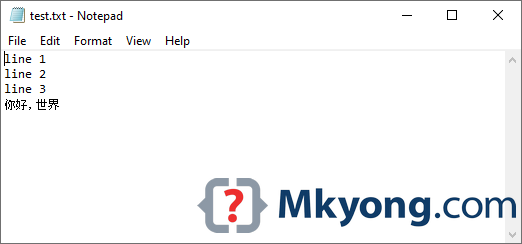
Further Reading
How to read a UTF-8 file in Java
Download Source Code
$ git clone https://github.com/mkyong/core-java
$ cd java-io

Helped me a lot thanks
how to use scanner input in java to convert unicode code point to utf8, utf16, utf32
I had this problem, but simply switching from Gedit to VSCode worked for me
How to create a file with chinese characters in the file name
awesome !
Code ain’t working for me may be because of this : http://stackoverflow.com/a/4053854
Please provide another working solution asap. I guess there is something in Apache Commons for the same.
Hello there,
This code does not really work for me.
Here’s how I tested it. My test.txt file is saved with UTF-8 encoding and contains this line:
—————
w été jedn? stron? ôpèç Ûg ütà
—————
My test program below first reads the file in BufferedReader and then writes in Writer.
—————
package test;
import java.io.BufferedReader;
import java.io.BufferedWriter;
import java.io.FileInputStream;
import java.io.FileOutputStream;
import java.io.IOException;
import java.io.InputStreamReader;
import java.io.OutputStreamWriter;
import java.io.UnsupportedEncodingException;
import java.io.Writer;
public class Test_temp {
public Test_temp() {
String sPath = “E:/workspace/project/src/test/test.txt”;
if (sPath != null && !sPath.trim().equals(“”)) {
try {
Writer out = new BufferedWriter(new OutputStreamWriter(new FileOutputStream(sPath + “.new”), “UTF8”));
BufferedReader in = new BufferedReader(new InputStreamReader(new FileInputStream(sPath), “UTF8”));
String s = null;
while ((s = in.readLine()) != null) {
String UTF8Str = new String(s.getBytes(), “UTF8”);
System.out.println(“[” + UTF8Str + “]”);
out.append(UTF8Str).append(“\r\n”);
}
System.out.println(“Reading Process Completly Successfully.”);
in.close();
out.flush();
out.close();
} catch (UnsupportedEncodingException ue) {
System.out.println(“Not supported : ” + ue.getMessage());
} catch (IOException e) {
System.out.println(e.getMessage());
}
}
}
public static void main(String[] args) {
new Test_temp();
}
}
—————
The new generated file (test.txt.new) is also encoded with UTF-8 but characters are corrupted:
———–
?w ?t? jedn? stron? ?p?? ?g ?
———–
Could you please tell me what do I do wrong?
Thanks
ganba
are you sure that you’re using a UTF-( reader to validate the file?
Regards,
Tony