This article shows how to parse JSON Array using Gson.
Table of contents:
- 1. Download Google Gson
- 2. Parse JSON Array using Gson
- 3. Parse JSON Array of Object Array using Gson
- 4. JSON array contains array of object
- 5. Unusual JSON array contains array of string
- 6. Download Source Code
- 7. References
P.S Tested with Gson 2.10.1
1. Download Google Gson
Declare gson in the pom.xml.
    <dependency>
        <groupId>com.google.code.gson</groupId>
        <artifactId>gson</artifactId>
        <version>2.10.1</version>
    </dependency>
2. Parse JSON Array using Gson
A sample of JSON array structure.
[
  {
    "id": 1, "name": "a"
  },
  {
    "id": 2, "name": "b"
  }
]
Basic of JSON.
[ ]= array{ }= object
Create a Java object with field names matching the JSON array properties.
package com.mkyong.json.gson.model;

public class Item {

    private int id;
    private String name;

    // getters, setters, toString, constructors etc...
}
The following example uses Gson to convert a JSON array to the List<Item>.
package com.mkyong.json.gson;

import com.google.gson.Gson;
import com.google.gson.reflect.TypeToken;
import com.mkyong.json.gson.model.Item;

import java.lang.reflect.Type;
import java.util.List;

public class GsonParseJsonArrayExample1 {

    public static void main(String[] args) {

        String json = """
                [
                  {
                    "id": 1, "name": "a"
                  },
                  {
                    "id": 2, "name": "b"
                  }
                ]
                """;

        Gson gson = new Gson();

        // create a List<Item>
        Type listItemType = new TypeToken<List<Item>>() {}.getType();

        // convert json array to List<Item>
        List<Item> list = gson.fromJson(json, listItemType);

        list.forEach(System.out::println);
    }
}
Output
Item{id=1, name='a'}
Item{id=2, name='b'}
3. Parse JSON Array of Object Array using Gson
Review another sample JSON array.
[
  {
    "id": 1,
    "name": "a",
    "types":
    [
      {"id": 1,"name": "a1"},
      {"id": 2,"name": "a2"}
    ]
  },
  {
    "id": 2,
    "name": "b",
    "types":
    [
      {"id": 1,"name": "b1"},
      {"id": 2,"name": "b2"}
    ]
  }
]
The above JSON array looks complicated, but we just need to create objects whose properties match the JSON field names and types. Gson will handle the data binding automatically.
package com.mkyong.json.gson.model;

public class Item {

    private int id;
    private String name;

    // getters, setters, toString, constructors etc...
}
package com.mkyong.json.gson.model;

public class ItemType {

    private int id;
    private String name;

    // getters, setters, toString, constructors etc...
}
Test it.
package com.mkyong.json.gson;

import com.google.gson.Gson;
import com.google.gson.reflect.TypeToken;
import com.mkyong.json.gson.model.Item;

import java.lang.reflect.Type;
import java.util.List;

public class GsonParseJsonArrayExample2 {

    public static void main(String[] args) {

        String json = """
                [
                  {
                    "id": 1,
                    "name": "a",
                    "types":
                    [
                      {"id": 1,"name": "a1"},
                      {"id": 2,"name": "a2"}
                    ]
                  },
                  {
                    "id": 2,
                    "name": "b",
                    "types":
                    [
                      {"id": 1,"name": "b1"},
                      {"id": 2,"name": "b2"}
                    ]
                  }
                ]
                """;

        Gson gson = new Gson();

        // create a List<Item>
        Type listItemType = new TypeToken<List<Item>>() {}.getType();

        // convert json array to List<Item>
        List<Item> list = gson.fromJson(json, listItemType);

        list.forEach(System.out::println);
    }
}
Output
Item{id=1, name='a', types=[ItemType{id=1, name='a1'}, ItemType{id=2, name='a2'}]}
Item{id=2, name='b', types=[ItemType{id=1, name='b1'}, ItemType{id=2, name='b2'}]}
4. JSON array contains array of object
Review another sample JSON array of array… a bit scary structure.
[
  {
    "id": 1,
    "name": "a",
    "types":
    [
      [
        {"id": 1,"name": "a1"},
        {"id": 2,"name": "a2"}
      ],
      [
        {"id": 3,"name": "a3"}
      ]
    ]
  },
  {
    "id": 2,
    "name": "b",
    "types":
    [
      [
        {"id": 1,"name": "b1"}
      ],
      [
        {"id": 2,"name": "b2"}
      ]
    ]
  }
]
To match it correctly, we can change the types to List<ItemType> types[].
package com.mkyong.json.gson.model;

import java.util.Arrays;
import java.util.List;

public class Item {

    private int id;
    private String name;

    // change List<ItemType> type -> List<ItemType>[] type
    private List<ItemType>[] types;

    @Override
    public String toString() {
        return "Item{" +
                "id=" + id +
                ", name='" + name + '\'' +
                ", types=" + Arrays.toString(types) +
                '}';
    }

    public int getId() {
        return id;
    }

    public void setId(int id) {
        this.id = id;
    }

    public String getName() {
        return name;
    }

    public void setName(String name) {
        this.name = name;
    }

    public List<ItemType>[] getTypes() {
        return types;
    }

    public void setTypes(List<ItemType>[] types) {
        this.types = types;
    }
}
Test it.
package com.mkyong.json.gson;

import com.google.gson.Gson;
import com.google.gson.reflect.TypeToken;
import com.mkyong.json.gson.model.Item;

import java.lang.reflect.Type;
import java.util.List;

public class GsonParseJsonArrayExample3 {

    public static void main(String[] args) {

        String json = """
                [
                   {
                     "id": 1,
                     "name": "a",
                     "types":
                     [
                       [
                         {"id": 1,"name": "a1"},
                         {"id": 2,"name": "a2"}
                       ],
                       [
                         {"id": 3,"name": "a3"}
                       ]
                     ]
                   },
                   {
                     "id": 2,
                     "name": "b",
                     "types":
                     [
                       [
                         {"id": 1,"name": "b1"}
                       ],
                       [
                         {"id": 2,"name": "b2"}
                       ]
                     ]
                   }
                 ]
                """;

        Gson gson = new Gson();

        // create a List<Item>
        Type listItemType = new TypeToken<List<Item>>() {}.getType();

        // convert json array to List<Item>
        List<Item> list = gson.fromJson(json, listItemType);

        list.forEach(System.out::println);
    }
}
Output
Item{id=1, name='a', types=[[ItemType{id=1, name='a1'}, ItemType{id=2, name='a2'}], [ItemType{id=3, name='a3'}]]}
Item{id=2, name='b', types=[[ItemType{id=1, name='b1'}], [ItemType{id=2, name='b2'}]]}
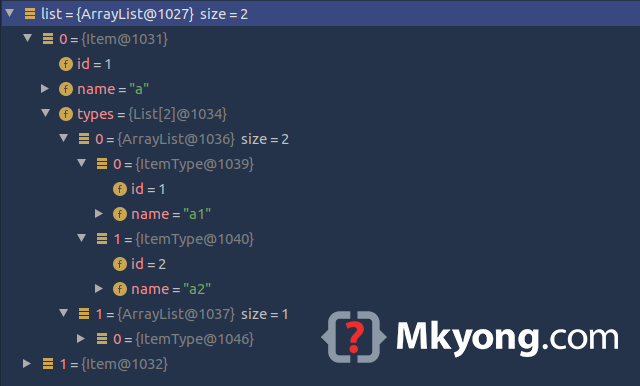
See the debugging mode.
5. Unusual JSON array contains array of string
Below is an unusual JSON array sample.
[
  {
    "id": 1,
    "name": "a",
    "types":
    [
      [
        "a1", 1
      ],
      [
        "a2", 2
      ]
    ]
  },
  {
    "id": 2,
    "name": "b",
    "types":
    [
      [
        "b1", 1
      ]
    ]
  }
]
To match it correctly, we can change the types to List<String> types[].
package com.mkyong.json.gson.model;

import java.util.Arrays;
import java.util.List;

public class Item {

    private int id;
    private String name;

    // change List<ItemType> type -> List<String>[] type
    private List<String>[] types;

    //
Test it.
package com.mkyong.json.gson;

import com.google.gson.Gson;
import com.google.gson.reflect.TypeToken;
import com.mkyong.json.gson.model.Item;

import java.lang.reflect.Type;
import java.util.List;

public class GsonParseJsonArrayExample4 {

    public static void main(String[] args) {

        String json = """
                [
                  {
                    "id": 1,
                    "name": "a",
                    "types":
                    [
                      [
                        "a1", 1
                      ],
                      [
                        "a2", 2
                      ]
                    ]
                  },
                  {
                    "id": 2,
                    "name": "b",
                    "types":
                    [
                      [
                        "b1", 1
                      ]
                    ]
                  }
                ]
                """;

        Gson gson = new Gson();

        // create a List<Item>
        Type listItemType = new TypeToken<List<Item>>() {}.getType();

        // convert json array to List<Item>
        List<Item> list = gson.fromJson(json, listItemType);

        list.forEach(System.out::println);
    }
}
Output
Item{id=1, name='a', types=[[a1, 1], [a2, 2]]}
Item{id=2, name='b', types=[[b1, 1]]}
6. Download Source Code
$ git clone https://github.com/mkyong/java-json
$ cd gson

No comments yet. Be the first to leave a comment!