The showOptionDialog method of JOptionPane is the Grand Unification of showConfirmDialog, showInputDialog and showMessageDialog.
The showOptionDialog returns an integer which represents the position of the user’s choice in the Object[].
If you want to read more about the different showXxxDialog methods, refer to
1. showConfirmDialog with different array types
The options array can be set to any type you choose.
package com.mkyong.optiondialog;

import javax.swing.*;

public class ConfirmDialog1a {

    public static void main(String[] args) {

        String[] options = {"abc", "def", "ghi", "jkl"};
        //Integer[] options = {1, 3, 5, 7, 9, 11};
        //Double[] options = {3.141, 1.618};
        //Character[] options = {'a', 'b', 'c', 'd'};
        int x = JOptionPane.showOptionDialog(null, "Returns the position of your choice on the array",
                "Click a button",
                JOptionPane.DEFAULT_OPTION, JOptionPane.INFORMATION_MESSAGE, null, options, options[0]);
        System.out.println(x);

    }
}
Output:
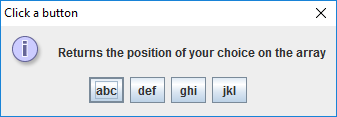
When “abc” is clicked:
0
When “def” is clicked:
1
When “ghi” is clicked:
2
When “jkl” is clicked:
3
You can also set the array as an Object[]
package com.mkyong.optiondialog;

import javax.swing.JCheckBox;
import javax.swing.JOptionPane;

public class ConfirmDialog1b {

    public static void main(String[] args) {

        JCheckBox check = new JCheckBox("Tick me");
        Object[] options = {'e', 2, 3.14, 4, 5, "TURTLES!", check};
        int x = JOptionPane.showOptionDialog(null, "So many options using Object[]",
                "Don't forget to Tick it!",
                JOptionPane.DEFAULT_OPTION, JOptionPane.ERROR_MESSAGE, null, options, options[0]);

        if (check.isSelected() && x != -1) {
            System.out.println("Your choice was " + options[x]);
        } else {
            System.out.println(":( no choice");
        }

    }

}
Output:
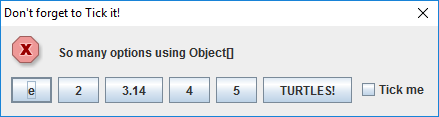
When checkbox is ticked and “TURTLES!” is clicked:
Your choice was TURTLES!
When the window is closed or the user clicked a button without ticking the checkbox:
:( no choice
2. showConfirmDialog
An example where the showConfirmDialog is placed in a frame and the icon is set to a local picture file.
package com.mkyong.optiondialog;

import java.awt.Color;
import java.awt.Dimension;
import java.awt.Font;
import java.awt.Toolkit;

import javax.swing.ImageIcon;
import javax.swing.JFrame;
import javax.swing.JLabel;
import javax.swing.JOptionPane;
import javax.swing.JPanel;
import javax.swing.SwingConstants;

@SuppressWarnings("serial")
public class ConfirmDialog2 extends JFrame {

    public ConfirmDialog2() {

        getContentPane().setBackground(new Color(238, 232, 170));
        getContentPane().setLayout(null);
        setTitle("Confirm Dialog in Frame");
        setDefaultCloseOperation(JFrame.EXIT_ON_CLOSE);
        setVisible(true);
        setResizable(false);
        setSize(450, 300);

        Dimension dim = Toolkit.getDefaultToolkit().getScreenSize();
        setLocation(dim.width / 2 - this.getWidth() / 2, dim.height / 2 - this.getHeight() / 2);

    }

    public JPanel panel() {

        JPanel panel = new JPanel();
        panel.setBounds(0, 0, 444, 271);
        panel.setBackground(new Color(176, 224, 230));
        getContentPane().add(panel);
        panel.setLayout(null);

        JLabel lblIcon = new JLabel("");
        lblIcon.setBounds(30, 30, 200, 200);
        lblIcon.setIcon(new ImageIcon("src/images/girl200.png"));
        panel.add(lblIcon);

        JLabel lblText2 = new JLabel("Lauren is the 4th daughter!");
        lblText2.setVerticalAlignment(SwingConstants.TOP);
        lblText2.setFont(new Font("Tahoma", Font.ITALIC, 14));
        lblText2.setHorizontalAlignment(SwingConstants.CENTER);
        lblText2.setBounds(240, 130, 175, 100);
        panel.add(lblText2);

        JLabel lblText1 = new JLabel("Yaaaay!");
        lblText1.setHorizontalAlignment(SwingConstants.CENTER);
        lblText1.setFont(new Font("Tahoma", Font.ITALIC, 14));
        lblText1.setBounds(240, 30, 175, 100);
        panel.add(lblText1);

        return panel;

    }

    public static void main(String[] args) {

        ConfirmDialog2 cdframe = new ConfirmDialog2();
        ImageIcon icon = new ImageIcon("src/images/girl64.png");
        String[] options = {"Mary", "Nora", "Anna", "Lauren"};
        int x = JOptionPane.showOptionDialog(cdframe, "Lauren's mom had four kids: Maria, Martha, Margaret...",
                "The missing kid", JOptionPane.DEFAULT_OPTION, JOptionPane.PLAIN_MESSAGE, icon, options, options[0]);

        if (x == 3) {
            cdframe.getContentPane().add(cdframe.panel());
            cdframe.repaint();
            cdframe.revalidate();
        } else {
            cdframe.dispose();
            JOptionPane.showMessageDialog(null, "Nooope!");
        }

    }
}
Output:
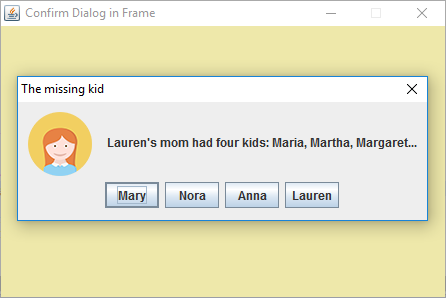
When Mary, Nora, Anna or the X (to close the window) is clicked:
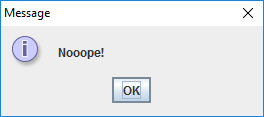
When Lauren is clicked:
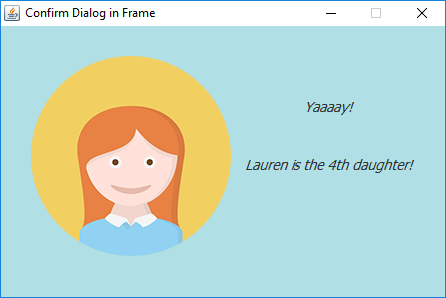
Image Source : https://en.wikipedia.org/wiki/File:Creative-Tail-People-girl.svg

import java.awt.Color; import java.awt.Dimension; import java.awt.Toolkit; import javax.swing.ImageIcon; import javax.swing.JFrame; import javax.swing.JOptionPane; @SuppressWarnings("serial") public class Madre_Tiene_4_Muchachas extends JFrame { // Konstruktor: public Madre_Tiene_4_Muchachas() { getContentPane().setBackground(new Color(200, 200, 150)); getContentPane().setLayout(null); setTitle("Extra Dialog im Frame :-) "); setDefaultCloseOperation(JFrame.EXIT_ON_CLOSE); setVisible(true); setResizable(false); setSize(450, 300); Dimension dim = Toolkit.getDefaultToolkit().getScreenSize(); setLocation(dim.width / 2 - this.getWidth() / 2, dim.height / 2 - this.getHeight() / 2); } }thank you
// Main: public static void main(String... args) { Madre_Tiene_4_Muchachas cdframe = new Madre_Tiene_4_Muchachas(); ImageIcon icon_maria = new ImageIcon("E:/NetBeansProjects/Madre_Tiene_4_Muchachas/M.jpg"); ImageIcon icon_nora = new ImageIcon("E:/NetBeansProjects/Madre_Tiene_4_Muchachas/N.jpg"); ImageIcon icon_anna = new ImageIcon("E:/NetBeansProjects/Madre_Tiene_4_Muchachas/A.jpg"); ImageIcon icon_laura = new ImageIcon("E:/NetBeansProjects/Madre_Tiene_4_Muchachas/L.jpg"); String[] options = {"Maria", "Nora", "Anna", "Laura"}; int m = JOptionPane.showOptionDialog(cdframe, " La Madre tiene 4 muchachas ! Escoge ?", null, JOptionPane.DEFAULT_OPTION, JOptionPane.PLAIN_MESSAGE, null, options, null); // Image-Ausgabe: cdframe.dispose(); switch (m) { case 0 -> JOptionPane.showMessageDialog(null, icon_maria); case 1 -> JOptionPane.showMessageDialog(null, icon_nora); case 2 -> JOptionPane.showMessageDialog(null, icon_anna); case 3 -> JOptionPane.showMessageDialog(null, icon_laura); } /* // Text-Ausgabe: cdframe.dispose(); switch (m) { case 0 -> JOptionPane.showMessageDialog(null, "Maria esta la primera muchacha !"); case 1 -> JOptionPane.showMessageDialog(null, "Nora esta la segunda muchacha !"); case 2 -> JOptionPane.showMessageDialog(null, "Anna esta la tercera muchacha !"); case 3 -> JOptionPane.showMessageDialog(null, "Laura esta la cuarta muchacha !"); } */ }thank you so much
Thank you very much, I found this very helpful for me. Now I know how to use JOption and I’m happy that I can use them in my mini project.