In this article, we show how to set up and use Log4j2 for logging in a Micronaut application.
Table of Contents:
- 1. Setting Up the Micronaut Project + Log4j2
- 2. Project Structure
- 3. Log4j2 Dependencies
- 4. log4j2.xml
- 5. Log4j2 Logging Example
- 6. Run the Application
- 7. Download Source Code
- 8. References
Technologies used:
- Java 21
- Micronaut 4.7.6
- Maven 3.x
- Log4j 2.24.3
The Micronaut framework default uses Logback to log messages.
1. Setting Up the Micronaut Project + Log4j2
We can create a Micronaut project using the Micronaut CLI. Open the terminal and run the following command:
mn create-app com.mkyong.log4j2 --build=maven --lang=java --features=log4j2
This will create a new Micronaut application using the Log4j2 logging framework.
2. Project Structure
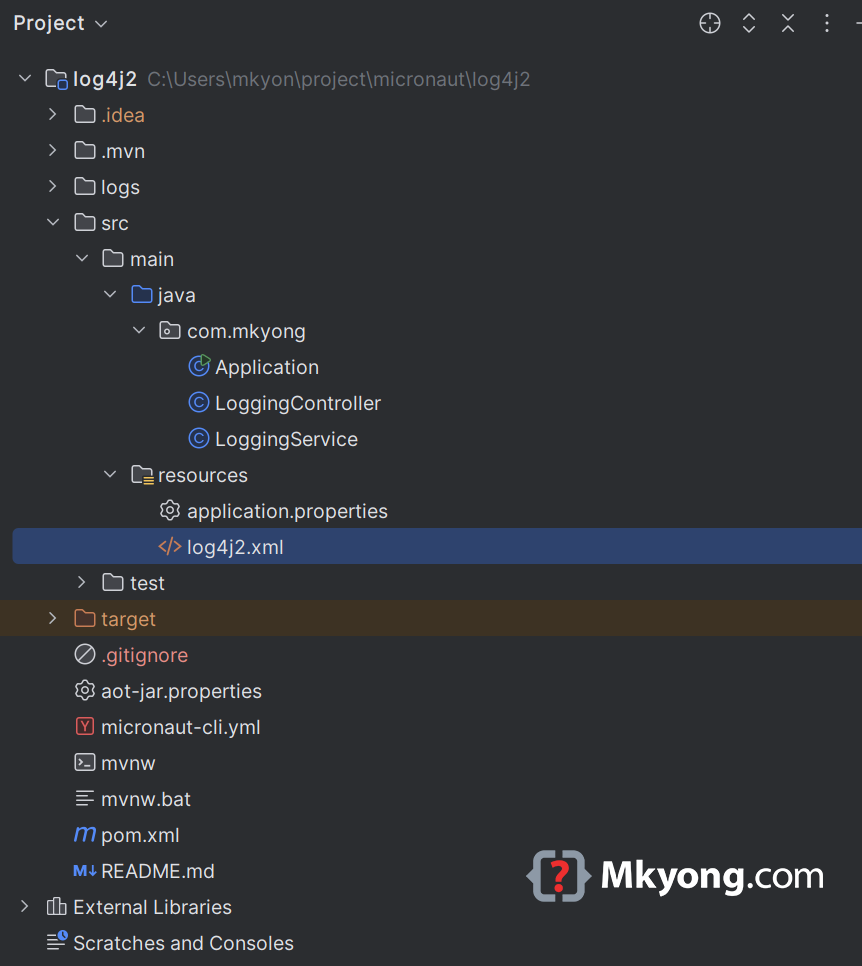
3. Log4j2 Dependencies
The Micronaut CLI --features=log4j2 will put the following log4j2 dependencies in the pom.xml.
    <dependencyManagement>
        <dependencies>
        <dependency>
          <groupId>org.apache.logging.log4j</groupId>
          <artifactId>log4j-bom</artifactId>
          <version>2.24.3</version>
          <type>pom</type>
          <scope>import</scope>
        </dependency>
        </dependencies>
      </dependencyManagement>

    <dependencies>
        <!-- log4j2 -->
        <dependency>
            <groupId>org.apache.logging.log4j</groupId>
            <artifactId>log4j-api</artifactId>
            <scope>compile</scope>
        </dependency>
        <dependency>
            <groupId>org.apache.logging.log4j</groupId>
            <artifactId>log4j-core</artifactId>
            <scope>runtime</scope>
        </dependency>
        <dependency>
            <groupId>org.apache.logging.log4j</groupId>
            <artifactId>log4j-slf4j-impl</artifactId>
            <scope>runtime</scope>
        </dependency>
    <dependencies>
3.1 SLF4J bindings targeting slf4j-api versions 1.7.x or earlier
The log4j-slf4j-impl is used with SLF4J 1.7.x releases or older. Since the Micronaut is using the SLF4J 2.x, run the app will cause the following messages:
SLF4J(W): No SLF4J providers were found.
SLF4J(W): Defaulting to no-operation (NOP) logger implementation
SLF4J(W): See https://www.slf4j.org/codes.html#noProviders for further details.
SLF4J(W): Class path contains SLF4J bindings targeting slf4j-api versions 1.7.x or earlier.
SLF4J(W): Ignoring binding found at [jar:file:.../log4j-slf4j-impl-2.24.3.jar!/org/slf4j/impl/StaticLoggerBinder.class]
SLF4J(W): See https://www.slf4j.org/codes.html#ignoredBindings for an explanation.
To fix it, update the log4j-slf4j-impl to log4j-slf4j2-impl.
    <!-- micronaut uses log4j-slf4j-impl, needs upgrade to log4j-slf4j2-impl -->
    <dependency>
        <groupId>org.apache.logging.log4j</groupId>
        <artifactId>log4j-slf4j2-impl</artifactId>
        <scope>runtime</scope>
    </dependency>
The log4j-slf4j2-impl is used with SLF4J 2.0.x releases or newer.
4. log4j2.xml
Create or update log4j2.xml in src/main/resources/. The following log4j2.xml file support log to console, file and rolling file.
<?xml version="1.0" encoding="UTF-8"?>
<Configuration status="WARN">
    <Appenders>
        <!-- Console Appender -->
        <Console name="Console" target="SYSTEM_OUT">
            <PatternLayout pattern="%d{HH:mm:ss.SSS} [%t] %-5level %logger{36} - %msg%n" />
        </Console>

        <!-- File Appender -->
        <File name="FileLogger" fileName="logs/app.log">
            <PatternLayout pattern="%d{yyyy-MM-dd HH:mm:ss} [%t] %-5level %logger{36} - %msg%n" />
        </File>

        <!-- Rolling File Appender -->
        <RollingFile name="RollingFileLogger" fileName="logs/rolling-app.log"
                     filePattern="logs/rolling-app-%d{yyyy-MM-dd}-%i.log.gz">
            <PatternLayout>
                <Pattern>%d{yyyy-MM-dd HH:mm:ss} [%t] %-5level %logger{36} - %msg%n</Pattern>
            </PatternLayout>
            <Policies>
                <TimeBasedTriggeringPolicy />
                <SizeBasedTriggeringPolicy size="5MB" />
            </Policies>
        </RollingFile>
    </Appenders>

    <Loggers>
        <!-- Application Logger -->
        <Root level="info">
            <AppenderRef ref="Console"/>
            <AppenderRef ref="FileLogger"/>
            <AppenderRef ref="RollingFileLogger"/>
        </Root>
    </Loggers>
</Configuration>
5. Log4j2 Logging Example
Create a service and controller and do some logging.
package com.mkyong;

import jakarta.inject.Singleton;
import org.apache.logging.log4j.LogManager;
import org.apache.logging.log4j.Logger;

@Singleton
public class LoggingService {

    private static final Logger logger = LogManager.getLogger(LoggingService.class);

    public void logSomething() {
        logger.info("This is an INFO log.");
        logger.warn("This is a WARN log.");
        logger.error("This is an ERROR log.");
    }

}
package com.mkyong;

import io.micronaut.http.annotation.Controller;
import io.micronaut.http.annotation.Get;

@Controller("/log")
public class LoggingController {

    private final LoggingService service;

    public LoggingController(LoggingService service) {
        this.service = service;
    }

    @Get("/")
    public String triggerLogging() {
        service.logSomething();
        return "Logging triggered. Check console and log files.";
    }

}
6. Run the Application
To run the application with Maven:
./mvnw mn:run
Visit http://localhost:8080/log and see the output in console
 __  __ _                                  _
|  \/  (_) ___ _ __ ___  _ __   __ _ _   _| |_
| |\/| | |/ __| '__/ _ \| '_ \ / _` | | | | __|
| |  | | | (__| | | (_) | | | | (_| | |_| | |_
|_|  |_|_|\___|_|  \___/|_| |_|\__,_|\__,_|\__|
15:29:43.746 [main] INFO  io.micronaut.runtime.Micronaut - Startup completed in 427ms. Server Running: http://localhost:8080
15:29:56.276 [..] INFO  com.mkyong.LoggingService - This is an INFO log.
15:29:56.276 [..] WARN  com.mkyong.LoggingService - This is a WARN log.
15:29:56.276 [..] ERROR com.mkyong.LoggingService - This is an ERROR log.
