In Spring Boot, we can use the @ConditionalOnProperty annotation to conditionally register the beans based on the property value in the application.properties or application.yml file.
This article will use the @ConditionalOnProperty annotation to simulate a toggle feature to turn features on or off at runtime without any code changes.
Technologies used:
- Spring Boot 3.1.2
- Java 17
- Maven
Table of contents:
- 1. Project Directory
- 2. Project Dependencies
- 3. @ConditionalOnProperty
- 4. What is matchIfMissing = true
- 5. Testing with arguments
- 6. Download Source Code
- 7. References
1. Project Directory
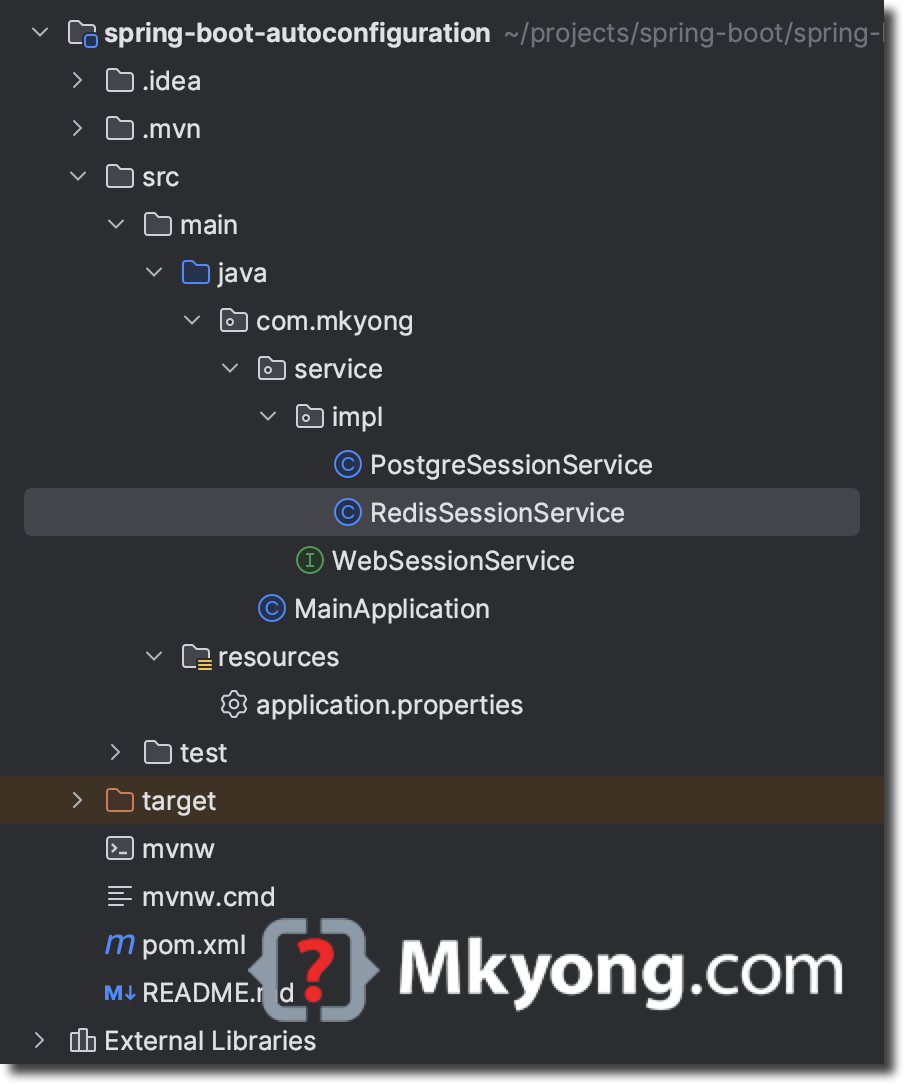
2. Project Dependencies
The @ConditionalOnProperty annotation is part of the Spring Boot auto-configuration module, org.springframework.boot.autoconfigure.*.
  <dependency>
      <groupId>org.springframework.boot</groupId>
      <artifactId>spring-boot-starter</artifactId>
  </dependency>
mvn dependency:tree

[INFO] org.springframework.boot:spring-boot-autoconfiguration:jar:1.0
[INFO] \- org.springframework.boot:spring-boot-starter:jar:3.1.2:compile
[INFO]    +- org.springframework.boot:spring-boot:jar:3.1.2:compile
[INFO]    |  \- org.springframework:spring-context:jar:6.0.11:compile
[INFO]    |     +- org.springframework:spring-aop:jar:6.0.11:compile
[INFO]    |     +- org.springframework:spring-beans:jar:6.0.11:compile
[INFO]    |     \- org.springframework:spring-expression:jar:6.0.11:compile
[INFO]    +- org.springframework.boot:spring-boot-autoconfigure:jar:3.1.2:compile
[INFO]    +- org.springframework.boot:spring-boot-starter-logging:jar:3.1.2:compile
[INFO]    |  +- ch.qos.logback:logback-classic:jar:1.4.8:compile
[INFO]    |  |  +- ch.qos.logback:logback-core:jar:1.4.8:compile
[INFO]    |  |  \- org.slf4j:slf4j-api:jar:2.0.7:compile
[INFO]    |  +- org.apache.logging.log4j:log4j-to-slf4j:jar:2.20.0:compile
[INFO]    |  |  \- org.apache.logging.log4j:log4j-api:jar:2.20.0:compile
[INFO]    |  \- org.slf4j:jul-to-slf4j:jar:2.0.7:compile
[INFO]    +- jakarta.annotation:jakarta.annotation-api:jar:2.1.1:compile
[INFO]    +- org.springframework:spring-core:jar:6.0.11:compile
[INFO]    |  \- org.springframework:spring-jcl:jar:6.0.11:compile
[INFO]    \- org.yaml:snakeyaml:jar:1.33:compile
3. @ConditionalOnProperty
3.1 Assume we have a WebSessionService interface, and the implementation is getting the session data from a PostgreSessionService. We want to develop a new feature to get the session data from the new RedisSessionService.
In this case, we can use @ConditionalOnProperty to conditionally register the beans based on the app.feature.new property value in the application.properties or application.yml file.
package com.mkyong.service;

public interface WebSessionService {
  String getUserData();
}
package com.mkyong.service.impl;

import com.mkyong.service.WebSessionService;
import org.springframework.boot.autoconfigure.condition.ConditionalOnProperty;
import org.springframework.stereotype.Service;

@Service
@ConditionalOnProperty(name = "app.feature.new", havingValue = "false", matchIfMissing = true)
public class PostgreSessionService implements WebSessionService {
  @Override
  public String getUserData() {
      return "Data from PostgreSQL Database";
  }
}
package com.mkyong.service.impl;

import com.mkyong.service.WebSessionService;
import org.springframework.boot.autoconfigure.condition.ConditionalOnProperty;
import org.springframework.stereotype.Service;

@Service
@ConditionalOnProperty(name = "app.feature.new", havingValue = "true")
public class RedisSessionService implements WebSessionService {

  @Override
  public String getUserData() {
      return "Data from Redis...";
  }
}
3.2 Set the app.feature.new to true.
app.feature.new=true
Create a @SpringBootApplication and run it.
package com.mkyong;

import com.mkyong.service.WebSessionService;
import org.springframework.beans.factory.annotation.Autowired;
import org.springframework.boot.CommandLineRunner;
import org.springframework.boot.SpringApplication;
import org.springframework.boot.autoconfigure.SpringBootApplication;
import org.springframework.context.annotation.Bean;

@SpringBootApplication
public class MainApplication {

  @Autowired
  WebSessionService sessionService;

  public static void main(String[] args) {
      SpringApplication.run(MainApplication.class, args);
  }

  @Bean
  public CommandLineRunner startup() {
      return args -> {
          System.out.println(sessionService.getUserData());
      };
  }

}
Spring will register the RedisSessionService bean and the output is:
Data from Redis...
3.3 Set the app.feature.new to false and rerun it again.
app.feature.new=false
Now, Spring will register the PostgreSessionService bean and the output is:
Data from PostgreSQL Database
4. What is matchIfMissing = true
In @ConditionalOnProperty, the attribute matchIfMissing = true means the condition should match if the property is not set and defaults to false.
In this case, If we comment out the app.feature.new property key and rerun the application.
# app.feature.new=false
Spring will register the PostgreSessionService bean and the output is:
Data from PostgreSQL Database
In summary.
# true = register RedisSessionService
# false = register PostgreSessionService
# missing property = register PostgreSessionService
app.feature.new=true
5. Testing with arguments
5.1 Set the app.feature.new to false.
app.feature.new=false
Run it.
  ./mvnw spring-boot:run

  # output, PostgreSessionService
  Data from PostgreSQL Database
5.2 Now, we turn on the new feature RedisSessionService without the code change by passing the property value as an argument to the Spring Boot application.
  ./mvnw spring-boot:run -Dspring-boot.run.jvmArguments="-Dapp.feature.new=true"

  # output RedisSessionService
  Data from Redis...
5.3 Pass the property value as an argument to final jar file.
  ./mvnw package

  java target/spring-boot-autoconfiguration-1.0.jar

  # output, PostgreSessionService
  Data from PostgreSQL Database
  java -Dapp.feature.new=truex -jar target/spring-boot-autoconfiguration-1.0.jar

  # output RedisSessionService
  Data from Redis...
6. Download Source Code
$ git clone https://github.com/mkyong/spring-boot.git
$ cd spring-boot-autoconfiguration
$ ./mvnw spring-boot:run
$ ./mvnw spring-boot:run -Dspring-boot.run.jvmArguments="-Dapp.feature.new=true"
