In this article, you will build a small Spring Boot web app. It has one web address, /. When you visit it, the app sends back the text Hello World, Spring Boot!.
Things you will use:
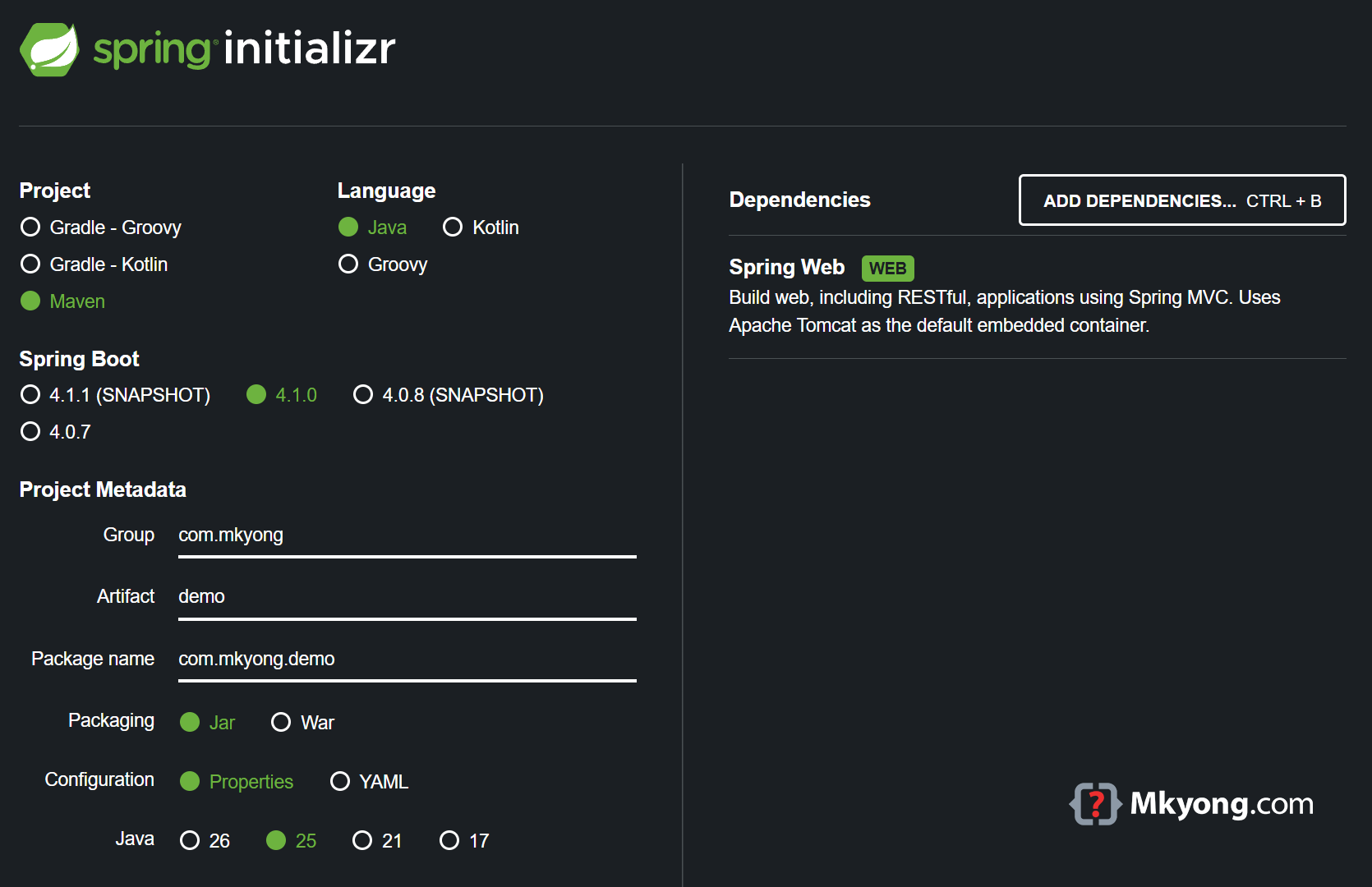
- Spring Boot 4.1.0
- Java 25
- Maven 3.9.6
Table of contents:
- Project Directory
- Spring Boot Maven Dependencies
- Project Dependencies in Tree Structure
- Spring Boot Web Application
- Spring Boot Entry Point
- Unit Test
- Demo
- Create an Executable JAR
- Download Source Code
- References
Note
Spring Boot 4 needs Java 17 or newer to run. This article uses Java 25.
Project Directory
The fastest way is to use Spring Initializr to make the project for you. Or you can make the folders by hand.
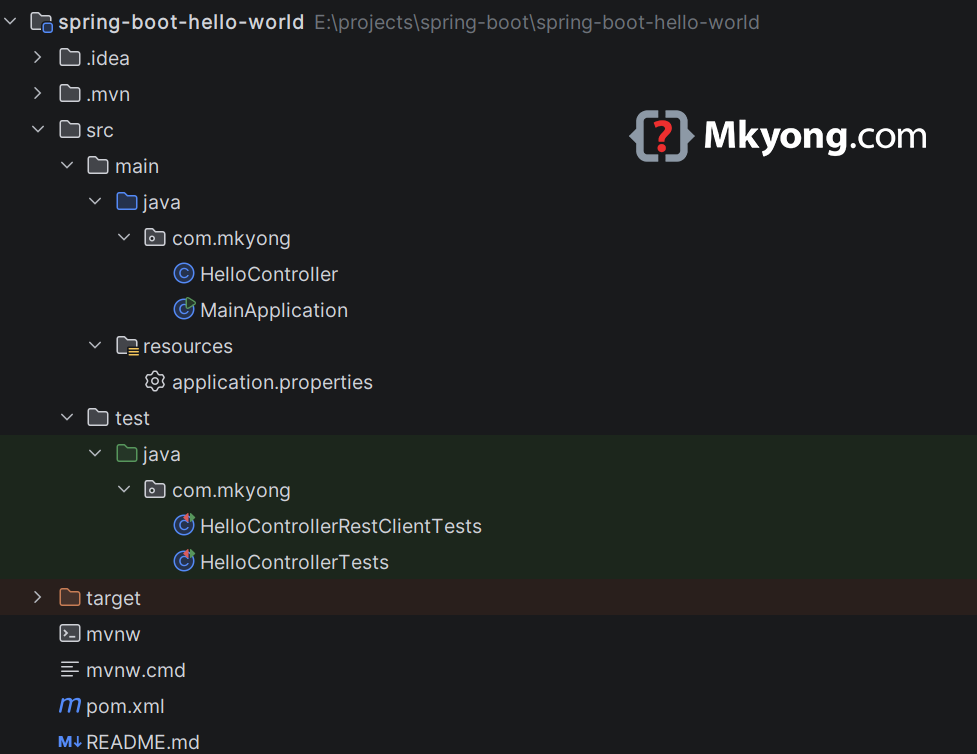
This is a normal Maven folder layout.
Spring Boot Maven Dependencies
The spring-boot-starter-parent gives your app a base setup. To make web pages, you add spring-boot-starter-webmvc.
    <parent>
        <groupId>org.springframework.boot</groupId>
        <artifactId>spring-boot-starter-parent</artifactId>
        <version>4.1.0</version>
        <relativePath/> <!-- get the parent from the repository, not a local folder -->
    </parent>

    <dependencies>
        <dependency>
            <groupId>org.springframework.boot</groupId>
            <artifactId>spring-boot-starter-webmvc</artifactId>
        </dependency>
    </dependencies>
Note
In Spring Boot 3 this starter was called spring-boot-starter-web. Spring Boot 4 split the old starters into smaller ones, so the name is now spring-boot-starter-webmvc. Read the Spring Boot 4.0 Migration Guide for the full list.
Here is the full pom.xml.
<?xml version="1.0" encoding="UTF-8"?>
<project xmlns="http://maven.apache.org/POM/4.0.0"
         xmlns:xsi="http://www.w3.org/2001/XMLSchema-instance"
         xsi:schemaLocation="http://maven.apache.org/POM/4.0.0
         http://maven.apache.org/xsd/maven-4.0.0.xsd">
    <modelVersion>4.0.0</modelVersion>

    <artifactId>spring-boot-hello-world</artifactId>
    <packaging>jar</packaging>
    <name>Spring Boot Hello World Example</name>
    <version>1.0</version>

    <parent>
        <groupId>org.springframework.boot</groupId>
        <artifactId>spring-boot-starter-parent</artifactId>
        <version>4.1.0</version>
        <relativePath/> <!-- lookup parent from repository, not local -->
    </parent>

    <properties>
        <java.version>25</java.version>
    </properties>

    <dependencies>

        <!-- Spring Boot 3 Web -->
        <!--
        <dependency>
            <groupId>org.springframework.boot</groupId>
            <artifactId>spring-boot-starter-web</artifactId>
        </dependency>
        -->

        <!-- Spring Boot 4 Web -->
        <dependency>
            <groupId>org.springframework.boot</groupId>
            <artifactId>spring-boot-starter-webmvc</artifactId>
        </dependency>

        <dependency>
            <groupId>org.springframework.boot</groupId>
            <artifactId>spring-boot-starter-webmvc-test</artifactId>
            <scope>test</scope>
        </dependency>

        <!-- Spring Boot 4, this tester still exists,
            but shift to per-technology test starters
        <dependency>
            <groupId>org.springframework.boot</groupId>
            <artifactId>spring-boot-starter-test</artifactId>
            <scope>test</scope>
        </dependency>
        -->

    </dependencies>

    <build>
        <plugins>
            <!-- packs your app into one runnable JAR -->
            <plugin>
                <groupId>org.springframework.boot</groupId>
                <artifactId>spring-boot-maven-plugin</artifactId>
            </plugin>
        </plugins>
    </build>

</project>
You do not need to add the Maven Compiler Plugin by hand. The parent already sets it up and reads your java.version property.
Project Dependencies in Tree Structure
The spring-boot-starter-webmvc also pulls in more helper code for you. The big ones are an embedded Tomcat (a small web server built into your app) and SLF4J Logback for logging.
You can see the full list with mvn dependency:tree.
$ mvn dependency:tree

[INFO] org.springframework.boot:spring-boot-hello-world:jar:1.0
[INFO] +- org.springframework.boot:spring-boot-starter-webmvc:jar:4.1.0:compile
[INFO] |  +- org.springframework.boot:spring-boot-starter:jar:4.1.0:compile
[INFO] |  |  +- org.springframework.boot:spring-boot-starter-logging:jar:4.1.0:compile
[INFO] |  |  |  +- ch.qos.logback:logback-classic:jar:1.5.34:compile
[INFO] |  |  |  |  \- ch.qos.logback:logback-core:jar:1.5.34:compile
[INFO] |  |  |  +- org.apache.logging.log4j:log4j-to-slf4j:jar:2.25.4:compile
[INFO] |  |  |  |  \- org.apache.logging.log4j:log4j-api:jar:2.25.4:compile
[INFO] |  |  |  \- org.slf4j:jul-to-slf4j:jar:2.0.18:compile
[INFO] |  |  +- org.springframework.boot:spring-boot-autoconfigure:jar:4.1.0:compile
[INFO] |  |  +- jakarta.annotation:jakarta.annotation-api:jar:3.0.0:compile
[INFO] |  |  \- org.yaml:snakeyaml:jar:2.6:compile
[INFO] |  +- org.springframework.boot:spring-boot-starter-jackson:jar:4.1.0:compile
[INFO] |  |  \- org.springframework.boot:spring-boot-jackson:jar:4.1.0:compile
[INFO] |  |     \- tools.jackson.core:jackson-databind:jar:3.1.4:compile
[INFO] |  |        +- com.fasterxml.jackson.core:jackson-annotations:jar:2.21:compile
[INFO] |  |        \- tools.jackson.core:jackson-core:jar:3.1.4:compile
[INFO] |  +- org.springframework.boot:spring-boot-starter-tomcat:jar:4.1.0:compile
[INFO] |  |  +- org.springframework.boot:spring-boot-starter-tomcat-runtime:jar:4.1.0:compile
[INFO] |  |  |  +- org.apache.tomcat.embed:tomcat-embed-core:jar:11.0.22:compile
[INFO] |  |  |  +- org.apache.tomcat.embed:tomcat-embed-el:jar:11.0.22:compile
[INFO] |  |  |  \- org.apache.tomcat.embed:tomcat-embed-websocket:jar:11.0.22:compile
[INFO] |  |  \- org.springframework.boot:spring-boot-tomcat:jar:4.1.0:compile
[INFO] |  +- org.springframework.boot:spring-boot-http-converter:jar:4.1.0:compile
[INFO] |  |  +- org.springframework.boot:spring-boot:jar:4.1.0:compile
[INFO] |  |  |  \- org.springframework:spring-context:jar:7.0.8:compile
[INFO] |  |  \- org.springframework:spring-web:jar:7.0.8:compile
[INFO] |  |     +- org.springframework:spring-beans:jar:7.0.8:compile
[INFO] |  |     \- io.micrometer:micrometer-observation:jar:1.17.0:compile
[INFO] |  |        \- io.micrometer:micrometer-commons:jar:1.17.0:compile
[INFO] |  \- org.springframework.boot:spring-boot-webmvc:jar:4.1.0:compile
[INFO] |     +- org.springframework.boot:spring-boot-servlet:jar:4.1.0:compile
[INFO] |     \- org.springframework:spring-webmvc:jar:7.0.8:compile
[INFO] |        +- org.springframework:spring-aop:jar:7.0.8:compile
[INFO] |        \- org.springframework:spring-expression:jar:7.0.8:compile
[INFO] ------------------------------------------------------------------------
[INFO] BUILD SUCCESS
[INFO] ------------------------------------------------------------------------
The first line is your own project. Everything below it came along for free.
Spring Boot Web Application
Now you make the part that answers web requests. The @RestController line tells Spring "this class handles web requests." The @GetMapping("/") line says "when someone visits /, run this method."
package com.mkyong;

import org.springframework.web.bind.annotation.GetMapping;
import org.springframework.web.bind.annotation.RestController;

// this class answers web requests and sends back plain text
@RestController
public class HelloController {

    // when someone visits "/", run this method
    @GetMapping("/")
    String hello() {
        // this text is sent back to the visitor
        return "Hello World, Spring Boot!";
    }

}
When someone visits /, the hello() method runs and sends the text back.
Note
You may also see @RequestMapping("/") in older code. That one answers every kind of request (GET, POST, PUT and so on). @GetMapping("/") only answers GET, which is what a browser sends when you open a page.
Spring Boot Entry Point
This is the start button for your app. The @SpringBootApplication line marks the main class. You run this one file and the whole web app starts.
package com.mkyong;

import org.springframework.boot.SpringApplication;
import org.springframework.boot.autoconfigure.SpringBootApplication;

// this is the main class that starts everything
@SpringBootApplication
public class MainApplication {

    // the program starts running here
    public static void main(String[] args) {
        // this line boots up the whole Spring Boot app
        SpringApplication.run(MainApplication.class, args);
    }

}
You run this file, and Spring Boot starts the web server for you.
Unit Test
In Spring Boot 4, @SpringBootTest alone does not set up the test tools for you. You add @AutoConfigureMockMvc and the spring-boot-starter-webmvc-test dependency from section 2.
MockMvc
MockMvc is a pretend visitor. It calls your controller without starting a real web server, so the test runs fast. This test visits / and checks the text comes back right.
package com.mkyong;

import org.junit.jupiter.api.Test;
import org.springframework.beans.factory.annotation.Autowired;

// Old (Spring Boot 3.x)
// import org.springframework.boot.test.autoconfigure.web.servlet.AutoConfigureMockMvc;

// New (Spring Boot 4.x)
import org.springframework.boot.webmvc.test.autoconfigure.AutoConfigureMockMvc;

import org.springframework.boot.test.context.SpringBootTest;
import org.springframework.http.MediaType;
import org.springframework.test.web.servlet.MockMvc;
import org.springframework.test.web.servlet.request.MockMvcRequestBuilders;

import static org.hamcrest.Matchers.equalTo;
import static org.springframework.test.web.servlet.result.MockMvcResultMatchers.content;
import static org.springframework.test.web.servlet.result.MockMvcResultMatchers.status;

@SpringBootTest
@AutoConfigureMockMvc
public class HelloControllerTests {

    @Autowired
    private MockMvc mvc;

    @Test
    public void hello_ok() throws Exception {
        mvc.perform(MockMvcRequestBuilders.get("/").accept(MediaType.APPLICATION_JSON))
                .andExpect(status().isOk())
                .andExpect(content().string(equalTo("Hello World, Spring Boot!")));
    }

}
The endpoint sends back plain text, so the test asks for TEXT_PLAIN, not JSON.
RestTestClient
RestTestClient is a real visitor. It starts a real web server on a random free port and sends a real request. This is slower, but it tests the whole thing end to end.
package com.mkyong;

import org.junit.jupiter.api.Test;
import org.springframework.beans.factory.annotation.Autowired;
import org.springframework.boot.resttestclient.autoconfigure.AutoConfigureRestTestClient;
import org.springframework.boot.test.context.SpringBootTest;
import org.springframework.test.web.servlet.client.RestTestClient;

// start a real server on a random port
@SpringBootTest(webEnvironment = SpringBootTest.WebEnvironment.RANDOM_PORT)
@AutoConfigureRestTestClient
public class HelloControllerRestClientTests {

    // the real visitor
    @Autowired
    private RestTestClient restTestClient;

    @Test
    public void hello_ok() {
        // visit "/", then check status is OK and text matches
        restTestClient.get().uri("/")
                .exchange()
                .expectStatus().isOk()
                .expectBody(String.class).isEqualTo("Hello World, Spring Boot!");
    }

}
Run both tests with mvn test.
$ mvn test

[INFO] Running com.mkyong.HelloControllerTests
[INFO] Tests run: 1, Failures: 0, Errors: 0, Skipped: 0
[INFO] Running com.mkyong.HelloControllerRestClientTests
[INFO] Tests run: 1, Failures: 0, Errors: 0, Skipped: 0
[INFO]
[INFO] Results:
[INFO]
[INFO] Tests run: 2, Failures: 0, Errors: 0, Skipped: 0
[INFO] ------------------------------------------------------------------------
[INFO] BUILD SUCCESS
[INFO] ------------------------------------------------------------------------
Both tests passed. Your controller sends back the right text.
Demo
Go into the project folder and run mvn spring-boot:run to start the app.
$ mvn spring-boot:run
Spring Boot starts its built-in Tomcat server on port 8080.
$ mvn spring-boot:run

  .   ____          _            __ _ _
 /\\ / ___'_ __ _ _(_)_ __  __ _ \ \ \ \
( ( )\___ | '_ | '_| | '_ \/ _` | \ \ \ \
 \\/  ___)| |_)| | | | | || (_| |  ) ) ) )
  '  |____| .__|_| |_|_| |_\__, | / / / /
 =========|_|==============|___/=/_/_/_/

 :: Spring Boot ::                (v4.1.0)

com.mkyong.MainApplication : Starting MainApplication using Java 25.0.2
o.s.boot.tomcat.TomcatWebServer : Tomcat started on port 8080 (http)
com.mkyong.MainApplication : Started MainApplication in 0.675 seconds
P.S. Press Ctrl + C to stop the app.
Now you can test it. Use curl to send a web request to /.
$ curl localhost:8080

Hello World, Spring Boot!
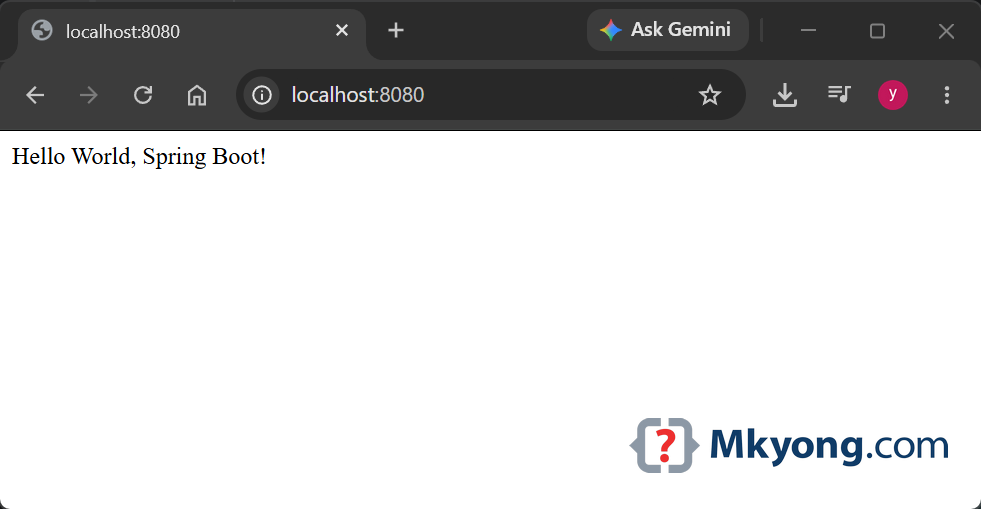
Or open a browser and go to http://localhost:8080/. You will see the plain text Hello World, Spring Boot!.
Create an Executable JAR
A JAR is one file that holds your whole app. The packaging line tells Maven to make a JAR.
  <groupId>com.mkyong</groupId>
  <artifactId>spring-boot-hello-world</artifactId>
  <version>1.0</version>
  <packaging>jar</packaging>
  <name>Spring Boot Hello World Example</name>
The spring-boot-maven-plugin packs it into a JAR you can run.
  <plugin>
      <groupId>org.springframework.boot</groupId>
      <artifactId>spring-boot-maven-plugin</artifactId>
  </plugin>
Run mvn clean package to build the JAR, then run it with java -jar.
$ cd [project-path]

$ mvn clean package

$ java -jar target/spring-boot-hello-world-1.0.jar
Output:
 :: Spring Boot ::                (v4.1.0)

com.mkyong.MainApplication : Starting MainApplication using Java 25.0.2
o.s.boot.tomcat.TomcatWebServer : Tomcat started on port 8080 (http)
com.mkyong.MainApplication : Started MainApplication in 0.652 seconds
You now have one file that runs your whole web app. You can copy it to any computer that has Java 25 and run it there.
Download Source Code
$ git clone https://github.com/mkyong/spring-boot.git
$ cd spring-boot/spring-boot-hello-world
$ mvn spring-boot:run
References
- Spring Boot Guides
- Building an Application with Spring Boot
- Serving Web Content with Spring MVC
- Spring Boot 4.0 Migration Guide
- Spring Boot 4.1 Release Notes
- Spring Boot Maven Plugin
- Apache Maven Compiler Plugin
- Common Application Properties
P.S This article is part of the Spring Boot 4 series, tested against Spring Boot 4.1.0 GA and Java 25.

good content
Thank You
Wonderful sir for starters.
I am looking for springBoot with microservice sample and simple example to start up