Unable to find a @SpringBootConfiguration,
	you need to use @ContextConfiguration or @SpringBootTest(classes=...) with your test
The Spring Boot tests @SpringBootTest or @DataJpaTest need to find the @SpringBootConfiguration application class to launch the entire application and do the tests. And if Spring Boot can’t find the SpringBootConfiguration, it throws errors and stops the tests.
A test class.
package com.mkyong;

import org.junit.jupiter.api.Test;
import org.springframework.beans.factory.annotation.Autowired;
import org.springframework.boot.test.context.SpringBootTest;
import org.springframework.boot.test.web.client.TestRestTemplate;
import org.springframework.http.ResponseEntity;

import static org.assertj.core.api.AssertionsForClassTypes.assertThat;

@SpringBootTest(webEnvironment = SpringBootTest.WebEnvironment.RANDOM_PORT)
public class HelloControllerTest {

	@Autowired
	private TestRestTemplate template;

	@Test
	public void hello_ok() throws Exception {
			ResponseEntity<String> response = template.getForEntity("/", String.class);
			assertThat(response.getBody()).isEqualTo("Hello World, Spring Boot!");
	}

}
A @SpringBootApplication class.
package com.mkyong.app;

import org.springframework.boot.SpringApplication;
import org.springframework.boot.autoconfigure.SpringBootApplication;

@SpringBootApplication
public class MyWebApplication {

	public static void main(String[] args) {
			SpringApplication.run(MyWebApplication.class, args);
	}

}
1. Solution – Redesign the directory structure
Spring Boot finds @SpringBootConfiguration annotation in the current package, and if they cannot find it there, they find it by traversing up the directory (package) hierarchy until they find it.
Review the below project structure. The MyWebApplication or @SpringBootConfiguration class is at the package com.mkyong.app; and the test HelloControllerTest is at the package com.mkyong, different package level.
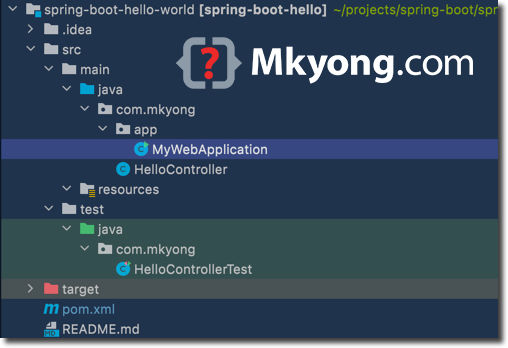
If we run the test, Spring Boot first try to find the @SpringBootConfiguration class at the package com.mkyong and if the file is not there, it finds at package com, and keeps traversing up the directory hierarchy until they find it; In this case, Spring Boot can’t find the @SpringBootConfiguration and throw the error Unable to find a @SpringBootConfiguration.
Unable to find a @SpringBootConfiguration,
	you need to use @ContextConfiguration or @SpringBootTest(classes=...) with your test
The solution is to redesign the directory structure or package so that the tests can find the @SpringBootConfiguration.
For examples:
Move com.mkyong.app.MyWebApplication to com.mkyong.MyWebApplication; both application and tests are at the same package level.
com.mkyong.MyWebApplicationcom.mkyong.HelloControllerTest

Or, we can move the test class com.mkyong.HelloControllerTest to com.mkyong.app.HelloControllerTest.
com.mkyong.app.MyWebApplicationcom.mkyong.app.HelloControllerTest
2. Solution – @SpringBootTest(classes =…)
Alternatively, if we can’t move the @SpringBootConfiguration or test classes, we can tell the test where to find the @SpringBootConfiguration class via @SpringBootTest(classes = MyWebApplication.class).
package com.mkyong;

import org.junit.jupiter.api.Test;
import org.springframework.beans.factory.annotation.Autowired;
import org.springframework.boot.test.context.SpringBootTest;
import org.springframework.boot.test.web.client.TestRestTemplate;
import org.springframework.http.ResponseEntity;

import static org.assertj.core.api.AssertionsForClassTypes.assertThat;

@SpringBootTest(classes = MyWebApplication.class, webEnvironment = SpringBootTest.WebEnvironment.RANDOM_PORT)
//@SpringBootTest(webEnvironment = SpringBootTest.WebEnvironment.RANDOM_PORT)
public class HelloControllerTest {

	@Autowired
	private TestRestTemplate template;

	@Test
	public void hello_ok() throws Exception {
			ResponseEntity<String> response = template.getForEntity("/", String.class);
			assertThat(response.getBody()).isEqualTo("Hello World, Spring Boot!");
	}

}
Download Source Code
$ git clone https://github.com/mkyong/spring-boot.git
$ cd spring-boot-hello-world
$ mvn spring-boot:run

First line of the solution resolved the issue.
Always helpul MK Young ! Thank you 🙂
Awesome dude
Thank you Sir, this is very helpful
Holy Mother of Coding, thank you!
I figured my error was that my source packages and my test packages were named different. My source package was com.miTiendaWeb, while my test package was myTiendaWeb. I changed the test package to com.miTiendaWeb, clicked on Clean and Built:
Thanks again!
It works fine! Thansk from Brazil.
thanks*