VirtualBox – Ubuntu slow and laggy UI

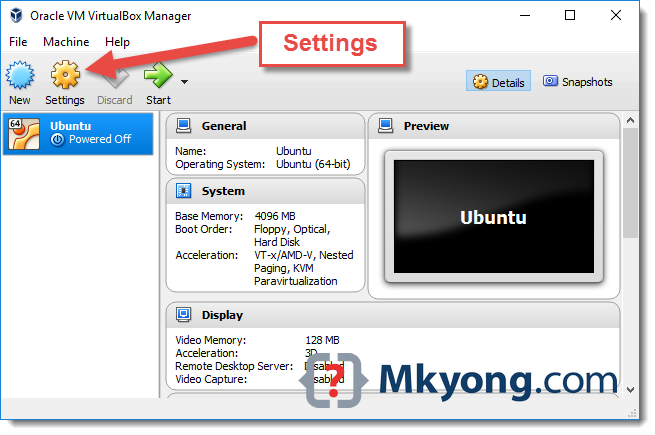
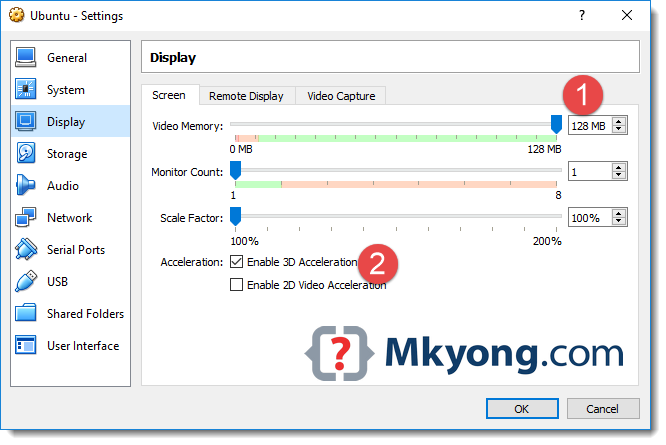
To solve the Ubuntu UI slow performance issue on VirtualBox, increase the “Video Memory” and “Enable 3D Acceleration

Environment

  1. VirtualBox 5.1.14
  2. Ubuntu 16

Solution

1. Shutdown VM, clicks “Settings

virtualbox-manager

2. Display –>> Screen tab –>> Increase the “Video Memory” to Max, and checked the “Enable 3D Acceleration

Enable-3D-Acceleration

Done.

References

  1. What is ‘Ubuntu Unity’ (for the Desktop)?

mkyong

Founder of Mkyong.com, passionate Java and open-source technologies. If you enjoy my tutorials, consider making a donation to these charities.

0 Comments
Most Voted
Newest Oldest
Inline Feedbacks
View all comments