This article will demonstrate Spring Boot Logging using the Logback SLF4J implementation.
Technologies used:
- Spring Boot 3.2.2
- Java 17
- Maven 3
By default, if you use the starters, Logback is used for logging
https://docs.spring.io/spring-boot/reference/features/logging.html
Table of contents:
- 1. Project Directory
- 2. Spring Boot Logging Dependencies
- 3. Spring Boot Logging using Logback
- 4. Log to File
- 5. Log Levels
- 6. Native logback.xml
- 7. logback-spring.xml
- 8. The order of application.properties, logback.xml, and logback-spring.xml?
- 9. So, which one for Spring Boot Logback?
- 10. Download Source Code
- 11. References
1. Project Directory
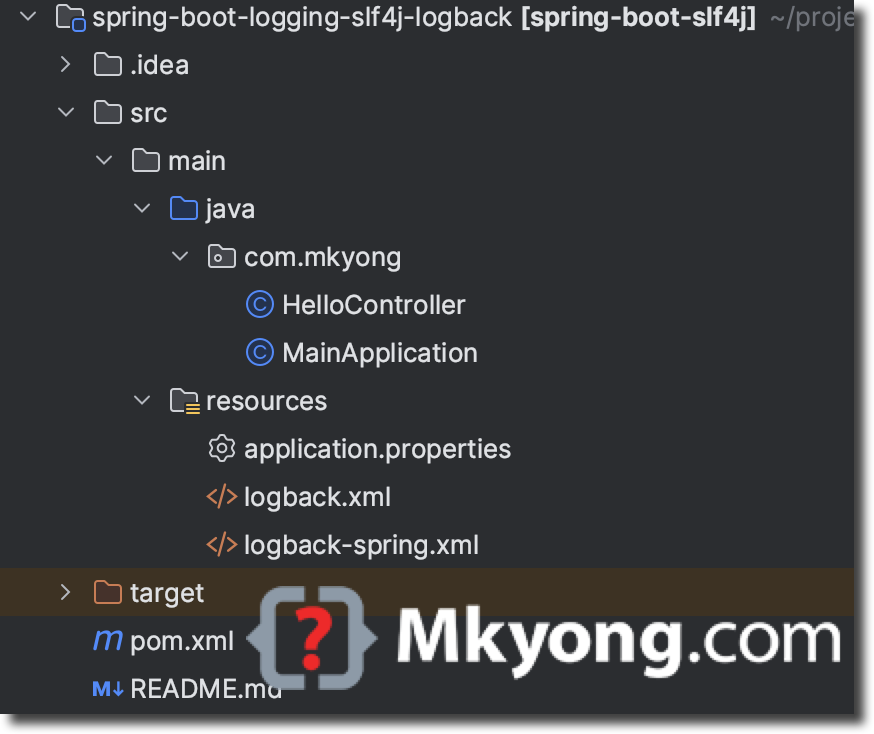
2. Spring Boot Logging Dependencies
In Spring Boot, the dependency spring-boot-starter-logging includes the logging frameworks. Since many Spring Boot starters include the spring-boot-starter-logging automatically, we unlikely need to add it manually.
For example, adding the dependency web spring-boot-starter-web will automatically include the spring-boot-starter-logging.
mvn dependency:tree

[INFO] +- org.springframework.boot:spring-boot-starter-web:jar:3.2.2:compile
[INFO] |  +- org.springframework.boot:spring-boot-starter:jar:3.2.2:compile
[INFO] |  |  +- org.springframework.boot:spring-boot:jar:3.2.2:compile
[INFO] |  |  +- org.springframework.boot:spring-boot-autoconfigure:jar:3.2.2:compile
[INFO] |  |  +- org.springframework.boot:spring-boot-starter-logging:jar:3.2.2:compile
[INFO] |  |  |  +- ch.qos.logback:logback-classic:jar:1.4.14:compile
[INFO] |  |  |  |  \- ch.qos.logback:logback-core:jar:1.4.14:compile
[INFO] |  |  |  +- org.apache.logging.log4j:log4j-to-slf4j:jar:2.21.1:compile
[INFO] |  |  |  |  \- org.apache.logging.log4j:log4j-api:jar:2.21.1:compile
[INFO] |  |  |  \- org.slf4j:jul-to-slf4j:jar:2.0.11:compile
[INFO] |  |  +- jakarta.annotation:jakarta.annotation-api:jar:2.1.1:compile
[INFO] |  |  \- org.yaml:snakeyaml:jar:2.2:compile
<?xml version="1.0" encoding="UTF-8"?>
<project xmlns="http://maven.apache.org/POM/4.0.0"
         xmlns:xsi="http://www.w3.org/2001/XMLSchema-instance"
         xsi:schemaLocation="http://maven.apache.org/POM/4.0.0
         http://maven.apache.org/xsd/maven-4.0.0.xsd">
    <modelVersion>4.0.0</modelVersion>

    <artifactId>spring-boot-slf4j</artifactId>
    <packaging>jar</packaging>
    <name>Spring Boot Logging SLF4j</name>
    <version>1.0</version>

    <parent>
        <groupId>org.springframework.boot</groupId>
        <artifactId>spring-boot-starter-parent</artifactId>
        <version>3.2.2</version>
        <relativePath/> <!-- lookup parent from repository, not local -->
    </parent>

    <properties>
        <java.version>17</java.version>
    </properties>

    <dependencies>
        <dependency>
            <groupId>org.springframework.boot</groupId>
            <artifactId>spring-boot-starter-web</artifactId>
        </dependency>
        <dependency>
            <groupId>org.springframework.boot</groupId>
            <artifactId>spring-boot-starter-test</artifactId>
            <scope>test</scope>
        </dependency>
    </dependencies>
    <build>
        <plugins>
            <plugin>
                <groupId>org.springframework.boot</groupId>
                <artifactId>spring-boot-maven-plugin</artifactId>
            </plugin>
            <plugin>
                <groupId>org.apache.maven.plugins</groupId>
                <artifactId>maven-compiler-plugin</artifactId>
                <version>3.11.0</version>
                <configuration>
                    <source>${java.version}</source>
                    <target>${java.version}</target>
                </configuration>
            </plugin>
        </plugins>
    </build>
</project>
3. Spring Boot Logging using Logback
By default, Spring Boot uses Logback for the logging, and the loggers are pre-configured to use console output with optional file output.
3.1. Log Example
We write a simple Spring Boot REST endpoint / and review the default logging to the console output.
package com.mkyong;

import org.slf4j.Logger;
import org.slf4j.LoggerFactory;
import org.springframework.web.bind.annotation.GetMapping;
import org.springframework.web.bind.annotation.PathVariable;
import org.springframework.web.bind.annotation.RestController;

@RestController
public class HelloController {

    // Get the SLF4J logger interface, default Logback, a SLF4J implementation
    private static final Logger logger = LoggerFactory.getLogger(HelloController.class);

    @GetMapping("/")
    public String hello() {

        // log to console (default)

        logger.debug("Debug level - Hello Logback");

        logger.info("Info level - Hello Logback");

        logger.error("Error level - Hello Logback");

        return "Hello SLF4J";
    }

}
package com.mkyong;

import org.springframework.boot.SpringApplication;
import org.springframework.boot.autoconfigure.SpringBootApplication;

@SpringBootApplication
public class MainApplication {

	public static void main(String[] args) {
		SpringApplication.run(MainApplication.class, args);
	}

}
Run the Spring Boot application.
mvn spring-boot:run
Test the Spring Boot endpoints /.
curl localhost:8080
Review the default log format in the console output:
2024-01-29T18:36:08.564+08:00  INFO 19361 --- [nio-8080-exec-1] com.mkyong.HelloController  : Info level - Hello Logback
2024-01-29T18:36:08.564+08:00 ERROR 19361 --- [nio-8080-exec-1] com.mkyong.HelloController  : Error level - Hello Logback
3.2 Log variables
We can use {} to log the variables.
package com.mkyong;

import org.slf4j.Logger;
import org.slf4j.LoggerFactory;
import org.springframework.web.bind.annotation.GetMapping;
import org.springframework.web.bind.annotation.PathVariable;
import org.springframework.web.bind.annotation.RestController;

@RestController
public class HelloController {

    // Get the SLF4J logger interface, default Logback, a SLF4J implementation
    private static final Logger logger = LoggerFactory.getLogger(HelloController.class);

    // Log with variable
    @GetMapping("/hello/{name}")
    String find(@PathVariable String name) {

        logger.debug("Debug level - Hello Logback {}", name);

        logger.info("Info level - Hello Logback {}", name);

        logger.error("Error level - Hello Logback {}", name);

        return "Hello SLF4J" + name;

    }

}
Run the Spring Boot application and access the the endpoints /hello/{name}.
curl localhost:8080/hello/mkyong
Output.
2024-01-30T13:24:20.682+08:00  INFO  ... com.mkyong.HelloController : Info level - Hello Logback mkyong
2024-01-30T13:24:20.684+08:00 ERROR  ... com.mkyong.HelloController : Error level - Hello Logback mkyong
4. Log to File
By default, Spring Boot does not write logs to files; If we want to write to log files, we need to provide logging.file.name or logging.file.path property in the application.properties.
P.S. Log files rotate when they reach 10 MB
logging.file.name=logs/app.log
Note
The logging.file property was deprecated and renamed to logging.file.name in Spring Boot 2.2. It was then removed in 2.3. For Spring Boot 3.x, please use logging.file.name.
4.1 File Rotation
For Logback, we can configure the file rotation directly in the application.properties.
The configuration file below will rotate or roll based on file size and date time.
logging.file.name=logs/app.log

#The filename pattern used to create log archives.
logging.logback.rollingpolicy.file-name-pattern=logs/%d{yyyy-MM, aux}/app.%d{yyyy-MM-dd}.%i.log

#The maximum size of log file before it is archived.
logging.logback.rollingpolicy.max-file-size=100MB

#The maximum amount of size log archives can take before being deleted.
logging.logback.rollingpolicy.total-size-cap=10GB

#The maximum number of archive log files to keep (defaults to 7).
logging.logback.rollingpolicy.max-history=10
Note
For more details, refer to the official docs Spring Boot Logback File Rotation
5. Log Levels
We can define the log levels in the application.properties.
Please review the log levels below and their defined order.
TRACE
DEBUG
INFO
WARN
ERROR
OFF
- When we set the log level to
INFO(default), it logs theINFO,WARN, andERRORlog events. - When we set the log level to
DEBUG, it logs theDEBUG,INFO,WARN, andERRORlog events. - When we set the log level to
ERROR, it logs only theERRORlog events.
    // log event DEBUG
    logger.debug("Debug level - Hello Logback {}", name);

    // log event INFO
    logger.info("Info level - Hello Logback {}", name);

    // log event ERROR
    logger.error("Error level - Hello Logback {}", name);
Spring Boot Logback supports package-level logging.
# root level
logging.level.root=error

# package level logging
logging.level.org.springframework.web=debug
logging.level.org.hibernate=error
logging.level.com.mkyong=error
For example, when we set the logging.level.org.springframework.web=debug, it logs the log events DEBUG, INFO, WARN and ERROR under the package org.springframework.web.
6. Native logback.xml
Spring Boot supports the native [logback.xml(https://logback.qos.ch/manual/index.html) configuration file; put the logback.xml in the resources folder, and Spring Boot will auto-detect it.
<?xml version="1.0" encoding="UTF-8"?>
<configuration>

    <property name="HOME_LOG" value="logs/app.log"/>

    <appender name="FILE-ROLLING" class="ch.qos.logback.core.rolling.RollingFileAppender">
        <file>${HOME_LOG}</file>

        <rollingPolicy class="ch.qos.logback.core.rolling.SizeAndTimeBasedRollingPolicy">
            <fileNamePattern>logs/%d{yyyy-MM, aux}/app.%d{yyyy-MM-dd}.%i.log</fileNamePattern>
            <!-- each archived file, size max 10MB -->
            <maxFileSize>10MB</maxFileSize>
            <!-- total size of all archive files, if total size > 20GB, it will delete old archived file -->
            <totalSizeCap>20GB</totalSizeCap>
            <!-- 60 days to keep -->
            <maxHistory>60</maxHistory>
        </rollingPolicy>

        <encoder>
            <pattern>%d %p %c{1.} [%t] %m%n</pattern>
        </encoder>
    </appender>

    <logger name="com.mkyong" level="debug" additivity="false">
        <appender-ref ref="FILE-ROLLING"/>
    </logger>

    <root level="error">
        <appender-ref ref="FILE-ROLLING"/>
    </root>

</configuration>
7. logback-spring.xml
For Spring Boot Logbak extensions, use the logback-spring.xml configuration file. Create logback-spring.xml and put it under the resources folder.
7.1 Spring Boot Profile-Specific Logging
Below is a Spring Boot profile-specific logging example:
- If no active profile (default), or active profiles are dev, staging, or test, logs to the console.
- If the profile is
production, logs to rolling files.
<?xml version="1.0" encoding="UTF-8"?>
<configuration>
    <include resource="org/springframework/boot/logging/logback/defaults.xml" />

    <springProfile name="default | dev | staging | test">
        <include resource="org/springframework/boot/logging/logback/console-appender.xml"/>
        <root level="INFO">
            <appender-ref ref="CONSOLE"/>
        </root>
    </springProfile>

    <springProfile name="production">
        <appender name="FILE-ROLLING" class="ch.qos.logback.core.rolling.RollingFileAppender">
            <file>/Users/mkyong/logs/prod.log</file>

            <rollingPolicy class="ch.qos.logback.core.rolling.SizeAndTimeBasedRollingPolicy">
                <fileNamePattern>/Users/mkyong/logs/%d{yyyy-MM, aux}/prod.%d{yyyy-MM-dd}.%i.log</fileNamePattern>
                <!-- each archived file, size max 10MB -->
                <maxFileSize>10MB</maxFileSize>
                <!-- total size of all archive files, if total size > 20GB, it will delete old archived file -->
                <totalSizeCap>20GB</totalSizeCap>
                <!-- 60 days to keep -->
                <maxHistory>60</maxHistory>
            </rollingPolicy>

            <encoder>
                <pattern>%d %p %c [%t] %m%n</pattern>
            </encoder>
        </appender>

        <logger name="org.springframework.web" level="DEBUG"/>
        <logger name="com.mkyong" level="DEBUG"/>
        <root level="ERROR">
            <appender-ref ref="FILE-ROLLING"/>
        </root>
    </springProfile>

</configuration>
8. The order of application.properties, logback.xml, and logback-spring.xml?
In Spring Boot, we can use different configuration files, such as application.properties, logback.xml, and logback-spring.xml.
Spring Boot defined the order like this:
logback-spring.xmlhas the highest priority; it supports Spring Profiles.- If the
logback-spring.xmlis absent, Spring Boot looks forlogback.xml, the standard configuration file Logback uses. - Both
application.propertiesandapplication.ymlare used for general Spring Boot configuration. Iflogback-spring.xmlorlogback.xmlare present, they take precedence, and the settings inapplication.propertiesorapplication.ymlsupplement or override certain logging configurations (like log levels).
9. So, which one for Spring Boot Logback?
- Use
logback-spring.xmlto support Spring Profiles or the profile-specific logging features. - Use
logback.xmlif there is no need to use the Spring profile. - Use
application.propertiesfor a simple console or file logging.
10. Download Source Code
$ git clone https://github.com/mkyong/spring-boot.git
$ cd spring-boot-logging-slf4j-logback
$ mvn spring-boot:run
$ curl localhost:8080 , review the log in console
$ curl localhost:8080/hello/your-name , review the log in console
