To install Apache Ant on Windows, you just need to download the Ant’s zip file, and Unzip it, and configure the ANT_HOME Windows environment variables.
Tools Used :
- JDK 1.7
- Apache Ant 1.9.4
- Windows 8.1
1. JAVA_HOME
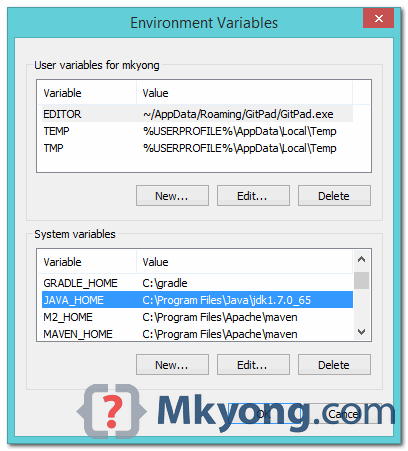
Make sure JDK is installed, and JAVA_HOME is configured as Windows environment variable.
2. Download Apache Ant
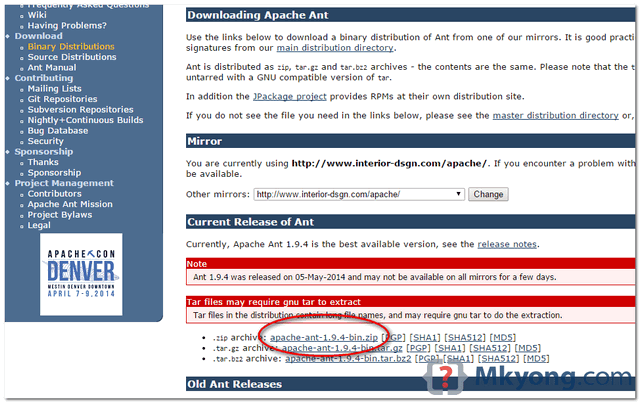
Visit Apache Ant official website, download the Ant binary zip file, for example : apache-ant-1.9.4-bin.zip, unzip it to the folder you want to store Apache Ant.
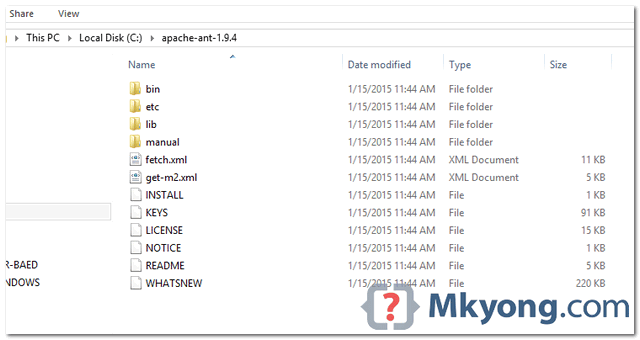
Assume you unzip to this folder – C:\apache-ant-1.9.4
3. Add ANT_HOME
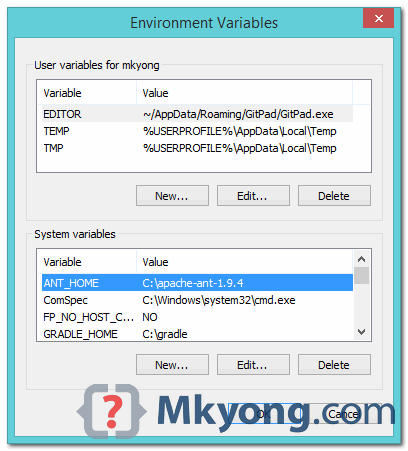
Add ANT_HOME as the Windows environment variable, and point it to your Ant folder.
4. Update PATH
Update PATH variable, append %ANT_HOME%\bin at the end, so that you can run the Ant’s command everywhere.
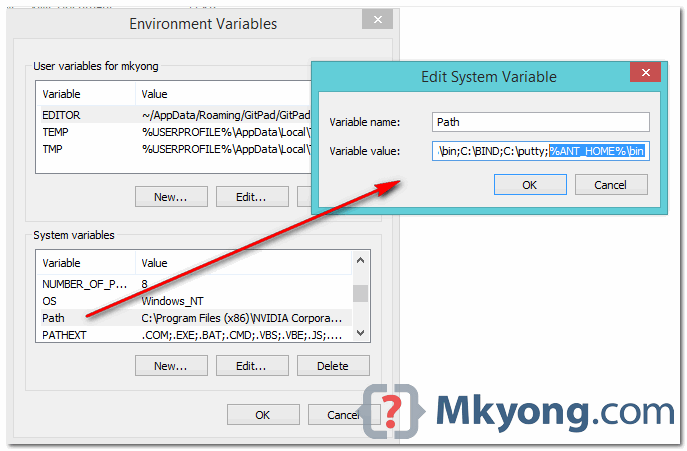
5. Verification
C:\Users\mkyong>ant -v
Apache Ant(TM) version 1.9.4 compiled on April 29 2014
Trying the default build file: build.xml
Buildfile: build.xml does not exist!
Build failed
If you see a similar message above, means the Apache Ant is installed successfully on Windows.

Hello,
Thanks for tutorial.
Did you know what is explanation for?
Trying the default build file: build.xml
Buildfile: build.xml does not exist!
Build failed
Verification should not to be done with “ant -v” !
Flag -v means verbose
Instead “ant -version” should to be used for verification.
can you also provide the reference for msbuild Ant tutorial
Thank you for this nice work
thank you
Thank you!
C:\>ant -version
‘ant’ n’est pas reconnu en tant que commande interne
ou externe, un programme exécutable ou un fichier de commandes.
1.Go to Apache bin folder
2.Find ant windows bat file
3.Right click and run as Admin
4.Now go to command prompt
5.Then check ant -v
Thanks !!
Thank you! Mkyong.com rules. Best answers for my googles searches (on Java subject) usually goes for this site. Nice work! Congratulations.
thank youu
Thanks
Nice tutor. worked well.
THANK YOU ORIENT MASTER
Thank you! Seriously, the Apache Ant site should just link to this page for the install instructions.
i get createprocess error=2 on building tasks, help could be appreciated
Getting this error while checking ant -v
%JAVA_HOME%\lib\tools.jar was unexpected at this time.
I had to restart my machine after making changes to environment variables.
Thanks
Thanks!
Thanks ! it was 5 am in the morning and this post helped me a lot!
Microsoft Windows [Version 6.1.7601]
Copyright (c) 2009 Microsoft Corporation. All rights reserved.
C:UsersUser>ant -v
Unable to locate tools.jar. Expected to find it in C:Program FilesJavajre1.8.
0_131libtools.jar
Apache Ant(TM) version 1.9.7 compiled on April 9 2016
Trying the default build file: build.xml
Buildfile: build.xml does not exist!
Build failed
Please help me, i got it while i am doing according your instructions….
When i verify I am getting the following exception:
java.lang.ClassCastException: org.apache.tools.ant.Main cannot be cast to org.ap
ache.tools.ant.launch.AntMain
at org.apache.tools.ant.launch.Launcher.run(Launcher.java:284)
at org.apache.tools.ant.launch.Launcher.main(Launcher.java:112)
ant.home: C:[HIDDEN_PATH]apache-ant-1.9.7
Classpath: C:[HIDDEN_PATH]apache-ant-1.9.7libant-launcher.jar;
C:[HIDDEN_PATH]apache-ant-1.9.7libant-antlr.jar;
C:[HIDDEN_PATH]apache-ant-1.9.7libant-apache-bcel.jar;
C:[HIDDEN_PATH]apache-ant-1.9.7libant-apache-bsf.jar;
C:[HIDDEN_PATH]apache-ant-1.9.7libant-apache-log4j.jar;
C:[HIDDEN_PATH]apache-ant-1.9.7libant-apache-oro.jar;
C:[HIDDEN_PATH]apache-ant-1.9.7libant-apache-regexp.jar;
C:[HIDDEN_PATH]apache-ant-1.9.7libant-apache-resolver.jar;
C:[HIDDEN_PATH]apache-ant-1.9.7libant-apache-xalan2.jar;
C:[HIDDEN_PATH]apache-ant-1.9.7libant-commons-logging.jar;
C:[HIDDEN_PATH]apache-ant-1.9.7libant-commons-net.jar;
C:[HIDDEN_PATH]apache-ant-1.9.7libant-jai.jar;
C:[HIDDEN_PATH]apache-ant-1.9.7libant-javamail.jar;
C:[HIDDEN_PATH]apache-ant-1.9.7libant-jdepend.jar;
C:[HIDDEN_PATH]apache-ant-1.9.7libant-jmf.jar;
C:[HIDDEN_PATH]apache-ant-1.9.7libant-jsch.jar;
C:[HIDDEN_PATH]apache-ant-1.9.7libant-junit.jar;
C:[HIDDEN_PATH]apache-ant-1.9.7libant-junit4.jar;
C:[HIDDEN_PATH]apache-ant-1.9.7libant-launcher.jar;
C:[HIDDEN_PATH]apache-ant-1.9.7libant-netrexx.jar;
C:[HIDDEN_PATH]apache-ant-1.9.7libant-swing.jar;
C:[HIDDEN_PATH]apache-ant-1.9.7libant-testutil.jar;
C:[HIDDEN_PATH]apache-ant-1.9.7libant.jar;
C:Javajdk1.7.0_80libtools.jar
Launcher JAR: C:[HIDDEN_PATH]apache-ant-1.9.7libant-launcher.jar
Launcher Directory: C:[HIDDEN_PATH]apache-ant-1.9.7lib
Please help.
So easy, thanks !!!
Simple, easy to follow, and worked first time.
Thank you
Hi, can you please tell me where should I found the verification message?
I follow all your steps but I don’t know where should the verification message appear…
I need your help please.
Perfect, thank you
Thanks for this.
Thanks !
Thanks!
thanks