A guide to show you how to configure Tomcat 6.0 to support SSL or https connection.
1. Generate Keystore
First, uses “keytool” command to create a self-signed certificate. During the keystore creation process, you need to assign a password and fill in the certificate’s detail.
$Tomcat\bin>keytool -genkey -alias mkyong -keyalg RSA -keystore c:\mkyongkeystore
Enter keystore password:
Re-enter new password:
What is your first and last name?
  [Unknown]:  yong mook kim
What is the name of your organizational unit?
  //omitted to save space
  [no]:  yes

Enter key password for <mkyong>
        (RETURN if same as keystore password):
Re-enter new password:

$Tomcat\bin>
Here, you just created a certificate named “mkyongkeystore“, which locate at “c:\“.
You can use same “
keytool” command to list the existing certificate’s detail
$Tomcat\bin>keytool -list -keystore c:\mkyongkeystore
Enter keystore password:

Keystore type: JKS
Keystore provider: SUN

Your keystore contains 1 entry

mkyong, 14 Disember 2010, PrivateKeyEntry,
Certificate fingerprint (MD5): C8:DD:A1:AF:9F:55:A0:7F:6E:98:10:DE:8C:63:1B:A5

$Tomcat\bin>
2. Connector in server.xml
Next, locate your Tomcat’s server configuration file at $Tomcat\conf\server.xml, modify it by adding a connector element to support for SSL or https connection.
File : $Tomcat\conf\server.xml
 //...
 <!-- Define a SSL HTTP/1.1 Connector on port 8443
         This connector uses the JSSE configuration, when using APR, the
         connector should be using the OpenSSL style configuration
         described in the APR documentation -->

 <Connector port="8443" protocol="HTTP/1.1" SSLEnabled="true"
               maxThreads="150" scheme="https" secure="true"
               clientAuth="false" sslProtocol="TLS"
	       keystoreFile="c:\mkyongkeystore"
	       keystorePass="password" />
  //...
keystorePass="password" is the password you assigned to your keystore via “keytool” command.
3. Done
Saved it and restart Tomcat, access to https://localhost:8443/
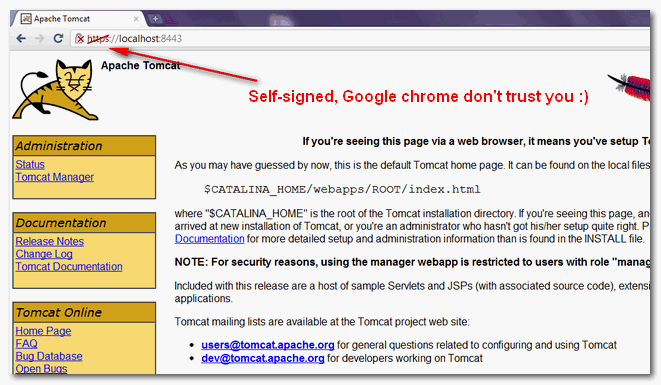
In this example, we are using Google Chrome to access the Tomcat configured SSL site, and you may notice a crossed icon appear before the https protocol :), this is caused by the self-signed certificate and Google chrome just do not trust it.
In production environment, you should consider buy a signed certificate from trusted SSL service provider like verisign or sign it with your own CA server

Hi mkyong,
I have configured configured ssl certificated in tomcat server.xml file through connector also my ssl certificate is signed from third party and i allowed only tls v1.2 but still when i access application there yellow insecure icon on url.
Please suggest some solutions
I am getting ERR_SSL_PROTOCOL_ERROR. Not showing apache tomcat screen.
Thanks man!
I have installed ssl but I do not want to mention 8443 in url. My web app should be open with domain only. How can it possible? please help me.
I have done all the things as according, but still, it’s not working, I am getting the same problem, “this site can’t be reached”
the server.xml is getting overwritten after restarting the server.
I’m getting error like that after passed https://localhost:8443 please let me know issues about chrome
NET::ERR_CERT_AUTHORITY_INVALID
I have enabled SSL with a self signed certificate that is valid…and when I call the mothods from the controller through postman they seem to work on https but also on http. It should not work on http anymore. Can somebody help me on this ? I have a spring boot application.
securedapp
/*
CONFIDENTIAL
do this ur problem will be solved
regards,
With this http: // localhost: 8443 does not redirect to https.
You must configure it to redirect http: // localhost: 8443 to https: // localhost: 8443
Edit in web.xml
securedapp
/*
CONFIDENTIAL
The url pattern is set to /* so any page/resource from your application is secure (it can be only accessed with https). The transport-guarantee tag is set to CONFIDENTIAL to make sure your app will work on SSL.
Hi Mykong… Thanks a lot this information.. It helped resolving SSL related issue in my end. I found the information provided by you are simple and user friendly…
Thanks Mykong. It is like breeze.
Hi All,
Can i use a certificate generate in other server?
Regards!!!
How to configure tomcat with APR?
what is CA server?
Thanks alot man. your tutorials are great.
Don’t forget to remove your tomcat instance from Eclipse and create a new one.
Thx, it was that trick
Hi MKYONG,
I’m unable to test this in eclipse Juno with Tomcat 8.
I have the following error.
Exception in thread “main” javax.xml.ws.WebServiceException: Failed to access the WSDL at: https://localhost:8280/HelloWorldWS/hello?wsdl. It failed with:
Unrecognized SSL message, plaintext connection?.
at com.sun.xml.ws.wsdl.parser.RuntimeWSDLParser.tryWithMex(RuntimeWSDLParser.java:136)
at com.sun.xml.ws.wsdl.parser.RuntimeWSDLParser.parse(RuntimeWSDLParser.java:122)
at com.sun.xml.ws.client.WSServiceDelegate.parseWSDL(WSServiceDelegate.java:226)
at com.sun.xml.ws.client.WSServiceDelegate.(WSServiceDelegate.java:189)
at com.sun.xml.ws.client.WSServiceDelegate.(WSServiceDelegate.java:159)
at com.sun.xml.ws.spi.ProviderImpl.createServiceDelegate(ProviderImpl.java:81)
at javax.xml.ws.Service.(Unknown Source)
at javax.xml.ws.Service.create(Unknown Source)
at com.mkyong.client.HelloWorldClient.main(HelloWorldClient.java:17)
Caused by: javax.net.ssl.SSLException: Unrecognized SSL message, plaintext connection?
at sun.security.ssl.InputRecord.handleUnknownRecord(Unknown Source)
at sun.security.ssl.InputRecord.read(Unknown Source)
at sun.security.ssl.SSLSocketImpl.readRecord(Unknown Source)
at sun.security.ssl.SSLSocketImpl.performInitialHandshake(Unknown Source)
at sun.security.ssl.SSLSocketImpl.startHandshake(Unknown Source)
at sun.security.ssl.SSLSocketImpl.startHandshake(Unknown Source)
at sun.net.www.protocol.https.HttpsClient.afterConnect(Unknown Source)
at sun.net.www.protocol.https.AbstractDelegateHttpsURLConnection.connect(Unknown Source)
at sun.net.www.protocol.http.HttpURLConnection.getInputStream(Unknown Source)
at sun.net.www.protocol.https.HttpsURLConnectionImpl.getInputStream(Unknown Source)
at java.net.URL.openStream(Unknown Source)
at com.sun.xml.ws.wsdl.parser.RuntimeWSDLParser.createReader(RuntimeWSDLParser.java:785)
at com.sun.xml.ws.wsdl.parser.RuntimeWSDLParser.resolveWSDL(RuntimeWSDLParser.java:236)
at com.sun.xml.ws.wsdl.parser.RuntimeWSDLParser.parse(RuntimeWSDLParser.java:107)
… 7 more
Firefox the following error message shown
Secure Connection Failed
An error occurred during a connection to localhost:8280.
SSL received a record that exceeded the maximum permissible length.
(Error code: ssl_error_rx_record_too_long)
Please do let me know for any inputs you have .
Regards,
Laskhmana Kumar
Hi, I configured my tomcat 8 with these settings. I can access it from localhost and it works.
But I can’t use it from global IP and remotely, I can access my app from HTTP port but not from HTTPS (8443). I have disabled firewall.
I tried resolveHosts=”true” (as I used for HTTP) too, but it didn’t work.
Did I miss anything for remote access?
I found my solution.
I am using Amazon EC2 VM and I have forgotten to open inbound rule for 8443 port in security group.
Thanks anyway.
I am also using AWS EC2 , I want to open my tomcat app with ssl without mention any port. I configured 80 and 443 port in server.xml. But some time it gives error like tomcat shutdown port not running. please help
hi
Hi Mkyong,
it was very help full,
Mkyong,
I have a configuration where I need HTTPS on the client side as well as for connections initiated by the Tomcat server itself. (i.e. Tomcat -> (SSL) -> Other server). I configured a connector running on port 8443 correctly (https cert shows up in browser), but Tomcat is not using the cert for communications initiated by it. Where can I configure the process’ keystore without modifying my code or using -D opts (which will show my keystore’s location and password out in the open)?
Thnx Mkyong….this example is simple nd useful..
This didn’t work for me, but it was close. When I launched myy server, I got this error message: No Certificate file specified or invalid file format.
I read somewhere that the fix was to change the protocol attribute in the Connector tag in the server.xml file.
I changed it from “HTTP/1.1” to “org.apache.coyote.http11.Http11NioProtocol” and relaunched my server, and it worked fine after that.
(I was running Tomcat 6.0.35)
hi, its working , but now i want to add https from my login page not from my home page…
hello, mr mkyoung i used keystoreFile=”c:mkyongkeystore”
keystorePass=”password” /> but it show me file not found exception…
plz help me .
Thanks Mkyong. You saved me from a sleepless night…
Could you please add some lines about the location of the keystore? Is its location relevant?
you just put on c:/yourfilename
Can u please the steps for Configuring the SSL in Jetty.Am stuck with it for long time.am in desperate need of help
Hello sir,
I want to know ssl enable for tomcat7.I followed as it is in above described for tomcat6.I created keystore file and password.Then after i start the applecation but i got MalFormedException Invalid byte 1 of 1-byte UTF-8.Plese reply me sir.
In my application after adding the above the code works in both http as well as https.Should we add any declaration in web.xml ?
yes we need to add the security constraint in the web.xml related to your project
it will work as redirect to http to https
MKYONG
PINGPONG
SINGTHESONG
Sir how are you???
Do you like noodles or something????
Hi,
Will the application deployed in the tomcat will still be accessible in tomcat’s non https port?. By default the http port is 8080. So if we configure tomcat for https in 8443 port,will the application be still available in the http port 8080?
yes for sure check it….
Storing keystore password in server.xml looks wrong. What would be more secure way to set it up?
Try using correct permissions on your filesystem, preventing other users from reading the file.
Thanks it was helpful.
To make https work with above settings, below line needs to be commented out
in server.xml
Thanks it was helpful.
To make https work with above settings, below line needs to be commented out
in server.xml
The listener tag which need to be commented out in server.xml is as follows-
Listener className=”org.apache.catalina.core.AprLifecycleListener” SSLEngine=”on”
great thanks!!
your tutorials are really cool, simple and works out very well 🙂
keep posting !
Hello
When I try to generate the key using : keytool -genkey -alias Myalias-keyalg RSA -keystore c:\Myfolder, I get to fill all needed information, but when I arrive to this part :
** Is CN=Loiane Groner, OU=home, O=home, L=Sao Paulo, ST=SP, C=BR correct?
[no]: yes **
they send me back to filling user full name, and it’s the same thing all over again.
Do you happen to know where the problem is ?
Thank you !!
I have built an Web Application on struts 1.3.x and deployed in Tomcat 7. Single Sign On is also deployed on top of apache and for communication mod_jk is also installed. I had set the timeout in Tomcat for 30 mins. SSL is also enabled.
Sometimes when users were working then the application automatically logs out. Can you suggest me what may be the solution. If you need any info then please do let me know.
I don’t want this post to be published any where.
http://www.mulesoft.com/tomcat-ssl
another good reference
How can I restrict HTTPS to some applications / URL patterns hosted on my tomcat server?
protocol=”HTTP/1.1″ didnt work. i change to protocol=”org.apache.coyote.http11.Http11Protocol” and it works
This doesnot work
For which tomcat version…?
+1
Excellent Article! Thanks to the author for taking the time out to compose it.
Very intuitive, and it has demystified essential SSL setup by using good old Tomcat. It has also worked fine on Tomcat 5.5.
Can one server have multiple instances of Tomcat running that are both configured for SSL? how does the second (or 3rd, or 4th) get configured?
i am getting invalid server certificate even if i have given correct keystore password in tomcat ssl configuration.
Hi everyone,
I have a typical case where tomcat is running and i run the batch for stopping it.But the cammand promt shows ‘stopping catalina services’ it the port is not yet free and when i run the tomcat ‘Socket bind failed’ exception occurs.
Note : the stopping and starting of tomcat is done programatically through java.
It gives me exception when I use protocol=”HTTP/1.1″ but works fine for protocol=”org.apache.coyote.http11.Http11NioProtocol”.
Also I am getting the Error 107 (net::ERR_SSL_PROTOCOL_ERROR): SSL protocol error when I try to use the cacerts from the security directory of jre but works fine for the self-signed certificate.
Hi, i have the same problem, have you solve this error?
Yes I solved the problem by adding my certificate to the cacerts using the IBM KeyManager tool.
It works file when i start server mannualy, but in eclipse if i run any project it gives error data not found. Any help.
For the Eclipse Tomcat integration, try modifying the server.xml in the Eclipse Servers folder, and not in $TOMCAT_HOME/conf/server.xml
Hi, i have an application and i can access it using http://localhost:8080/myApp and https://localhost:8443/myApp. However, i want to get rid of specifying 8080 or 8443 for http and https respectively. Especially for https, i want https://localhost/myApp to work and access myApp under securely (using 8443) with out showing the port in the url. How can i achieve this. I am using tomcat 5.5.31. Please help.
Hi Vikram,
I am sure you would have figured it by now. You can achieve this through Apache – Tomcat integration, Apache being the HTTP Web Server, which is accessible on port 80 (HTTP) or 443 (HTTPS). Internally, Apache will route the request to http://:8080/ or https:/// as the case may be.
Hi Mkyong,
tnx for the sample, it was very help full,
And i got a issue in tomcat7, when i used in windows7
error in server start up-
SEVERE: Failed to initialize end point associated with ProtocolHandler [“http-apr-8443”]
this was resolved by commenting as following-
this was resolved by commenting as following line-
this was resolved by commenting as following line-
Listener className=”org.apache.catalina.core.AprLifecycleListener” SSLEngine=”on”
I installed tomcat v7 and Eclipse but in testing the installation the error i have is
“Server Tomcat v 7 at local host refused to start”
“Server instaces is not configured”
kindly help
i have a create war file of my project, the web.xml entry is
Ganesha
index.html
index.htm
index.jsp
default.html
default.htm
default.jsp
securedapp
/*
CONFIDENTIAL
i have generate the key using
keytool -genkey -alias server -keypass changeit -keystore server.keystore -storepass changet
and put this file in C:\server.keystore
server.xml entry is
i deploy my war file in tomcat
and start server,
when i click to my project in tomcat manager
my project url is:https://localhost:8443/Ganesha/
but the browser says:
This webpage is not available
The webpage at https://localhost:8443/Ganesha/ might be temporarily down or it may have moved permanently to a new web address.
Here are some suggestions:
Reload this web page later.
Error 7 (net::ERR_TIMED_OUT): The operation timed ou
step-1:
i have a create war file of my project, the web.xml entry is
Ganesha
index.html
index.htm
index.jsp
default.html
default.htm
default.jsp
securedapp
/*
CONFIDENTIAL
step-2:
i have generate the key using
keytool -genkey -alias server -keypass changeit -keystore server.keystore -storepass changet
and put this file in C:\server.keystore
step-3:
server.xml entry is
step-4:
i deploy my war file in tomcat
and start server,
when i click to my project in tomcat manager
my project url is:https://localhost:8443/Ganesha/
but the browser says:
This webpage is not available
The webpage at https://localhost:8443/Ganesha/ might be temporarily down or it may have moved permanently to a new web address.
Here are some suggestions:
Reload this web page later.
Error 7 (net::ERR_TIMED_OUT): The operation timed out
Hi, thanks for this post, it helped me a lot. My problem now is, that the https connection is only addressable through the intern network and not by using the extern IP(although I did a port-forwarding in the router settings for 8443 to my local IP). Any idea what this might cause? Thanks!
I am working on the exact same scenario , but for me i am still getting not secure warning on the address bar , were u able to resolve it ?
Unable to connect https:\\localhost:8443
I have done successfully creation of certificate
Incorporate in Server.xml file
But i am unable to connect with https:\\localhost:8443
i can with http:\\localhost:8080
please help me out
I have done successfully creation of certificate
Incorporate in Server.xml file
But i am unable to connect with https:\\localhost:8443
i can with http:\\localhost:8080
Your keystore and key passwords could be different. Change your key’s password to be the same as that of the keystore. It should work.
Thanks again.