In this tutorial, we show you how to print the List values via JSTL c:forEach tag.
P.S This web project is using Spring MVC frameworks v3.2
1. Project Structure
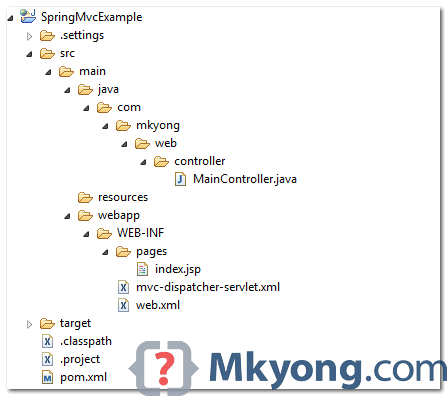
Review the project directory structure, a standard Maven project.
2. Project Dependencies
Add Spring and JSTL libraries.
pom.xml
	<properties>
		<spring.version>3.2.2.RELEASE</spring.version>
		<jstl.version>1.2</jstl.version>
	</properties>

	<dependencies>

		<!-- jstl -->
		<dependency>
			<groupId>jstl</groupId>
			<artifactId>jstl</artifactId>
			<version>${jstl.version}</version>
		</dependency>

		<!-- Spring Core -->
		<dependency>
			<groupId>org.springframework</groupId>
			<artifactId>spring-core</artifactId>
			<version>${spring.version}</version>
		</dependency>

		<dependency>
			<groupId>org.springframework</groupId>
			<artifactId>spring-web</artifactId>
			<version>${spring.version}</version>
		</dependency>

		<dependency>
			<groupId>org.springframework</groupId>
			<artifactId>spring-webmvc</artifactId>
			<version>${spring.version}</version>
		</dependency>

	</dependencies>
3. Spring Controller
A Spring controller to return a List.
MainController.java
package com.mkyong.web.controller;

import java.util.ArrayList;
import java.util.List;
import org.springframework.stereotype.Controller;
import org.springframework.web.bind.annotation.RequestMapping;
import org.springframework.web.bind.annotation.RequestMethod;
import org.springframework.web.servlet.ModelAndView;

@Controller
public class MainController {

	@RequestMapping(value = "/", method = RequestMethod.GET)
	public ModelAndView getdata() {

		List<String> list = getList();

		//return back to index.jsp
		ModelAndView model = new ModelAndView("index");
		model.addObject("lists", list);

		return model;

	}

	private List<String> getList() {

		List<String> list = new ArrayList<String>();
		list.add("List A");
		list.add("List B");
		list.add("List C");
		list.add("List D");
		list.add("List 1");
		list.add("List 2");
		list.add("List 3");

		return list;

	}

}
4. JSP Page
To print the returned List from controller, uses JSTL c:forEach tag.
index.jsp
<%@taglib prefix="c" uri="http://java.sun.com/jsp/jstl/core"%>
<html>
<body>
	<h2>Spring MVC and List Example</h2>

	<c:if test="${not empty lists}">

		<ul>
			<c:forEach var="listValue" items="${lists}">
				<li>${listValue}</li>
			</c:forEach>
		</ul>

	</c:if>
</body>
</html>
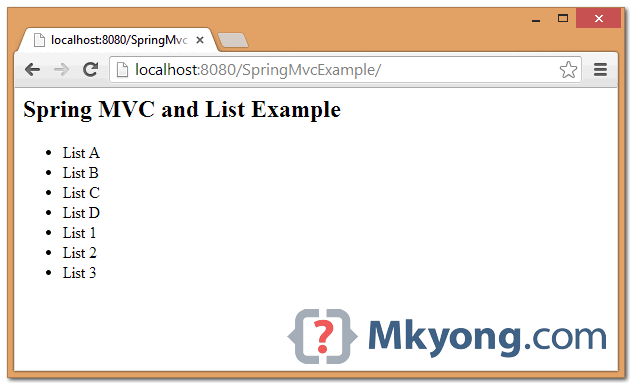
Output – http://localhost:8080/SpringMvcExample/
5. Download Source Code
Download – SpringMVC-Lists-Example (11 KB)

Whitelabel Error Page
This application has no explicit mapping for /error, so you are seeing this as a fallback.
Thu Aug 22 14:26:58 PDT 2019
There was an unexpected error (type=Not Found, status=404).
No message available
hi, sir, i have problems, how to create very basic List of Spring MVC ?
how i can do it ?
sir,
@RequestMapping(“/view/{id}”)
public String viewcountry(@PathVariable(“id”)String id,Model model)
{
/*ModelAndView obj=new ModelAndView(“Countrylist”);*/
System.out.println(“id=”+id);
countrylist=countrylistDao.Get(id);
model.addAttribute(“cntry”,countrylist);
return “Countrylist”;
}
this is my controller for retrieve data from database by id. in jsp, i coundn’t dispaly the data. please help me i paste my jsp page below,
Bootstrap Example
#main{
width: 100%;
height: 45vh;
background-image: url(‘${img}/usa.jpg’);
background-size: cover;
opacity: 0.7;
}
${cntry.getCountry_name()}
${cntry.getUniversity_name()}
${cntry.getLocation()}
UniversityName
Location
UniversityName
Location
UniversityName
Location
UniversityName
Location
UniversityName
Location
UniversityName
Location
That’s what I needed for my future project http://www.qlu.center
hello sir,can you please explain a program for getting the input from the user and adding it in the list
i do get this error all time….anyone help me on this pls
tried to add jar files and tried to add dependency in maven but still no luck…..
[ERROR ] SRVE0293E: [Servlet Error]-[Failed to load listener: org.springframework.web.context.ContextLoaderListener]: java.lang.NoClassDefFoundError: javax/servlet/ServletContextListener
at java.lang.ClassLoader.findBootstrapClass(Native Method)
at java.lang.ClassLoader.findBootstrapClassOrNull(Unknown Source)
at java.lang.ClassLoader.loadClass(Unknown Source)
at java.lang.ClassLoader.loadClass(Unknown Source)
at sun.misc.Launcher$AppClassLoader.loadClass(Unknown Source)
at java.lang.ClassLoader.loadClass(Unknown Source)
at java.lang.ClassLoader.findSystemClass(Unknown Source)
at com.ibm.ws.classloading.internal.GatewayClassLoader.loadClass(GatewayClassLoader.java:127)
at [internal classes]
[ERROR ] SRVE0279E: Error occured while processing global listeners for the application {0}: {1}
java.lang.NullPointerException
[ERROR ] SRVE8052E: Logging ClassNotFoundException
org/springframework/web/servlet/DispatcherServlet
[ERROR ] SRVE0276E: Error while initializing Servlet [mvc-dispatcher]: javax.servlet.UnavailableException: SRVE0200E: Servlet [org.springframework.web.servlet.DispatcherServlet]: Could not find required class – org/springframework/web/servlet/DispatcherServlet
at com.ibm.ws.webcontainer.servlet.ServletWrapper$1.run(ServletWrapper.java:1497)
at [internal classes]
Hi..
In above example its not setting value for list in jsp page..
Please could you provide me full example code.
Thanks.
Hi, do u know how to to set a value to a list of a object passed to a jsp ? eg.
I need to set one email to the email list of User from jsp
class User{
private List emails;
public void setEmails(List emails) {
this.emails = emails;
}
}
@Controller
public class UserController {
@RequestMapping(value = “/register”, method = RequestMethod.GET)
public ModelAndView user() {
return new ModelAndView(“user”, “command”, new User());
}
}
<form:label path="”>Email
<form:input path="” />
I think I found it, its
Email