
In this article, we will discuss about “How to create a Spring Boot + Spring Data + Elasticsearch Example”.
Tools used in this article :
- Spring Boot 1.5.1.RELEASE
- Spring Boot Starter Data Elasticsearch 1.5.1.RELEASE
- Spring Data Elasticsearch 2.10.RELEASE
- Elasticsearch 2.4.4
- Maven
- Java 8
SpringBoot 1.5.1.RELEASE and Spring Data Elasticsearch 2.10.RELEASE supports only ElasticSearch 2.4.0. They don’t support the latest version of ElasticSearch 5.x version. Read this – Spring Data Elasticsearch Spring Boot version matrix
Related – Elasticsearch Basics
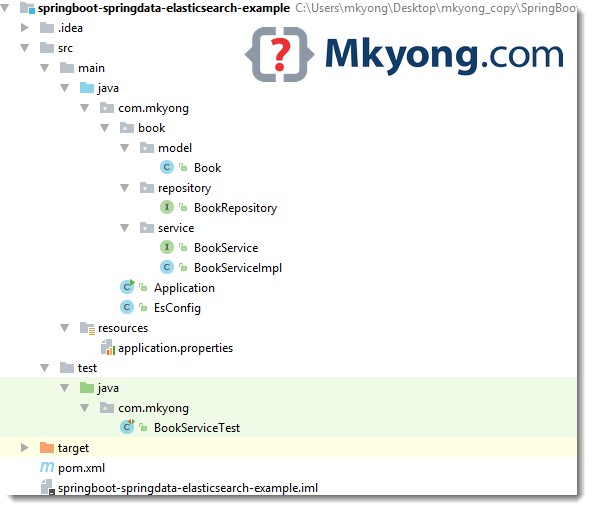
1. Project Structure
A standard Maven project structure.
2. Project Dependency
Declares a spring-boot-starter-data-elasticsearch for Spring Data ElasticSearch application.
<?xml version="1.0" encoding="UTF-8"?>
<project xmlns="http://maven.apache.org/POM/4.0.0"
         xmlns:xsi="http://www.w3.org/2001/XMLSchema-instance"
         xsi:schemaLocation="http://maven.apache.org/POM/4.0.0
         http://maven.apache.org/xsd/maven-4.0.0.xsd">
    <modelVersion>4.0.0</modelVersion>

    <artifactId>springboot-springdata-elasticsearch-example</artifactId>
    <packaging>jar</packaging>
    <url>https://www.mkyong.com</url>
    <version>1.0</version>

    <parent>
        <groupId>org.springframework.boot</groupId>
        <artifactId>spring-boot-starter-parent</artifactId>
        <version>1.5.1.RELEASE</version>
    </parent>

    <properties>
        <java.version>1.8</java.version>
    </properties>

    <dependencies>
        <dependency>
            <groupId>org.springframework.boot</groupId>
            <artifactId>spring-boot-starter-data-elasticsearch</artifactId>
        </dependency>

        <dependency>
            <groupId>org.springframework.boot</groupId>
            <artifactId>spring-boot-starter-test</artifactId>
            <scope>test</scope>
        </dependency>

        <!-- Runtime, for Embedded Elasticsearch,
            comment this if connect to external elastic search server-->
        <dependency>
            <groupId>net.java.dev.jna</groupId>
            <artifactId>jna</artifactId>
            <scope>runtime</scope>
        </dependency>

    </dependencies>

    <build>
        <plugins>
            <!-- Package as an executable jar/war -->
            <plugin>
                <groupId>org.springframework.boot</groupId>
                <artifactId>spring-boot-maven-plugin</artifactId>
            </plugin>
        </plugins>
    </build>

</project>
Review the project dependencies :
$ mvn dependency:tree
[INFO] Scanning for projects...
[INFO]
[INFO] ------------------------------------------------------------------------
[INFO] Building springboot-springdata-elasticsearch-example 1.0
[INFO] ------------------------------------------------------------------------
[INFO]
[INFO] --- maven-dependency-plugin:2.10:tree (default-cli) @ springboot-springdata-elasticsearch-example ---
[INFO] org.springframework.boot:springboot-springdata-elasticsearch-example:jar:1.0
[INFO] +- org.springframework.boot:spring-boot-starter-data-elasticsearch:jar:1.5.1.RELEASE:compile
[INFO] |  +- org.springframework.boot:spring-boot-starter:jar:1.5.1.RELEASE:compile
[INFO] |  |  +- org.springframework.boot:spring-boot:jar:1.5.1.RELEASE:compile
[INFO] |  |  +- org.springframework.boot:spring-boot-autoconfigure:jar:1.5.1.RELEASE:compile
[INFO] |  |  +- org.springframework.boot:spring-boot-starter-logging:jar:1.5.1.RELEASE:compile
[INFO] |  |  |  +- ch.qos.logback:logback-classic:jar:1.1.9:compile
[INFO] |  |  |  |  \- ch.qos.logback:logback-core:jar:1.1.9:compile
[INFO] |  |  |  +- org.slf4j:jul-to-slf4j:jar:1.7.22:compile
[INFO] |  |  |  \- org.slf4j:log4j-over-slf4j:jar:1.7.22:compile
[INFO] |  |  \- org.yaml:snakeyaml:jar:1.17:compile
[INFO] |  \- org.springframework.data:spring-data-elasticsearch:jar:2.1.0.RELEASE:compile
[INFO] |     +- org.springframework:spring-context:jar:4.3.6.RELEASE:compile
[INFO] |     |  +- org.springframework:spring-aop:jar:4.3.6.RELEASE:compile
[INFO] |     |  +- org.springframework:spring-beans:jar:4.3.6.RELEASE:compile
[INFO] |     |  \- org.springframework:spring-expression:jar:4.3.6.RELEASE:compile
[INFO] |     +- org.springframework:spring-tx:jar:4.3.6.RELEASE:compile
[INFO] |     +- org.springframework.data:spring-data-commons:jar:1.13.0.RELEASE:compile
[INFO] |     +- commons-lang:commons-lang:jar:2.6:compile
[INFO] |     +- joda-time:joda-time:jar:2.9.7:compile
[INFO] |     +- org.elasticsearch:elasticsearch:jar:2.4.4:compile
[INFO] |     |  +- org.apache.lucene:lucene-core:jar:5.5.2:compile
[INFO] |     |  +- org.apache.lucene:lucene-backward-codecs:jar:5.5.2:compile
[INFO] |     |  +- org.apache.lucene:lucene-analyzers-common:jar:5.5.2:compile
[INFO] |     |  +- org.apache.lucene:lucene-queries:jar:5.5.2:compile
[INFO] |     |  +- org.apache.lucene:lucene-memory:jar:5.5.2:compile
[INFO] |     |  +- org.apache.lucene:lucene-highlighter:jar:5.5.2:compile
[INFO] |     |  +- org.apache.lucene:lucene-queryparser:jar:5.5.2:compile
[INFO] |     |  |  \- org.apache.lucene:lucene-sandbox:jar:5.5.2:compile
[INFO] |     |  +- org.apache.lucene:lucene-suggest:jar:5.5.2:compile
[INFO] |     |  |  \- org.apache.lucene:lucene-misc:jar:5.5.2:compile
[INFO] |     |  +- org.apache.lucene:lucene-join:jar:5.5.2:compile
[INFO] |     |  |  \- org.apache.lucene:lucene-grouping:jar:5.5.2:compile
[INFO] |     |  +- org.apache.lucene:lucene-spatial:jar:5.5.2:compile
[INFO] |     |  |  +- org.apache.lucene:lucene-spatial3d:jar:5.5.2:compile
[INFO] |     |  |  \- com.spatial4j:spatial4j:jar:0.5:compile
[INFO] |     |  +- com.google.guava:guava:jar:18.0:compile
[INFO] |     |  +- org.elasticsearch:securesm:jar:1.0:compile
[INFO] |     |  +- com.carrotsearch:hppc:jar:0.7.1:compile
[INFO] |     |  +- com.fasterxml.jackson.dataformat:jackson-dataformat-smile:jar:2.8.6:compile
[INFO] |     |  +- com.fasterxml.jackson.dataformat:jackson-dataformat-yaml:jar:2.8.6:compile
[INFO] |     |  +- com.fasterxml.jackson.dataformat:jackson-dataformat-cbor:jar:2.8.6:compile
[INFO] |     |  +- io.netty:netty:jar:3.10.6.Final:compile
[INFO] |     |  +- com.ning:compress-lzf:jar:1.0.2:compile
[INFO] |     |  +- com.tdunning:t-digest:jar:3.0:compile
[INFO] |     |  +- org.hdrhistogram:HdrHistogram:jar:2.1.6:compile
[INFO] |     |  +- commons-cli:commons-cli:jar:1.3.1:compile
[INFO] |     |  \- com.twitter:jsr166e:jar:1.1.0:compile
[INFO] |     +- com.fasterxml.jackson.core:jackson-core:jar:2.8.6:compile
[INFO] |     +- com.fasterxml.jackson.core:jackson-databind:jar:2.8.6:compile
[INFO] |     |  \- com.fasterxml.jackson.core:jackson-annotations:jar:2.8.0:compile
[INFO] |     +- org.slf4j:slf4j-api:jar:1.7.22:compile
[INFO] |     \- org.slf4j:jcl-over-slf4j:jar:1.7.22:compile
[INFO] +- org.springframework.boot:spring-boot-starter-test:jar:1.5.1.RELEASE:test
[INFO] |  +- org.springframework.boot:spring-boot-test:jar:1.5.1.RELEASE:test
[INFO] |  +- org.springframework.boot:spring-boot-test-autoconfigure:jar:1.5.1.RELEASE:test
[INFO] |  +- com.jayway.jsonpath:json-path:jar:2.2.0:test
[INFO] |  |  \- net.minidev:json-smart:jar:2.2.1:test
[INFO] |  |     \- net.minidev:accessors-smart:jar:1.1:test
[INFO] |  |        \- org.ow2.asm:asm:jar:5.0.3:test
[INFO] |  +- junit:junit:jar:4.12:test
[INFO] |  +- org.assertj:assertj-core:jar:2.6.0:test
[INFO] |  +- org.mockito:mockito-core:jar:1.10.19:test
[INFO] |  |  \- org.objenesis:objenesis:jar:2.1:test
[INFO] |  +- org.hamcrest:hamcrest-core:jar:1.3:test
[INFO] |  +- org.hamcrest:hamcrest-library:jar:1.3:test
[INFO] |  +- org.skyscreamer:jsonassert:jar:1.4.0:test
[INFO] |  |  \- com.vaadin.external.google:android-json:jar:0.0.20131108.vaadin1:test
[INFO] |  +- org.springframework:spring-core:jar:4.3.6.RELEASE:compile
[INFO] |  \- org.springframework:spring-test:jar:4.3.6.RELEASE:test
[INFO] \- net.java.dev.jna:jna:jar:4.2.2:runtime
[INFO] ------------------------------------------------------------------------
[INFO] BUILD SUCCESS
[INFO] ------------------------------------------------------------------------
[INFO] Total time: 1.867 s
[INFO] Finished at: 2017-03-14T19:55:41+08:00
[INFO] Final Memory: 27M/437M
[INFO] ------------------------------------------------------------------------
3. Spring Data ElasticSearch Application
Let us start Spring Boot + Spring Data + Elasticsearch Example now.
3.1. Develop Model for our project
package com.mkyong.book.model;

import org.springframework.data.annotation.Id;
import org.springframework.data.elasticsearch.annotations.Document;

@Document(indexName = "mkyong", type = "books")
public class Book {

    @Id
    private String id;
    private String title;
    private String author;
    private String releaseDate;

    public Book() {
    }

    public Book(String id, String title, String author, String releaseDate) {
        this.id = id;
        this.title = title;
        this.author = author;
        this.releaseDate = releaseDate;
    }

    //getters and setters

    @Override
    public String toString() {
        return "Book{" +
                "id='" + id + '\'' +
                ", title='" + title + '\'' +
                ", author='" + author + '\'' +
                ", releaseDate='" + releaseDate + '\'' +
                '}';
    }
}
3.2. Develop Elasticsearch Repository for our project
package com.mkyong.book.repository;

import com.mkyong.book.model.Book;
import org.springframework.data.domain.Page;
import org.springframework.data.domain.Pageable;
import org.springframework.data.elasticsearch.repository.ElasticsearchRepository;

import java.util.List;

public interface BookRepository extends ElasticsearchRepository<Book, String> {

    Page<Book> findByAuthor(String author, Pageable pageable);

    List<Book> findByTitle(String title);

}
3.3. Develop Service component for our project
package com.mkyong.book.service;

import com.mkyong.book.model.Book;
import org.springframework.data.domain.Page;
import org.springframework.data.domain.PageRequest;

import java.util.List;

public interface BookService {

    Book save(Book book);

    void delete(Book book);

    Book findOne(String id);

    Iterable<Book> findAll();

    Page<Book> findByAuthor(String author, PageRequest pageRequest);

    List<Book> findByTitle(String title);

}
package com.mkyong.book.service;

import com.mkyong.book.model.Book;
import com.mkyong.book.repository.BookRepository;
import org.springframework.beans.factory.annotation.Autowired;
import org.springframework.data.domain.Page;
import org.springframework.data.domain.PageRequest;
import org.springframework.stereotype.Service;

import java.util.List;

@Service
public class BookServiceImpl implements BookService {

    private BookRepository bookRepository;

	@Autowired
    public void setBookRepository(BookRepository bookRepository) {
        this.bookRepository = bookRepository;
    }


    public Book save(Book book) {
        return bookRepository.save(book);
    }

    public void delete(Book book) {
        bookRepository.delete(book);
    }

    public Book findOne(String id) {
        return bookRepository.findOne(id);
    }

    public Iterable<Book> findAll() {
        return bookRepository.findAll();
    }

    public Page<Book> findByAuthor(String author, PageRequest pageRequest) {
        return bookRepository.findByAuthor(author, pageRequest);
    }

    public List<Book> findByTitle(String title) {
        return bookRepository.findByTitle(title);
    }

}
3.4. Develop application.properties with Elasticsearch properties.
elasticsearch.clustername = mkyong-cluster
elasticsearch.host = localhost
elasticsearch.port = 9300

#
# Home directory of the embedded Elasticsearch instance. Default to the
# current working directory.
#
#spring.data.elasticsearch.properties.path.home=target/elastic-embedded
#spring.data.elasticsearch.properties.transport.tcp.connect_timeout=60s
3.5. Develop SpringBoot Configuration. Connect to Elastic Search cluster via TransportClient
package com.mkyong;

import org.elasticsearch.client.Client;
import org.elasticsearch.client.transport.TransportClient;
import org.elasticsearch.common.settings.Settings;
import org.elasticsearch.common.transport.InetSocketTransportAddress;
import org.springframework.beans.factory.annotation.Value;
import org.springframework.context.annotation.Bean;
import org.springframework.context.annotation.Configuration;
import org.springframework.data.elasticsearch.core.ElasticsearchOperations;
import org.springframework.data.elasticsearch.core.ElasticsearchTemplate;
import org.springframework.data.elasticsearch.repository.config.EnableElasticsearchRepositories;

import java.net.InetAddress;

@Configuration
@EnableElasticsearchRepositories(basePackages = "com.mkyong.book.repository")
public class EsConfig {

    @Value("${elasticsearch.host}")
    private String EsHost;

    @Value("${elasticsearch.port}")
    private int EsPort;

    @Value("${elasticsearch.clustername}")
    private String EsClusterName;

    @Bean
    public Client client() throws Exception {

        Settings esSettings = Settings.settingsBuilder()
                .put("cluster.name", EsClusterName)
                .build();

        //https://www.elastic.co/guide/en/elasticsearch/guide/current/_transport_client_versus_node_client.html
        return TransportClient.builder()
                .settings(esSettings)
                .build()
                .addTransportAddress(
				  new InetSocketTransportAddress(InetAddress.getByName(EsHost), EsPort));
    }

    @Bean
    public ElasticsearchOperations elasticsearchTemplate() throws Exception {
        return new ElasticsearchTemplate(client());
    }

    //Embedded Elasticsearch Server
    /*@Bean
    public ElasticsearchOperations elasticsearchTemplate() {
        return new ElasticsearchTemplate(nodeBuilder().local(true).node().client());
    }*/

}
4. Develop Test Application
Let us develop one Test Application to unit test our code.
package com.mkyong;

import com.mkyong.book.model.Book;
import com.mkyong.book.service.BookService;
import org.junit.Before;
import org.junit.Test;
import org.junit.runner.RunWith;
import org.springframework.beans.factory.annotation.Autowired;
import org.springframework.boot.test.context.SpringBootTest;
import org.springframework.data.domain.Page;
import org.springframework.data.domain.PageRequest;
import org.springframework.data.elasticsearch.core.ElasticsearchTemplate;
import org.springframework.test.context.junit4.SpringRunner;

import java.util.ArrayList;
import java.util.List;

import static org.hamcrest.CoreMatchers.is;
import static org.hamcrest.MatcherAssert.assertThat;
import static org.junit.Assert.*;

@RunWith(SpringRunner.class)
@SpringBootTest(classes = Application.class)
public class BookServiceTest {

    @Autowired
    private BookService bookService;

    @Autowired
    private ElasticsearchTemplate esTemplate;

    @Before
    public void before() {
        esTemplate.deleteIndex(Book.class);
        esTemplate.createIndex(Book.class);
        esTemplate.putMapping(Book.class);
        esTemplate.refresh(Book.class);
    }

    @Test
    public void testSave() {

        Book book = new Book("1001", "Elasticsearch Basics", "Rambabu Posa", "23-FEB-2017");
        Book testBook = bookService.save(book);

        assertNotNull(testBook.getId());
        assertEquals(testBook.getTitle(), book.getTitle());
        assertEquals(testBook.getAuthor(), book.getAuthor());
        assertEquals(testBook.getReleaseDate(), book.getReleaseDate());

    }

    @Test
    public void testFindOne() {

        Book book = new Book("1001", "Elasticsearch Basics", "Rambabu Posa", "23-FEB-2017");
        bookService.save(book);

        Book testBook = bookService.findOne(book.getId());

        assertNotNull(testBook.getId());
        assertEquals(testBook.getTitle(), book.getTitle());
        assertEquals(testBook.getAuthor(), book.getAuthor());
        assertEquals(testBook.getReleaseDate(), book.getReleaseDate());

    }

    @Test
    public void testFindByTitle() {

        Book book = new Book("1001", "Elasticsearch Basics", "Rambabu Posa", "23-FEB-2017");
        bookService.save(book);

        List<Book> byTitle = bookService.findByTitle(book.getTitle());
        assertThat(byTitle.size(), is(1));
    }

    @Test
    public void testFindByAuthor() {

        List<Book> bookList = new ArrayList<>();

        bookList.add(new Book("1001", "Elasticsearch Basics", "Rambabu Posa", "23-FEB-2017"));
        bookList.add(new Book("1002", "Apache Lucene Basics", "Rambabu Posa", "13-MAR-2017"));
        bookList.add(new Book("1003", "Apache Solr Basics", "Rambabu Posa", "21-MAR-2017"));
        bookList.add(new Book("1007", "Spring Data + ElasticSearch", "Rambabu Posa", "01-APR-2017"));
        bookList.add(new Book("1008", "Spring Boot + MongoDB", "Mkyong", "25-FEB-2017"));

        for (Book book : bookList) {
            bookService.save(book);
        }

        Page<Book> byAuthor = bookService.findByAuthor("Rambabu Posa", new PageRequest(0, 10));
        assertThat(byAuthor.getTotalElements(), is(4L));

        Page<Book> byAuthor2 = bookService.findByAuthor("Mkyong", new PageRequest(0, 10));
        assertThat(byAuthor2.getTotalElements(), is(1L));

    }

    @Test
    public void testDelete() {

        Book book = new Book("1001", "Elasticsearch Basics", "Rambabu Posa", "23-FEB-2017");
        bookService.save(book);
        bookService.delete(book);
        Book testBook = bookService.findOne(book.getId());
        assertNull(testBook);
    }

}
5. Run Spring Boot Application
5.1 To run this demo, we should follow this steps
- Prerequisite-1: Install Java and set JAVA_HOME and PATH variables.
- Prerequisite-2: Install Maven.
- Prerequisite-3: Install Elasticsearch 2.4.0
Let us assume ELASTICSEARCH_HOME = C:\elasticsearch-2.4.0 - Prerequisite-4: Configure ElasticSearch Cluster
Open ${ELASTICSEARCH_HOME}\config\elasticsearch.yml and add the following configuration${ELASTICSEARCH_HOME}\config\elasticsearch.ymlcluster.name: mkyong-cluster - Prerequisite-5: Start Elasticsearch Instance
5.2 Run Spring Boot Application, it will insert 3 book objects into Elastic Server.
package com.mkyong;

import com.mkyong.book.model.Book;
import com.mkyong.book.service.BookService;
import org.elasticsearch.client.Client;
import org.springframework.beans.factory.annotation.Autowired;
import org.springframework.boot.CommandLineRunner;
import org.springframework.boot.SpringApplication;
import org.springframework.boot.autoconfigure.SpringBootApplication;
import org.springframework.data.domain.Page;
import org.springframework.data.domain.PageRequest;
import org.springframework.data.elasticsearch.core.ElasticsearchOperations;

import java.util.Map;

@SpringBootApplication
public class Application implements CommandLineRunner {

    @Autowired
    private ElasticsearchOperations es;

    @Autowired
    private BookService bookService;

    public static void main(String args[]) {
        SpringApplication.run(Application.class, args);
    }

    @Override
    public void run(String... args) throws Exception {

        printElasticSearchInfo();

        bookService.save(new Book("1001", "Elasticsearch Basics", "Rambabu Posa", "23-FEB-2017"));
        bookService.save(new Book("1002", "Apache Lucene Basics", "Rambabu Posa", "13-MAR-2017"));
        bookService.save(new Book("1003", "Apache Solr Basics", "Rambabu Posa", "21-MAR-2017"));

        //fuzzey search
        Page<Book> books = bookService.findByAuthor("Rambabu", new PageRequest(0, 10));

        //List<Book> books = bookService.findByTitle("Elasticsearch Basics");

        books.forEach(x -> System.out.println(x));


    }

    //useful for debug, print elastic search details
    private void printElasticSearchInfo() {

        System.out.println("--ElasticSearch--");
        Client client = es.getClient();
        Map<String, String> asMap = client.settings().getAsMap();

        asMap.forEach((k, v) -> {
            System.out.println(k + " = " + v);
        });
        System.out.println("--ElasticSearch--");
    }

}
Output
  .   ____          _            __ _ _
 /\\ / ___'_ __ _ _(_)_ __  __ _ \ \ \ \
( ( )\___ | '_ | '_| | '_ \/ _` | \ \ \ \
 \\/  ___)| |_)| | | | | || (_| |  ) ) ) )
  '  |____| .__|_| |_|_| |_\__, | / / / /
 =========|_|==============|___/=/_/_/_/
 :: Spring Boot ::        (v1.5.1.RELEASE)

//...
--ElasticSearch--
client.type = transport
cluster.name = mkyong-cluster
name = Baal
network.server = false
node.client = true
transport.ping_schedule = 5s
--ElasticSearch--
Book{id='1001', title='Elasticsearch Basics', author='Rambabu Posa', releaseDate='23-FEB-2017'}
Book{id='1002', title='Apache Lucene Basics', author='Rambabu Posa', releaseDate='13-MAR-2017'}
Book{id='1003', title='Apache Solr Basics', author='Rambabu Posa', releaseDate='21-MAR-2017'}
//...
When we run the application, our data is stored at ${ELASTICSEARCH_HOME}\data\mkyong-cluster.
5.3 Maven package and run it.
$ mvn package
$ java -jar target/springboot-springdata-elasticsearch-example-1.0.jar
5.4 Test with cURL tool.
C:\curl-7.53.1\bin>curl "http://localhost:9200/mkyong/books/_search?pretty=true"
{
  "took" : 3,
  "timed_out" : false,
  "_shards" : {
    "total" : 5,
    "successful" : 5,
    "failed" : 0
  },
  "hits" : {
    "total" : 3,
    "max_score" : 1.0,
    "hits" : [ {
      "_index" : "mkyong",
      "_type" : "books",
      "_id" : "1001",
      "_score" : 1.0,
      "_source" : {
        "id" : "1001",
        "title" : "Elasticsearch Basics",
        "author" : "Rambabu Posa",
        "releaseDate" : "23-FEB-2017"
      }
    }, {
      "_index" : "mkyong",
      "_type" : "books",
      "_id" : "1002",
      "_score" : 1.0,
      "_source" : {
        "id" : "1002",
        "title" : "Apache Lucene Basics",
        "author" : "Rambabu Posa",
        "releaseDate" : "13-MAR-2017"
      }
    }, {
      "_index" : "mkyong",
      "_type" : "books",
      "_id" : "1003",
      "_score" : 1.0,
      "_source" : {
        "id" : "1003",
        "title" : "Apache Solr Basics",
        "author" : "Rambabu Posa",
        "releaseDate" : "21-MAR-2017"
      }
    } ]
  }
}
C:\curl-7.53.1\bin>curl "http://localhost:9200/mkyong/books/_search?q=_id:1003&pretty=true"
{
  "took" : 3,
  "timed_out" : false,
  "_shards" : {
    "total" : 5,
    "successful" : 5,
    "failed" : 0
  },
  "hits" : {
    "total" : 1,
    "max_score" : 1.0,
    "hits" : [ {
      "_index" : "mkyong",
      "_type" : "books",
      "_id" : "1003",
      "_score" : 1.0,
      "_source" : {
        "id" : "1003",
        "title" : "Apache Solr Basics",
        "author" : "Rambabu Posa",
        "releaseDate" : "21-MAR-2017"
      }
    } ]
  }
}
Download Source Code
References
- Elasticsearch Home Page
- Elasticsearch Repositories
- Connecting to Elasticsearch using Spring Data
- Spring Official example – Spring Boot + Spring data + ElasticSearch
- Embedding ElasticSearch In a Spring Application
- Spring Data Elasticsearch Spring Boot version matrix
- Transport Client Versus Node Client
- Elasticsearch hello world example
please update one example with elastic search ingest pipeline with attachment processor to upload and search for pdf content data by using spring data elastic search
Hi,
I am not able to download above example.
could someone help me for downloading above example.
APPLICATION FAILED TO START
***************************
Description:
Field bookService in com.example.demo.Application required a bean of type ‘com.sample.api.service.BookService’ that could not be found.
Action:
Consider defining a bean of type ‘com.sample.api.service.BookService’ in your configuration.
check for @ service annotation
Can I use indexName dynamically from properties file?
@Document(indexName= ${someValueFromProperties})
Very useful information…!!!
can you share me the code base that store file or data in easticsearch and how….. i everything on web but i couldn’t find please help me.
if anyone has then plzz share the knowledge.
Hi,
i need to insert data into multiple indexes of same book type Book as in example but different index name based on some filter how can i specify multiple index names in same pojo/Bean
Thanks
Thanks Rambabu
Hi,
Thanks for the tutorial.
I get the following error running with the software having the mentioned versions. ES 2.4.4 etc
019-05-31 12:08:12.465 INFO 17956 — [ main] org.elasticsearch.client.transport : [Aero] failed to get node info for {#transport#-1}{127.0.0.1}{127.0.0.1:9200}, disconnecting…
org.elasticsearch.transport.ReceiveTimeoutTransportException: [][127.0.0.1:9200][cluster:monitor/nodes/liveness] request_id [0] timed out after [5004ms]
at org.elasticsearch.transport.TransportService$TimeoutHandler.run(TransportService.java:698) ~[elasticsearch-2.4.4.jar!/:2.4.4]
at java.util.concurrent.ThreadPoolExecutor.runWorker(ThreadPoolExecutor.java:1142) ~[na:1.8.0_91]
at java.util.concurrent.ThreadPoolExecutor$Worker.run(ThreadPoolExecutor.java:617) ~[na:1.8.0_91]
at java.lang.Thread.run(Thread.java:745) ~[na:1.8.0_91]
2019-05-31 12:08:12.895 ERROR 17956 — [ main] .d.e.r.s.AbstractElasticsearchRepository : failed to load elasticsearch nodes : org.elasticsearch.client.transport.NoNodeAvailableException: None of the configured nodes are available: [{#transport#-1}{127.0.0.1}{127.0.0.1:9200}]
2019-05-31 12:08:13.189 INFO 17956 — [ main] o.s.j.e.a.AnnotationMBeanExporter : Registering beans for JMX exposure on startup
–ElasticSearch–>
client.type = transport
cluster.name = pnakkala-cluster
name = Aero
network.server = false
node.client = true
transport.ping_schedule = 5s
<–ElasticSearch–
2019-05-31 12:08:13.297 INFO 17956 — [ main] utoConfigurationReportLoggingInitializer :
Error starting ApplicationContext. To display the auto-configuration report re-run your application with 'debug' enabled.
2019-05-31 12:08:13.305 ERROR 17956 — [ main] o.s.boot.SpringApplication : Application startup failed
java.lang.IllegalStateException: Failed to execute CommandLineRunner
at org.springframework.boot.SpringApplication.callRunner(SpringApplication.java:779) [spring-boot-1.5.1.RELEASE.jar!/:1.5.1.RELEASE]
at org.springframework.boot.SpringApplication.callRunners(SpringApplication.java:760) [spring-boot-1.5.1.RELEASE.jar!/:1.5.1.RELEASE]
at org.springframework.boot.SpringApplication.afterRefresh(SpringApplication.java:747) [spring-boot-1.5.1.RELEASE.jar!/:1.5.1.RELEASE]
at org.springframework.boot.SpringApplication.run(SpringApplication.java:315) [spring-boot-1.5.1.RELEASE.jar!/:1.5.1.RELEASE]
at org.springframework.boot.SpringApplication.run(SpringApplication.java:1162) [spring-boot-1.5.1.RELEASE.jar!/:1.5.1.RELEASE]
at org.springframework.boot.SpringApplication.run(SpringApplication.java:1151) [spring-boot-1.5.1.RELEASE.jar!/:1.5.1.RELEASE]
at com.mkyong.Application.main(Application.java:26) [classes!/:1.0]
at sun.reflect.NativeMethodAccessorImpl.invoke0(Native Method) ~[na:1.8.0_91]
at sun.reflect.NativeMethodAccessorImpl.invoke(NativeMethodAccessorImpl.java:62) ~[na:1.8.0_91]
at sun.reflect.DelegatingMethodAccessorImpl.invoke(DelegatingMethodAccessorImpl.java:43) ~[na:1.8.0_91]
at java.lang.reflect.Method.invoke(Method.java:498) ~[na:1.8.0_91]
at org.springframework.boot.loader.MainMethodRunner.run(MainMethodRunner.java:48) [springboot-springdata-elasticsearch-example-1.0.jar:1.0]
at org.springframework.boot.loader.Launcher.launch(Launcher.java:87) [springboot-springdata-elasticsearch-example-1.0.jar:1.0]
at org.springframework.boot.loader.Launcher.launch(Launcher.java:50) [springboot-springdata-elasticsearch-example-1.0.jar:1.0]
at org.springframework.boot.loader.JarLauncher.main(JarLauncher.java:51) [springboot-springdata-elasticsearch-example-1.0.jar:1.0]
Caused by: org.elasticsearch.client.transport.NoNodeAvailableException: None of the configured nodes are available: [{#transport#-1}{127.0.0.1}{127.0.0.1:9200}]
at org.elasticsearch.client.transport.TransportClientNodesService.ensureNodesAreAvailable(TransportClientNodesService.java:326) ~[elasticsearch-2.4.4.jar!/:2.4.4]
at org.elasticsearch.client.transport.TransportClientNodesService.execute(TransportClientNodesService.java:223) ~[elasticsearch-2.4.4.jar!/:2.4.4]
at org.elasticsearch.client.transport.support.TransportProxyClient.execute(TransportProxyClient.java:55) ~[elasticsearch-2.4.4.jar!/:2.4.4]
at org.elasticsearch.client.transport.TransportClient.doExecute(TransportClient.java:295) ~[elasticsearch-2.4.4.jar!/:2.4.4]
at org.elasticsearch.client.support.AbstractClient.execute(AbstractClient.java:359) ~[elasticsearch-2.4.4.jar!/:2.4.4]
at org.elasticsearch.action.ActionRequestBuilder.execute(ActionRequestBuilder.java:86) ~[elasticsearch-2.4.4.jar!/:2.4.4]
at org.elasticsearch.action.ActionRequestBuilder.execute(ActionRequestBuilder.java:56) ~[elasticsearch-2.4.4.jar!/:2.4.4]
at org.springframework.data.elasticsearch.core.ElasticsearchTemplate.index(ElasticsearchTemplate.java:536) ~[spring-data-elasticsearch-2.1.0.RELEASE.jar!/:na]
at org.springframework.data.elasticsearch.repository.support.AbstractElasticsearchRepository.save(AbstractElasticsearchRepository.java:142) ~[spring-data-elasticsearch-2.1.0.RELEASE.jar!/:na]
at sun.reflect.NativeMethodAccessorImpl.invoke0(Native Method) ~[na:1.8.0_91]
at sun.reflect.NativeMethodAccessorImpl.invoke(NativeMethodAccessorImpl.java:62) ~[na:1.8.0_91]
at sun.reflect.DelegatingMethodAccessorImpl.invoke(DelegatingMethodAccessorImpl.java:43) ~[na:1.8.0_91]
at java.lang.reflect.Method.invoke(Method.java:498) ~[na:1.8.0_91]
at org.springframework.data.repository.core.support.RepositoryFactorySupport$QueryExecutorMethodInterceptor.executeMethodOn(RepositoryFactorySupport.java:504) ~[spring-data-commons-1.13.0.RELEASE.jar!/:na]
at org.springframework.data.repository.core.support.RepositoryFactorySupport$QueryExecutorMethodInterceptor.doInvoke(RepositoryFactorySupport.java:489) ~[spring-data-commons-1.13.0.RELEASE.jar!/:na]
at org.springframework.data.repository.core.support.RepositoryFactorySupport$QueryExecutorMethodInterceptor.invoke(RepositoryFactorySupport.java:461) ~[spring-data-commons-1.13.0.RELEASE.jar!/:na]
at org.springframework.aop.framework.ReflectiveMethodInvocation.proceed(ReflectiveMethodInvocation.java:179) ~[spring-aop-4.3.6.RELEASE.jar!/:4.3.6.RELEASE]
at org.springframework.data.projection.DefaultMethodInvokingMethodInterceptor.invoke(DefaultMethodInvokingMethodInterceptor.java:61) ~[spring-data-commons-1.13.0.RELEASE.jar!/:na]
at org.springframework.aop.framework.ReflectiveMethodInvocation.proceed(ReflectiveMethodInvocation.java:179) ~[spring-aop-4.3.6.RELEASE.jar!/:4.3.6.RELEASE]
at org.springframework.aop.interceptor.ExposeInvocationInterceptor.invoke(ExposeInvocationInterceptor.java:92) ~[spring-aop-4.3.6.RELEASE.jar!/:4.3.6.RELEASE]
at org.springframework.aop.framework.ReflectiveMethodInvocation.proceed(ReflectiveMethodInvocation.java:179) ~[spring-aop-4.3.6.RELEASE.jar!/:4.3.6.RELEASE]
at org.springframework.data.repository.core.support.SurroundingTransactionDetectorMethodInterceptor.invoke(SurroundingTransactionDetectorMethodInterceptor.java:57) ~[spring-data-commons-1.13.0.RELEASE.jar!/:na]
at org.springframework.aop.framework.ReflectiveMethodInvocation.proceed(ReflectiveMethodInvocation.java:179) ~[spring-aop-4.3.6.RELEASE.jar!/:4.3.6.RELEASE]
at org.springframework.aop.framework.JdkDynamicAopProxy.invoke(JdkDynamicAopProxy.java:213) ~[spring-aop-4.3.6.RELEASE.jar!/:4.3.6.RELEASE]
at com.sun.proxy.$Proxy45.save(Unknown Source) ~[na:na]
at com.mkyong.book.service.BookServiceImpl.save(BookServiceImpl.java:23) ~[classes!/:1.0]
at com.mkyong.Application.run(Application.java:34) [classes!/:1.0]
at org.springframework.boot.SpringApplication.callRunner(SpringApplication.java:776) [spring-boot-1.5.1.RELEASE.jar!/:1.5.1.RELEASE]
… 14 common frames omitted
What could be wrong?
MKyong,
Do you have this sample with Elasticseach 7? We have to use RestHighLevelClient and not TransportClient.
It will be very helpfull!
thank you a lot!
tks,
how to get all result when search without using page request?
Dear Rambabu,
thank you a lot for this very detailed and very helpful tutorial
Hi,
I keep on getting the following error on starting the application.
Required a bean named ‘elasticsearchTemplate’ that could not be found.
Consider defining a bean named ‘elasticsearchTemplate’ in your configuration.
Any idea what it could be ?
has solved?
Where is specificate Elasticsearch version? I try to run with 5.6.0 and i have errors.
Thanks for your sharing knowledge. Please update your sample for working with Elastic Search 6.5.x and spring boot 2.x.x .
org.springframework.boot
spring-boot-starter-parent
2.1.0.RELEASE
org.springframework.boot
spring-boot-starter-data-elasticsearch
Again thanks.
hi
I can created a sample depend on this sample with spring boot 2.1.1 and elasticsearch 6.5.0
thanks a lot men.
thank you for sharing the knowledge i am understanding elastics search based on field conditions but now i want to add other conditions there and need to use if else so edit it as well. thank you !
Hi, can u tell how to modify this program to add MySQL database. I just added details in application.properties like url, username, password. After that it is storing only in db and not in ES. Can you tell me what is the reason and how to store in both db and elastic search? Thanks
Program is running. While saving through program it is storing in db, but not in elasticsearch
Program is running. While saving through program it is storing in db, but not in elasticsearch
Can you please explain how you use ES 2.4.4 and ES 2.4.0. is supported only?
I followed your guide and I tried with ES 2.4.0 but it generates dependencies for ES 2.4.4 for some reason, and it seems there is a conflict because of that:
at org.elasticsearch.common.inject.internal.Errors.throwCreationExceptionIfErrorsExist(Errors.java:360) ~[elasticsearch-2.4.4.jar:2.4.4]
at org.elasticsearch.common.inject.InjectorBuilder.injectDynamically(InjectorBuilder.java:178) ~[elasticsearch-2.4.4.jar:2.4.4]
at org.elasticsearch.common.inject.InjectorBuilder.build(InjectorBuilder.java:110) ~[elasticsearch-2.4.4.jar:2.4.4]
at org.elasticsearch.common.inject.Guice.createInjector(Guice.java:93) ~[elasticsearch-2.4.4.jar:2.4.4]
at org.elasticsearch.common.inject.Guice.createInjector(Guice.java:70) ~[elasticsearch-2.4.4.jar:2.4.4]
at org.elasticsearch.common.inject.ModulesBuilder.createInjector(ModulesBuilder.java:46) ~[elasticsearch-2.4.4.jar:2.4.4]
at org.elasticsearch.client.transport.TransportClient$Builder.build(TransportClient.java:162) ~[elasticsearch-2.4.4.jar:2.4.4]
at com.mkyong.EsConfig.client(EsConfig.java:39) ~[classes/:na]
I am getting the error: stacktrace below:
2017-12-03 23:13:43.053 ERROR 7084 — [ main] o.s.boot.SpringApplication : Application startup failed
java.lang.NoClassDefFoundError: org/elasticsearch/common/transport/TransportAddress
at java.lang.Class.getDeclaredMethods0(Native Method) ~[na:1.8.0_152]
at java.lang.Class.privateGetDeclaredMethods(Class.java:2701) ~[na:1.8.0_152]
at java.lang.Class.getDeclaredMethods(Class.java:1975) ~[na:1.8.0_152]
at org.springframework.util.ReflectionUtils.getDeclaredMethods(ReflectionUtils.java:613) ~[spring-core-4.3.6.RELEASE.jar:4.3.6.RELEASE]
at org.springframework.util.ReflectionUtils.doWithMethods(ReflectionUtils.java:524) ~[spring-core-4.3.6.RELEASE.jar:4.3.6.RELEASE]
at org.springframework.util.ReflectionUtils.doWithMethods(ReflectionUtils.java:510) ~[spring-core-4.3.6.RELEASE.jar:4.3.6.RELEASE]
at org.springframework.util.ReflectionUtils.getUniqueDeclaredMethods(ReflectionUtils.java:570) ~[spring-core-4.3.6.RELEASE.jar:4.3.6.RELEASE]
Please fix CROS issue in the Elasticsearch DB Config
can u Please help me out in writing the SQL Like query(“%pattern%”) in elasticsearch . Query: List findByTitleLike(String title); How to pass the string when i call the findByTitleLike method. Plz explain
Thanks Mkyong.
It’s very helpful
Why you need a service component here when repository is doing all the work?
can any body take a look at this question:
https://stackoverflow.com/questions/45813841/java-lang-illegalstateexception-received-message-from-unsupported-version-2-0?noredirect=1#comment78585669_45813841
hi guys, I have a problem which I can solve and is very important to me. I will be grateful if you take a look at it in stackoverflow: https://stackoverflow.com/questions/45780711/none-of-the-configured-nodes-are-available
Mkyong
Thank you for share you knowledge, it’s very helpfull.
Guys, I have a issue. Not connecting to elastic server. I added question here.
https://stackoverflow.com/questions/44987244/sprint-boot-and-elastic-search-connection-issue
Please try to help me.
I am getting this error.Please help resolving this:-
Error starting ApplicationContext. To display the auto-configuration report re-run your application with ‘debug’ enabled.
2017-06-13 13:07:59.633 ERROR 12700 — [ main] o.s.boot.SpringApplication : Application startup failed
java.lang.IllegalStateException: Failed to execute CommandLineRunner
at org.springframework.boot.SpringApplication.callRunner(SpringApplication.java:779) [spring-boot-1.5.1.RELEASE.jar!/:1.5.1.RELEASE]
at org.springframework.boot.SpringApplication.callRunners(SpringApplication.java:760) [spring-boot-1.5.1.RELEASE.jar!/:1.5.1.RELEASE]
Hi, Spring Data for Elastic Search 5.4.1 is out. Can you update this program to support ES 5.4.1?
yeah this is so great. i;m also having this issue. please update the application
Caused by: org.elasticsearch.client.transport.NoNodeAvailableException: None of the configured nodes are available:
you must have elasticsearch installed and running
i have the same issue, but have elasticsearch start. None of the configured nodes are available: [{#transport#-1}{127.0.0.1}{127.0.0.1:9200}] but I can see that is working with kibana, but with spring i have problems. I like read your blogs. Thank you for sharing.
I am fairly new to this but, on his tests it seems he is hitting a real elasticsearch instance, shouldn’t he be using an embedded elasticsearch instead?
Elastic is coming out with a high level Java Client very soon. Currently Elastic is at version 5.4.X… why would you want to use a framework that only supports a version of software that is out of date?
Can we have an example of free text search? Partial and exact text search.