
In this tutorial, we will show you how to send email via SMTP in Spring Boot.
Technologies used :
- Spring Boot 2.1.2.RELEASE
- Spring 5.1.4.RELEASE
- Java Mail 1.6.2
- Maven 3
- Java 8
1. Project Directory
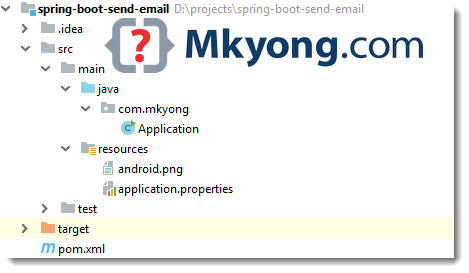
2. Maven
To send email, declares spring-boot-starter-mail, it will pull the JavaMail dependencies.
pom.xml
<?xml version="1.0" encoding="UTF-8"?>
<project xmlns="http://maven.apache.org/POM/4.0.0"
         xmlns:xsi="http://www.w3.org/2001/XMLSchema-instance"
         xsi:schemaLocation="http://maven.apache.org/POM/4.0.0
	http://maven.apache.org/xsd/maven-4.0.0.xsd">
    <modelVersion>4.0.0</modelVersion>

    <artifactId>spring-boot-send-email</artifactId>
    <packaging>jar</packaging>
    <name>Spring Boot Send Email</name>
    <url>https://www.mkyong.com</url>
    <version>1.0</version>

    <parent>
        <groupId>org.springframework.boot</groupId>
        <artifactId>spring-boot-starter-parent</artifactId>
        <version>2.1.2.RELEASE</version>
    </parent>

    <properties>
        <java.version>1.8</java.version>
    </properties>

    <dependencies>

        <dependency>
            <groupId>org.springframework.boot</groupId>
            <artifactId>spring-boot-starter</artifactId>
        </dependency>

        <!-- send email -->
        <dependency>
            <groupId>org.springframework.boot</groupId>
            <artifactId>spring-boot-starter-mail</artifactId>
        </dependency>

    </dependencies>

    <build>
        <plugins>
            <!-- Package as an executable jar/war -->
            <plugin>
                <groupId>org.springframework.boot</groupId>
                <artifactId>spring-boot-maven-plugin</artifactId>
            </plugin>

            <plugin>
                <groupId>org.apache.maven.plugins</groupId>
                <artifactId>maven-surefire-plugin</artifactId>
                <version>2.22.0</version>
            </plugin>

        </plugins>
    </build>
</project>
Display the project dependencies.
$ mvn dependency:tree

[INFO] org.springframework.boot:spring-boot-send-email:jar:1.0
[INFO] +- org.springframework.boot:spring-boot-starter:jar:2.1.2.RELEASE:compile
[INFO] |  +- org.springframework.boot:spring-boot:jar:2.1.2.RELEASE:compile
[INFO] |  |  \- org.springframework:spring-context:jar:5.1.4.RELEASE:compile
[INFO] |  |     +- org.springframework:spring-aop:jar:5.1.4.RELEASE:compile
[INFO] |  |     \- org.springframework:spring-expression:jar:5.1.4.RELEASE:compile
[INFO] |  +- org.springframework.boot:spring-boot-autoconfigure:jar:2.1.2.RELEASE:compile
[INFO] |  +- org.springframework.boot:spring-boot-starter-logging:jar:2.1.2.RELEASE:compile
[INFO] |  |  +- ch.qos.logback:logback-classic:jar:1.2.3:compile
[INFO] |  |  |  +- ch.qos.logback:logback-core:jar:1.2.3:compile
[INFO] |  |  |  \- org.slf4j:slf4j-api:jar:1.7.25:compile
[INFO] |  |  +- org.apache.logging.log4j:log4j-to-slf4j:jar:2.11.1:compile
[INFO] |  |  |  \- org.apache.logging.log4j:log4j-api:jar:2.11.1:compile
[INFO] |  |  \- org.slf4j:jul-to-slf4j:jar:1.7.25:compile
[INFO] |  +- javax.annotation:javax.annotation-api:jar:1.3.2:compile
[INFO] |  +- org.springframework:spring-core:jar:5.1.4.RELEASE:compile
[INFO] |  |  \- org.springframework:spring-jcl:jar:5.1.4.RELEASE:compile
[INFO] |  \- org.yaml:snakeyaml:jar:1.23:runtime

[INFO] \- org.springframework.boot:spring-boot-starter-mail:jar:2.1.2.RELEASE:compile
[INFO]    +- org.springframework:spring-context-support:jar:5.1.4.RELEASE:compile
[INFO]    |  \- org.springframework:spring-beans:jar:5.1.4.RELEASE:compile
[INFO]    \- com.sun.mail:javax.mail:jar:1.6.2:compile
[INFO]       \- javax.activation:activation:jar:1.1:compile
3. Gmail SMTP
This example is using Gmail SMTP server, tested with TLS (port 587) and SSL (port 465). Read this Gmail SMTP
application.properties
spring.mail.host=smtp.gmail.com
spring.mail.port=587
spring.mail.username=username
spring.mail.password=password

# Other properties
spring.mail.properties.mail.smtp.auth=true
spring.mail.properties.mail.smtp.connectiontimeout=5000
spring.mail.properties.mail.smtp.timeout=5000
spring.mail.properties.mail.smtp.writetimeout=5000

# TLS , port 587
spring.mail.properties.mail.smtp.starttls.enable=true

# SSL, post 465
#spring.mail.properties.mail.smtp.socketFactory.port = 465
#spring.mail.properties.mail.smtp.socketFactory.class = javax.net.ssl.SSLSocketFactory
Note
For Gmail SMTP, if your account is enabled the 2-Step verification, please create an “App Password”. Read more on this JavaMail – Sending email via Gmail SMTP example
For Gmail SMTP, if your account is enabled the 2-Step verification, please create an “App Password”. Read more on this JavaMail – Sending email via Gmail SMTP example
4. Sending Email
Spring provides an JavaMailSender interface on top of JavaMail APIs.
4.1 Send a normal text email.
import org.springframework.mail.SimpleMailMessage;
import org.springframework.mail.javamail.JavaMailSender;

	@Autowired
    private JavaMailSender javaMailSender;

	void sendEmail() {

        SimpleMailMessage msg = new SimpleMailMessage();
        msg.setTo("[email protected]", "[email protected]", "[email protected]");

        msg.setSubject("Testing from Spring Boot");
        msg.setText("Hello World \n Spring Boot Email");

        javaMailSender.send(msg);

    }
4.2 Send an HTML email and a file attachment.
import org.springframework.core.io.ClassPathResource;
import org.springframework.mail.javamail.JavaMailSender;
import org.springframework.mail.javamail.MimeMessageHelper;

import javax.mail.MessagingException;
import javax.mail.internet.MimeMessage;

	void sendEmailWithAttachment() throws MessagingException, IOException {

        MimeMessage msg = javaMailSender.createMimeMessage();

        // true = multipart message
        MimeMessageHelper helper = new MimeMessageHelper(msg, true);

        helper.setTo("to_@email");

        helper.setSubject("Testing from Spring Boot");

        // default = text/plain
        //helper.setText("Check attachment for image!");

        // true = text/html
        helper.setText("<h1>Check attachment for image!</h1>", true);

		// hard coded a file path
        //FileSystemResource file = new FileSystemResource(new File("path/android.png"));

        helper.addAttachment("my_photo.png", new ClassPathResource("android.png"));

        javaMailSender.send(msg);

    }
5. Demo
5.1 Start Spring Boot, and it will send out an email.
Application.java
package com.mkyong;

import org.springframework.beans.factory.annotation.Autowired;
import org.springframework.boot.CommandLineRunner;
import org.springframework.boot.SpringApplication;
import org.springframework.boot.autoconfigure.SpringBootApplication;
import org.springframework.core.io.ClassPathResource;
import org.springframework.mail.SimpleMailMessage;
import org.springframework.mail.javamail.JavaMailSender;
import org.springframework.mail.javamail.MimeMessageHelper;

import javax.mail.MessagingException;
import javax.mail.internet.MimeMessage;
import java.io.IOException;

@SpringBootApplication
public class Application implements CommandLineRunner {

    @Autowired
    private JavaMailSender javaMailSender;

    public static void main(String[] args) {
        SpringApplication.run(Application.class, args);
    }

    @Override
    public void run(String... args) {

        System.out.println("Sending Email...");

        try {

            sendEmail();
            //sendEmailWithAttachment();

        } catch (MessagingException e) {
            e.printStackTrace();
        } catch (IOException e) {
            e.printStackTrace();
        }

        System.out.println("Done");

    }

    void sendEmail() {

        SimpleMailMessage msg = new SimpleMailMessage();
        msg.setTo("[email protected]", "[email protected]");

        msg.setSubject("Testing from Spring Boot");
        msg.setText("Hello World \n Spring Boot Email");

        javaMailSender.send(msg);

    }

    void sendEmailWithAttachment() throws MessagingException, IOException {

        MimeMessage msg = javaMailSender.createMimeMessage();

        // true = multipart message
        MimeMessageHelper helper = new MimeMessageHelper(msg, true);
        helper.setTo("[email protected]");

        helper.setSubject("Testing from Spring Boot");

        // default = text/plain
        //helper.setText("Check attachment for image!");

        // true = text/html
        helper.setText("<h1>Check attachment for image!</h1>", true);

        helper.addAttachment("my_photo.png", new ClassPathResource("android.png"));

        javaMailSender.send(msg);

    }
}
Terminal
  .   ____          _            __ _ _
 /\\ / ___'_ __ _ _(_)_ __  __ _ \ \ \ \
( ( )\___ | '_ | '_| | '_ \/ _` | \ \ \ \
 \\/  ___)| |_)| | | | | || (_| |  ) ) ) )
  '  |____| .__|_| |_|_| |_\__, | / / / /
 =========|_|==============|___/=/_/_/_/
 :: Spring Boot ::        (v2.1.2.RELEASE)

Sending Email...
Done
Download Source Code
$ git clone https://github.com/mkyong/spring-boot.git
$ cd email
$ cd email
//update SMTP info in application.properties
$ mvn spring-boot:run

Hi ,
Can some one share me Outlook Email automation Create ,Send and Received Using Selenium Java.
nice
How the bounce mail is handled here
Hi,
Thanks for the article. How to include the real sender’s email instead of the SMTP account ? For example, a customer who answers to a vendor’s publication.
Regards,
username and password authentication failed showing error
good. How can do it with using functions ?
Hey I used that it’s working, I want to set the password from one bean class which is getting password from DB. How I can do that in this case. I tried below code and it’s saying password missing. Please help.
==========================================
sendmail(){
……………..
MimeMessage message = getMailSender().createMimeMessage();
…………….
}
==========================================
public JavaMailSender getMailSender() {
JavaMailSenderImpl mailSender = new JavaMailSenderImpl();
mailSender.setPassword(“asdasdasdas”);
return mailSender;
}
==================================================
error = Authentication failed; nested exception is javax.mail.AuthenticationFailedException: failed to connect, no password specified?
Can anyone check on this ?
– Bean method ‘mailSender’ not loaded because AnyNestedCondition 0 matched 2 did not; NestedCondition on MailSenderAutoConfiguration.MailSenderCondition.JndiNameProperty @ConditionalOnProperty (spring.mail.jndi-name) did not find property ‘jndi-name’; NestedCondition on MailSenderAutoConfiguration.MailSenderCondition.HostProperty @ConditionalOnProperty (spring.mail.host) did not find property ‘host’
getting this error please help.
Hello,
Thanks for this tutorial.
I’m getting this error
javax.mail.AuthenticationFailedException: 454 4.7.0 Too many login attempts, please try again later. x18sm2989666wmi.29 – gsmtp
Could anyone help please? Thank you!
hey there, SimpleMailMessage needs to “setFrom”, otherwise it will occur error
Yeah it only worked after setFrom Thanks.
Mail health check failed
javax.mail.AuthenticationFailedException: 535 5.7.3 Authentication unsuccessful [MWHPR11CA0027.namprd11.prod.outlook.com]
Vijay, you have to set Less Secure app as ON. try to go below url and make Less Secure app ON. and then try. Hope it will work. but after testing make sure to make it OFF only, because it’s not recommended because of security reason.
https://myaccount.google.com/lesssecureapps
May 2022, less secure apps will be retired. The best solution is http://security.google.com/settings/security/apppasswords
Hi ,
Thanks for this wonderful stepwise tutorial on sending email using gmail SMTP.
would like to know if we want a DoNotReply kind of email, can this be achievable with these configurations or some more changes is required.
please advise,
Thanks
I am getting this error. Please help.
***************************
APPLICATION FAILED TO START
***************************
Description:
Field javaMailSender in com.subex.util.Application required a bean of type ‘org.springframework.mail.javamail.JavaMailSender’ that could not be found.
The injection point has the following annotations:
– @org.springframework.beans.factory.annotation.Autowired(required=true)
Action:
Consider defining a bean of type ‘org.springframework.mail.javamail.JavaMailSender’ in your configuration.
I have the same problem as you . My project is multipy maven project . I put my dependency to root pom, so it worked
Hey,
How to get SMTP response success or failed. How to system know, Its send successfully for user.
Use Try catch exception
it said too many login attemps how should i fix this?
Instead of application.properties file is there way to declare hostname with in function?
Brad, you can set it wherever you initiate the JavaMailSenderImpl call
@Bean
public JavaMailSender getJavaMailSender() {
JavaMailSenderImpl mailSender = new JavaMailSenderImpl();
mailSender.setHost(“smtp.gmail.com”);
return mailSender;
}
How can I change sender email credentials?… If I Send an email with one account this works great!… but If I want to send emails from different accounts how can I do this?
It is working fine. I have one doubt. Gmail added one feature called “confidential mode” so, nobody can forward, copy the message. That is not there in java mail sender. Is there any ways to implement that?
What version of Springboot are you suing it? Could you please share the code here. I am using springboot 2.1.8 and even tried 2.1.2
Hi,
Thank you for the tutorial. I was able to send out emails using the Google SMTP. However, I have a limitation, the email sender is always the authenticated google account. I want to override the email sender using the setFrom() method of MimeMessageHelper class. I used the method in code and it was ignored.
My question is how can I authenticate with my google account but override the sender email with any email provided by the app user.
I was able to do this with MimeMessage using Transport.send().
For reference:
Scenario 1: sender email remains the one configured in the bean
SimpleMailMessage message = new SimpleMailMessage();
message.setTo(recipientEmail);
message.setFrom(senderEmail); // this line does not override the sender email in my configured bean.
message.setSubject(eventName);
message.setText(eventInfo + “\n\n” + senderEmail);
emailSender.send(message);
Scenario 2: sender email is set to whatever email address is passed to the method.
try {
MimeMessage message = new MimeMessage(session);
message.setFrom(new InternetAddress(senderEmail));
message.addRecipient(Message.RecipientType.TO, new InternetAddress(recipientEmail));
message.setSubject(eventName);
message.setText(eventInfo);
Transport.send(message);
emailSender.send(message);
log.debug(“Sent message successfully….”);
} catch (MessagingException mex) {
mex.printStackTrace();
}
How can I make scenario 1 behave like scenario 2 even with configured google credentials.
Thank you.
Please help with this issue
4 ERROR 24324 — [nio-8443-exec-5] o.a.c.c.C.[.[.[/].[dispatcherServlet] : Servlet.service() for servlet [dispatcherServlet] in context with path [] threw exception [Request processing failed; nested exception is org.springframework.mail.MailSendException: Mail server connection failed; nested exception is com.sun.mail.util.MailConnectException: Couldn’t connect to host, port: smtp.gmail.com, 465; timeout -1;
nested exception is:
java.net.ConnectException: Connection refused: connect. Failed messages: com.sun.mail.util.MailConnectException: Couldn’t connect to host, port: smtp.gmail.com, 465; timeout -1;
nested exception is:
java.net.ConnectException: Connection refused: connect; message exceptions (1) are:
Failed message 1: com.sun.mail.util.MailConnectException: Couldn’t connect to host, port: smtp.gmail.com, 465; timeout -1;
nested exception is:
java.net.ConnectException: Connection refused: connect] with root cause
java.net.ConnectException: Connection refused: connect
at java.base/java.net.PlainSocketImpl.connect0(Native Method) ~[na:na]
at java.base/java.net.PlainSocketImpl.socketConnect(Unknown Source) ~[na:na]
at java.base/java.net.AbstractPlainSocketImpl.doConnect(Unknown Source) ~[na:na]
at java.base/java.net.AbstractPlainSocketImpl.connectToAddress(Unknown Source) ~[na:na]
at java.base/java.net.AbstractPlainSocketImpl.connect(Unknown Source) ~[na:na
Hi,
I’ve checked out this repository, configured the necessary parameters, but I’ve got an Exception:
java.lang.reflect.InvocationTargetException
at sun.reflect.NativeMethodAccessorImpl.invoke0(Native Method)
at sun.reflect.NativeMethodAccessorImpl.invoke(NativeMethodAccessorImpl.java:62)
at sun.reflect.DelegatingMethodAccessorImpl.invoke(DelegatingMethodAccessorImpl.java:43)
at java.lang.reflect.Method.invoke(Method.java:498)
at org.springframework.boot.maven.AbstractRunMojo$LaunchRunner.run(AbstractRunMojo.java:558)
at java.lang.Thread.run(Thread.java:748)
Caused by: java.lang.IllegalStateException: Failed to execute CommandLineRunner
at org.springframework.boot.SpringApplication.callRunner(SpringApplication.java:816)
at org.springframework.boot.SpringApplication.callRunners(SpringApplication.java:797)
at org.springframework.boot.SpringApplication.run(SpringApplication.java:324)
at org.springframework.boot.SpringApplication.run(SpringApplication.java:1260)
at org.springframework.boot.SpringApplication.run(SpringApplication.java:1248)
at com.mkyong.Application.main(Application.java:24)
… 6 more
Caused by: org.springframework.mail.MailSendException: Mail server connection failed; nested exception is com.sun.mail.util.MailConnectException: Couldn’t connect to host, port: smtp.gmail.com, 587; timeout 5000;
nested exception is:
java.net.ConnectException: Connection refused: connect. Failed messages: com.sun.mail.util.MailConnectException: Couldn’t connect to host, port: smtp.gmail.com, 587; timeout 5000;
nested exception is:
java.net.ConnectException: Connection refused: connect; message exceptions (1) are:
Failed message 1: com.sun.mail.util.MailConnectException: Couldn’t connect to host, port: smtp.gmail.com, 587; timeout 5000;
nested exception is:
java.net.ConnectException: Connection refused: connect
at org.springframework.mail.javamail.JavaMailSenderImpl.doSend(JavaMailSenderImpl.java:447)
at org.springframework.mail.javamail.JavaMailSenderImpl.send(JavaMailSenderImpl.java:360)
at org.springframework.mail.javamail.JavaMailSenderImpl.send(JavaMailSenderImpl.java:355)
at com.mkyong.Application.sendEmailWithAttachment(Application.java:83)
at com.mkyong.Application.run(Application.java:34)
at org.springframework.boot.SpringApplication.callRunner(SpringApplication.java:813)
… 11 more
Caused by: com.sun.mail.util.MailConnectException: Couldn’t connect to host, port: smtp.gmail.com, 587; timeout 5000;
nested exception is:
java.net.ConnectException: Connection refused: connect
at com.sun.mail.smtp.SMTPTransport.openServer(SMTPTransport.java:2209)
at com.sun.mail.smtp.SMTPTransport.protocolConnect(SMTPTransport.java:740)
at javax.mail.Service.connect(Service.java:366)
at org.springframework.mail.javamail.JavaMailSenderImpl.connectTransport(JavaMailSenderImpl.java:517)
at org.springframework.mail.javamail.JavaMailSenderImpl.doSend(JavaMailSenderImpl.java:436)
… 16 more
Caused by: java.net.ConnectException: Connection refused: connect
at java.net.DualStackPlainSocketImpl.waitForConnect(Native Method)
at java.net.DualStackPlainSocketImpl.socketConnect(DualStackPlainSocketImpl.java:85)
at java.net.AbstractPlainSocketImpl.doConnect(AbstractPlainSocketImpl.java:350)
at java.net.AbstractPlainSocketImpl.connectToAddress(AbstractPlainSocketImpl.java:206)
at java.net.AbstractPlainSocketImpl.connect(AbstractPlainSocketImpl.java:188)
at java.net.PlainSocketImpl.connect(PlainSocketImpl.java:172)
at java.net.SocksSocketImpl.connect(SocksSocketImpl.java:392)
at java.net.Socket.connect(Socket.java:589)
at com.sun.mail.util.WriteTimeoutSocket.connect(WriteTimeoutSocket.java:115)
at com.sun.mail.util.SocketFetcher.createSocket(SocketFetcher.java:357)
at com.sun.mail.util.SocketFetcher.getSocket(SocketFetcher.java:238)
at com.sun.mail.smtp.SMTPTransport.openServer(SMTPTransport.java:2175)
… 20 more
I’ve turned on “Enable less secure apps” on my Google account properties on this page as well:
https://myaccount.google.com/lesssecureapps
This comment can be deleted, antivirus issue 🙂
Same problem. Did you resolve it?