The JDK source code is packaged in a src.jar, and should be in the JDK/Home folder. However, some JDK versions in Mac OSX didn’t include the source code or Javadoc.
Try find it :
sudo find / -name src.jar
If you couldn’t find the src.jar, then get it from Apple developer website.
1. Download from Apple Developer
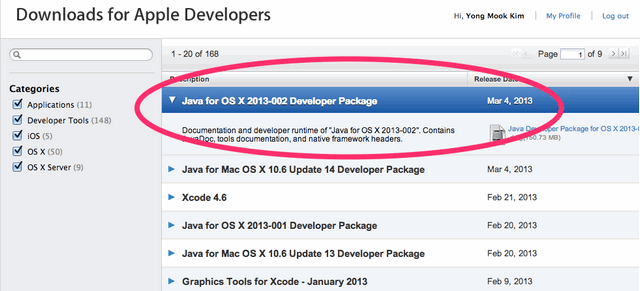
Go https://developer.apple.com/downloads/index.action , sign in with your Apple ID.
Download the “Java for OS X 2013-0* Developer Package“, it contains JDK runtime, source code and Javadoc, install the downloaded *.dmg and follow the wizard guide to finish the installation.
2. Find JDK Source Code
After the installation, the JDK source code should be found in following location :
/Library/Java/JavaVirtualMachines/jdk_version.jdk/Contents/Home/src.jar

##example
/Library/Java/JavaVirtualMachines/1.6.0_43-b01-447.jdk/Contents/Home/src.jar
Note
Alternatively, you can download the JDK source from the Oracle JDK website.
Alternatively, you can download the JDK source from the Oracle JDK website.

Thanks.
Thank you so much !!
I had success looking for src.zip instead of src.jar:
/Library/Java/JavaVirtualMachines/jdk1.7.0_25.jdk/Contents/Home/src.zip