A JDBC example to show you how to connect to a MySQL database with a JDBC driver.
Tested with:
- Java 8
- MySQL 5.7
- MySQL JDBC driver
mysql-connector-java:8.0.16
1. Download MySQL JDBC Driver
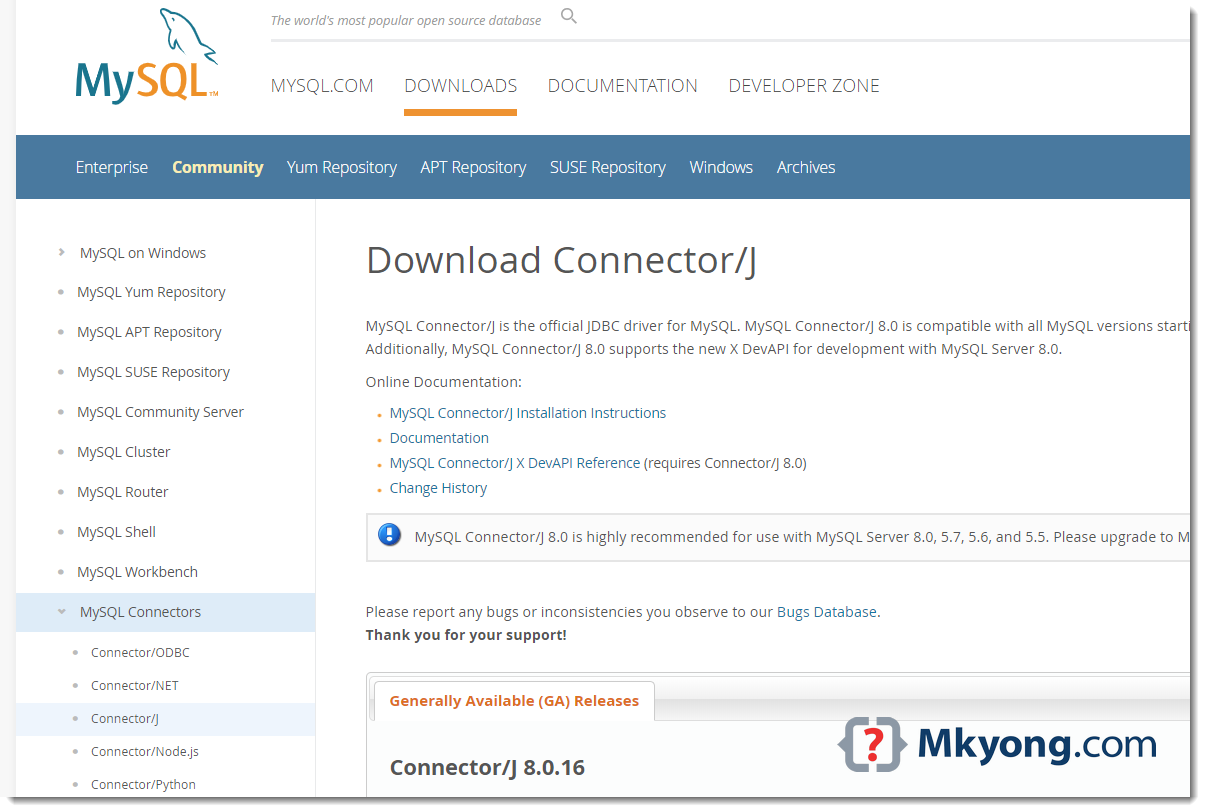
Visit https://dev.mysql.com/downloads/connector/j/ to download the latest MySQL JDBC Driver.
2. JDBC Connection
2.1 Make a connection to the MySQL database.
JDBCExample.java
import java.sql.Connection;
import java.sql.DriverManager;
import java.sql.SQLException;

public class JDBCExample {

    public static void main(String[] args) {

        // https://docs.oracle.com/javase/8/docs/api/java/sql/package-summary.html#package.description
        // auto java.sql.Driver discovery -- no longer need to load a java.sql.Driver class via Class.forName

        // register JDBC driver, optional since java 1.6
        /*try {
            Class.forName("com.mysql.jdbc.Driver");
        } catch (ClassNotFoundException e) {
            e.printStackTrace();
        }*/

        // auto close connection
        try (Connection conn = DriverManager.getConnection(
                "jdbc:mysql://127.0.0.1:3306/test", "root", "password")) {

            if (conn != null) {
                System.out.println("Connected to the database!");
            } else {
                System.out.println("Failed to make connection!");
            }

        } catch (SQLException e) {
            System.err.format("SQL State: %s\n%s", e.getSQLState(), e.getMessage());
        } catch (Exception e) {
            e.printStackTrace();
        }

    }
}
Test:
# compile
> javac JDBCExample.java

# run
> java JDBCExample

SQL State: 08001
No suitable driver found for jdbc:mysql://127.0.0.1:3306/test
To run it with java command, we need to load the MySQL JDBC driver manually. Assume everything is stored in the c:\test folder, run it again with this -cp option.
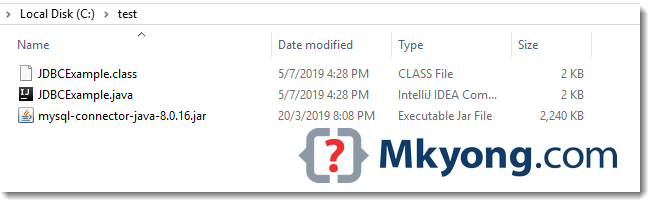
> java -cp "c:\test\mysql-connector-java-8.0.16.jar;c:\test" JDBCExample
Connected to the database!
3. Maven Project
3.1 The MySQL JDBC driver is available in the Maven central repository.
pom.xml
	<dependency>
		<groupId>mysql</groupId>
		<artifactId>mysql-connector-java</artifactId>
		<version>8.0.16</version>
    </dependency>
3.2 A simple JDBC select example.
JDBCExample2.java
import com.mkyong.jdbc.model.Employee;

import java.math.BigDecimal;
import java.sql.*;
import java.util.ArrayList;
import java.util.List;

public class JDBCExample2 {

    public static void main(String[] args) {

        System.out.println("MySQL JDBC Connection Testing ~");

        List<Employee> result = new ArrayList<>();

        String SQL_SELECT = "Select * from EMPLOYEE";

        try (Connection conn = DriverManager.getConnection(
                "jdbc:mysql://127.0.0.1:3306/test", "root", "password");
             PreparedStatement preparedStatement = conn.prepareStatement(SQL_SELECT)) {

            ResultSet resultSet = preparedStatement.executeQuery();

            while (resultSet.next()) {

                long id = resultSet.getLong("ID");
                String name = resultSet.getString("NAME");
                BigDecimal salary = resultSet.getBigDecimal("SALARY");
                Timestamp createdDate = resultSet.getTimestamp("CREATED_DATE");

                Employee obj = new Employee();
                obj.setId(id);
                obj.setName(name);
                obj.setSalary(salary);
                // Timestamp -> LocalDateTime
                obj.setCreatedDate(createdDate.toLocalDateTime());

                result.add(obj);

            }
            result.forEach(x -> System.out.println(x));

        } catch (SQLException e) {
            System.err.format("SQL State: %s\n%s", e.getSQLState(), e.getMessage());
        } catch (Exception e) {
            e.printStackTrace();
        }

    }

}
Employee.java
import java.math.BigDecimal;
import java.time.LocalDateTime;

public class Employee {

    private Long id;
    private String name;
    private BigDecimal salary;
    private LocalDateTime createdDate;

    //...
}
Table definition.
CREATE TABLE EMPLOYEE
(
    ID INT NOT NULL AUTO_INCREMENT,
    NAME VARCHAR(100) NOT NULL,
    SALARY DECIMAL(15, 2) NOT NULL,
    CREATED_DATE DATETIME NOT NULL DEFAULT CURRENT_TIMESTAMP,
    PRIMARY KEY (ID)
);
Download Source Code
$ git clone https://github.com/mkyong/java-jdbc.git

Truly a live saver, thanks a lot!
is it really works?
thank you sir
Hi. Thank you for the excellent explanation. I wanted to ask what I am writing exactly in the url when I use localhost in mysql using jdbc in android studio. I tried all kinds of Syntax and did not work me the connection to the database. Do I need to specify the port in the url or the IP address of my computer?
3/14/19 4:36:20:213 GMT] 4f6f5df5 SystemOut U ——– MySQL JDBC Connection Testing ————
[3/14/19 4:36:20:218 GMT] 4f6f5df5 SystemOut U MySQL JDBC Driver Registered!
java.lang.NoClassDefFoundError: java/util/LinkedHashMap
at java.lang.ClassLoader.defineClass0(Native Method)
at java.lang.ClassLoader.defineClass(ClassLoader.java(Compiled Code))
at java.security.SecureClassLoader.defineClass(SecureClassLoader.java(Compiled Code))
at com.ibm.ws.classloader.CompoundClassLoader._defineClass(CompoundClassLoader.java(Compiled Code))
at com.ibm.ws.classloader.CompoundClassLoader.findClass(CompoundClassLoader.java(Compiled Code))
at com.ibm.ws.classloader.CompoundClassLoader.loadClass(CompoundClassLoader.java(Compiled Code))
at java.lang.ClassLoader.loadClass(ClassLoader.java(Compiled Code))
at com.mysql.jdbc.NonRegisteringDriver.connect(NonRegisteringDriver.java:283)
at java.sql.DriverManager.getConnection(DriverManager.java:543)
at java.sql.DriverManager.getConnection(DriverManager.java:194)
at com.portrade.ipms.icms.schedulers.TafmsInterfaceJob.execute(TafmsInterfaceJob.java:49)
at org.quartz.core.JobRunShell.run(JobRunShell.java:195)
at org.quartz.simpl.SimpleThreadPool$WorkerThread.run(SimpleThreadPool.java:520)
i try used this method. however i face this error.
i have no idea with this error.
Helpful, Thank you sir.
Thanks, Helpful post
thank u
now how do i use it in struts 2 to insert
thank you so much for this article.
Can I also apply this connection to my SQL mail database connecting a ticketing system that requires connection to SQL? Please advise . Thank you.
connection failed:[HY000][MYSQL] [ODBC 5.2(w)Driver] access denied for ‘root’ @localhost’
while creating the data source on ODBC data source administrator …I face this problem
Why is it important using these statements?:
try {
Class.forName(“com.mysql.jdbc.Driver”);
} catch (ClassNotFoundException e) {
System.out.println(“Where is your MySQL JDBC Driver?”);
e.printStackTrace();
return;
}
Is it just to test?
Yes it is important in the way you can test the presence of the DB Driver. If it is not present, you can properly output a message for the user “I am sorry, you want me to connect to this f… DB, but I don’t even have the driver. I can’t go on the script!” 😉
Try/catch are important. You should learn and understand the use of these, they are a very important part of modern event-driven programming, and, in some ways, one of the more problematic, as they lead to code which is very non-linear in nature (and thus much harder to debug). But you need to understand them — along with object-oriented concepts, they cannot be underestimated as to their importance to understanding how to program.
how to connect android app to sql server database……
i’m beginner in android so i m made a android apps to connect sql server so plzzz help me ..
Thanks for your help. It’s really helpful !
How to set jdbc classapth permanently
OMG!! After searching the internet for 6 Hours it stranded upon this. It is not like i don’t know how to use Google.
But i was looking for any tutorial that does JDBC connection without using ANY IDE.
Actually i have a case where i don’t have any IDE, all i have is JDK and Notepad. I had to search a lot to find how to “install” or where to put this JDBC driver Jar file. Phew helped a lot. Thanks.
Your articles are always best and easier to understand. The quality that brings the visitors is the simplicity and to the point talk. I was looking for the database connectivity using Java with NetBeans and I have arrived at the right place
Thanks ,
this is very useful code for java beginner
This null check is useless:
if (connection != null)
Reason: DriverManager.getConnection(..) either returns a not null connection or fails with an exception. See method implementation:
if (con != null) {
// Success!
println(“getConnection returning ” + aDriver.driver.getClass().getName());
return (con);
}
.. throw ..
Helpful post . But to understand how these interfaces of drivers works, one should read a bit about interfaces also. I found a link for interface here javaandme.com/core-java/interfaces . Hope it will be useful.
Hi mkyong,
I am facing the com.mysql.jdbc.exceptions.jdbc4.CommunicationsException: Communications link failure
issue in JBoss 7.1.1+Spring 3+Hibernate, Please share if you resolved this problem or any suggestions
Thanks
Jay
how do i connect first to database? pls help
MySQL JDBC Connection Testing ————
MySQL JDBC Driver Registered!
Connection Failed! Check output console
com.mysql.jdbc.exceptions.jdbc4.CommunicationsException: Communications link failure
The last packet sent successfully to the server was 0 milliseconds ago. The driver has not received any packets from the server.
at sun.reflect.NativeConstructorAccessorImpl.newInstance0(Native Method)
at sun.reflect.NativeConstructorAccessorImpl.newInstance(NativeConstructorAccessorImpl.java:39)
at sun.reflect.DelegatingConstructorAccessorImpl.newInstance(DelegatingConstructorAccessorImpl.java:27)
at java.lang.reflect.Constructor.newInstance(Constructor.java:513)
at com.mysql.jdbc.Util.handleNewInstance(Util.java:411)
at com.mysql.jdbc.SQLError.createCommunicationsException(SQLError.java:1129)
at com.mysql.jdbc.MysqlIO.(MysqlIO.java:358)
at com.mysql.jdbc.ConnectionImpl.coreConnect(ConnectionImpl.java:2498)
at com.mysql.jdbc.ConnectionImpl.connectOneTryOnly(ConnectionImpl.java:2535)
at com.mysql.jdbc.ConnectionImpl.createNewIO(ConnectionImpl.java:2320)
at com.mysql.jdbc.ConnectionImpl.(ConnectionImpl.java:834)
at com.mysql.jdbc.JDBC4Connection.(JDBC4Connection.java:46)
at sun.reflect.NativeConstructorAccessorImpl.newInstance0(Native Method)
at sun.reflect.NativeConstructorAccessorImpl.newInstance(NativeConstructorAccessorImpl.java:39)
at sun.reflect.DelegatingConstructorAccessorImpl.newInstance(DelegatingConstructorAccessorImpl.java:27)
at java.lang.reflect.Constructor.newInstance(Constructor.java:513)
at com.mysql.jdbc.Util.handleNewInstance(Util.java:411)
at com.mysql.jdbc.ConnectionImpl.getInstance(ConnectionImpl.java:416)
at com.mysql.jdbc.NonRegisteringDriver.connect(NonRegisteringDriver.java:347)
at java.sql.DriverManager.getConnection(DriverManager.java:582)
at java.sql.DriverManager.getConnection(DriverManager.java:185)
at my.Connect.main(Connect.java:32)
Caused by: java.net.ConnectException: Connection refused: connect
at java.net.PlainSocketImpl.socketConnect(Native Method)
at java.net.PlainSocketImpl.doConnect(PlainSocketImpl.java:333)
at java.net.PlainSocketImpl.connectToAddress(PlainSocketImpl.java:195)
at java.net.PlainSocketImpl.connect(PlainSocketImpl.java:182)
at java.net.SocksSocketImpl.connect(SocksSocketImpl.java:366)
at java.net.Socket.connect(Socket.java:529)
at java.net.Socket.connect(Socket.java:478)
at java.net.Socket.(Socket.java:375)
at java.net.Socket.(Socket.java:218)
at com.mysql.jdbc.StandardSocketFactory.connect(StandardSocketFactory.java:256)
at com.mysql.jdbc.MysqlIO.(MysqlIO.java:308)
… 15 more
u have to comment out the bind_address = 127.0.0.1 by adding a # in front of it.
start your xamp server mysql module before running the application
Hi, i trying test the follow environment, but not worked. In emulator display message “No suitable Driver”, I using mysql connector 5.1.27. My code
package com.example.androidmysql;
import java.sql.Connection;
import java.sql.Driver;
import java.sql.DriverManager;
import java.sql.ResultSet;
import java.sql.SQLException;
import java.sql.Statement;
import android.os.Bundle;
import android.widget.TextView;
import android.app.Activity;
import android.database.*;
public class AndroidMysql extends Activity {
@Override
protected void onCreate(Bundle savedInstanceState) {
super.onCreate(savedInstanceState);
setContentView(R.layout.main);
final TextView codigo = (TextView) findViewById(R.id.codigo);
final TextView nome = (TextView) findViewById(R.id.nome);
final TextView email = (TextView) findViewById(R.id.email);
try {
Connection conexao = DriverManager.getConnection(“jdbc:mysql://192.168.3.112/banco”, “java”, “123456”);
Statement stm = conexao.createStatement();
ResultSet rs = stm.executeQuery(“SELECT id, nome, email FROM alunos”);
while (rs.next()) {
int coluna1 = rs.getInt(“id”);
String coluna2 = rs.getString(“nome”);
String coluna3 = rs.getString(“email”);
codigo.setText(String.valueOf(coluna1));
nome.setText(coluna2);
email.setText(coluna3);
}
}
catch (SQLException sqle) {
sqle.printStackTrace();
codigo.setText(sqle.getMessage());
nome.setText(sqle.getMessage());
email.setText(sqle.getMessage());
}
}
}
Any idea? what version mysql connector, using?
Thanks A Lot. This is help me lot
Maybe jdbc:mysql://hostname:port//dbname”,”username”, “password” ?
Need two // !
Hello. I have my java project in eclipse that has an sql connection with a database and is working fine. I want to export my project as a runnable jar but after exporting the connection doesnt work. Could you please advise how can I export my project with the connection intact please? thanks.
Hi Mkyong.
From your sentence: “P.S To run this example, your need mysql-connector-java-{version}-bin.jar in your classpath”
==> You mean that copy the “mysql-connector-java-{version}-bin.jar” into your classpath.
Is it right?
Id yes, could you tell us how to identify the classpath. Thanks.
How can i use JDBC with MYSQL in a JSP page ??
Can you explain that ??
hi.. can u make same tutorial for android ?
thank you for all tutorials
Hi Mr yong,
I try this test, But i don’t have mysql-connector-java-{version}-bin.jar file.
I use netbeans 7.2.1 for this,
How fix problem?
Thanks
Mr Sajjad, you just need to add mysql driver from NetBeans IDE library…
i get this error when run it:
——– MySQL JDBC Connection Testing ————
MySQL JDBC Driver Registered!
Connection Failed! Check output console
java.sql.SQLException: Communication link failure: java.io.IOException, underlying cause: Unexpected end of input stream
** BEGIN NESTED EXCEPTION **
java.io.IOException
MESSAGE: Unexpected end of input stream
STACKTRACE:
java.io.IOException: Unexpected end of input stream
at com.mysql.jdbc.MysqlIO.readPacket(MysqlIO.java:1096)
at com.mysql.jdbc.MysqlIO.doHandshake(MysqlIO.java:626)
at com.mysql.jdbc.Connection.createNewIO(Connection.java:1562)
at com.mysql.jdbc.Connection.(Connection.java:491)
at com.mysql.jdbc.NonRegisteringDriver.connect(NonRegisteringDriver.java:346)
at java.sql.DriverManager.getConnection(Unknown Source)
at java.sql.DriverManager.getConnection(Unknown Source)
at vo.Test.main(Test.java:87)
** END NESTED EXCEPTION **
at com.mysql.jdbc.MysqlIO.doHandshake(MysqlIO.java:699)
at com.mysql.jdbc.Connection.createNewIO(Connection.java:1562)
at com.mysql.jdbc.Connection.(Connection.java:491)
at com.mysql.jdbc.NonRegisteringDriver.connect(NonRegisteringDriver.java:346)
at java.sql.DriverManager.getConnection(Unknown Source)
at java.sql.DriverManager.getConnection(Unknown Source)
at vo.Test.main(Test.java:87)
i really dont now why this error occured?please help me
Hi, Elahe!
Are you using some IDE such as Eclipse or NetBeans??
You are doing awesome and I have learnt a lot from your tutorials
——– MySQL JDBC Connection Testing ————
MySQL JDBC Driver Registered!
Connection Failed! Check output console
com.mysql.jdbc.CommunicationsException: Communications link failure
The last packet sent successfully to the server was 0 milliseconds ago. The driver has not received any packets from the server.
at com.mysql.jdbc.SQLError.createCommunicationsException(SQLError.java:1117)
at com.mysql.jdbc.MysqlIO.(MysqlIO.java:355)
at com.mysql.jdbc.ConnectionImpl.coreConnect(ConnectionImpl.java:2479)
at com.mysql.jdbc.ConnectionImpl.connectOneTryOnly(ConnectionImpl.java:2516)
at com.mysql.jdbc.ConnectionImpl.createNewIO(ConnectionImpl.java:2301)
at com.mysql.jdbc.ConnectionImpl.(ConnectionImpl.java:834)
at com.mysql.jdbc.ConnectionImpl.getInstance(ConnectionImpl.java:412)
at com.mysql.jdbc.NonRegisteringDriver.connect(NonRegisteringDriver.java:317)
at java.sql.DriverManager.getConnection(Unknown Source)
at java.sql.DriverManager.getConnection(Unknown Source)
at com.mysql.jdbc.JDBCExample.main(JDBCExample.java:26)
Caused by: java.net.ConnectException: Connection refused: connect
at java.net.PlainSocketImpl.socketConnect(Native Method)
at java.net.PlainSocketImpl.doConnect(Unknown Source)
at java.net.PlainSocketImpl.connectToAddress(Unknown Source)
at java.net.PlainSocketImpl.connect(Unknown Source)
at java.net.SocksSocketImpl.connect(Unknown Source)
at java.net.Socket.connect(Unknown Source)
at java.net.Socket.connect(Unknown Source)
at java.net.Socket.(Unknown Source)
at java.net.Socket.(Unknown Source)
at com.mysql.jdbc.StandardSocketFactory.connect(StandardSocketFactory.java:259)
at com.mysql.jdbc.MysqlIO.(MysqlIO.java:305)
… 9 more
iam getting this error
Hi Sneha,
I am facing same issue in JBoss 7.1.1+Spring 3+Hibernate, Please share if you resolved this problem or any suggestions
Thanks
Jay
thank you,
i mean not “argv”, but “args” =)
thank you too
🙂
Thanks a lot Mr Mkyong, simple plain and collective
i jus copy paste you code i am getting error
###############################################
C:\Users\Mani\Desktop\java>java -cp . JDBCExample
Exception in thread “main” java.lang.NoClassDefFoundError: JDBCExample (wrong name: com/mkyong/common/JDBCExample)
at java.lang.ClassLoader.defineClass1(Native Method)
at java.lang.ClassLoader.defineClass(Unknown Source)
at java.security.SecureClassLoader.defineClass(Unknown Source)
at java.net.URLClassLoader.defineClass(Unknown Source)
at java.net.URLClassLoader.access$100(Unknown Source)
at java.net.URLClassLoader$1.run(Unknown Source)
at java.net.URLClassLoader$1.run(Unknown Source)
at java.security.AccessController.doPrivileged(Native Method)
at java.net.URLClassLoader.findClass(Unknown Source)
at java.lang.ClassLoader.loadClass(Unknown Source)
at sun.misc.Launcher$AppClassLoader.loadClass(Unknown Source)
at java.lang.ClassLoader.loadClass(Unknown Source)
at sun.launcher.LauncherHelper.checkAndLoadMain(Unknown Source)
set the classpath.means ojdbc14.jar for oracle 10g use,then resoleve your problem
Tanks a lot mkyong
Hi mkyong thanks, work fine in first attempt…
Its really very useful. Thank you so much.
very nice topic, I appreciated thanks.
Nice example great help just a suggestion mention the jar used in the start of the example because after wards it gets confusing
hi yong,I want jdbc with xml programs..
i’m using java 1.7.0_03
the result is :
what could happen?
hi yong! this is my code
import java.sql.SQLException;
  public class JDBCExample
          {

 public static void main(String[] argv)
           {

 System.out.println("-------- MySQL JDBC Connection Testing ------------");

		try
                   {

		Class.forName("com.mysql.jdbc.Driver");
                    }
                catch (ClassNotFoundException e)
                  {

		System.out.println("Where is your MySQL JDBC Driver?");
		e.printStackTrace();
		return;
                  }
		}
}
i am getting exceptions like this.can u help me…………
D:\ashok\user>java JDBCExample -------- MySQL JDBC Connection Testing ------------ Where is your MySQL JDBC Driver? java.lang.ClassNotFoundException: com.mysql.jdbc.Driver at java.net.URLClassLoader$1.run(Unknown Source) at java.net.URLClassLoader$1.run(Unknown Source) at java.security.AccessController.doPrivileged(Native Method) at java.net.URLClassLoader.findClass(Unknown Source) at java.lang.ClassLoader.loadClass(Unknown Source) at sun.misc.Launcher$AppClassLoader.loadClass(Unknown Source) at java.lang.ClassLoader.loadClass(Unknown Source) at java.lang.Class.forName0(Native Method) at java.lang.Class.forName(Unknown Source) at JDBCExample.main(JDBCExample.java:13)Have you tried running java -cp . JDBCExample
Run the example along with your MySQL JDBC driver.
me also getting the same error i.e run time error even i hv set the path correctly
Hello,
I’ve got the issue below even after setting the path for jdbc driver.
not able to figure out what exactly is wrong.
please do help.
type Exception report
message javax.servlet.ServletException: java.lang.ClassNotFoundException: com.mysql.jdbc.Driver
description The server encountered an internal error that prevented it from fulfilling this request.
exception
org.apache.jasper.JasperException: javax.servlet.ServletException: java.lang.ClassNotFoundException: com.mysql.jdbc.Driver
org.apache.jasper.servlet.JspServletWrapper.handleJspException(JspServletWrapper.java:549)
org.apache.jasper.servlet.JspServletWrapper.service(JspServletWrapper.java:455)
org.apache.jasper.servlet.JspServlet.serviceJspFile(JspServlet.java:390)
org.apache.jasper.servlet.JspServlet.service(JspServlet.java:334)
javax.servlet.http.HttpServlet.service(HttpServlet.java:728)
root cause
javax.servlet.ServletException: java.lang.ClassNotFoundException: com.mysql.jdbc.Driver
org.apache.jasper.runtime.PageContextImpl.doHandlePageException(PageContextImpl.java:912)
org.apache.jasper.runtime.PageContextImpl.handlePageException(PageContextImpl.java:841)
org.apache.jsp.admin_jsp._jspService(admin_jsp.java:121)
org.apache.jasper.runtime.HttpJspBase.service(HttpJspBase.java:70)
javax.servlet.http.HttpServlet.service(HttpServlet.java:728)
org.apache.jasper.servlet.JspServletWrapper.service(JspServletWrapper.java:432)
org.apache.jasper.servlet.JspServlet.serviceJspFile(JspServlet.java:390)
org.apache.jasper.servlet.JspServlet.service(JspServlet.java:334)
javax.servlet.http.HttpServlet.service(HttpServlet.java:728)
root cause
java.lang.ClassNotFoundException: com.mysql.jdbc.Driver
org.apache.catalina.loader.WebappClassLoader.loadClass(WebappClassLoader.java:1713)
org.apache.catalina.loader.WebappClassLoader.loadClass(WebappClassLoader.java:1558)
org.apache.jasper.servlet.JasperLoader.loadClass(JasperLoader.java:126)
org.apache.jasper.servlet.JasperLoader.loadClass(JasperLoader.java:63)
java.lang.Class.forName0(Native Method)
java.lang.Class.forName(Unknown Source)
org.apache.jsp.admin_jsp._jspService(admin_jsp.java:84)
org.apache.jasper.runtime.HttpJspBase.service(HttpJspBase.java:70)
javax.servlet.http.HttpServlet.service(HttpServlet.java:728)
org.apache.jasper.servlet.JspServletWrapper.service(JspServletWrapper.java:432)
org.apache.jasper.servlet.JspServlet.serviceJspFile(JspServlet.java:390)
org.apache.jasper.servlet.JspServlet.service(JspServlet.java:334)
javax.servlet.http.HttpServlet.service(HttpServlet.java:728)
note The full stack trace of the root cause is available in the Apache Tomcat/7.0.37 logs.
what is MY SQL JDBC driver
Hi Yong,
I have below code.
import java.sql.DriverManager;
import java.sql.Connection;
import java.sql.SQLException;

public class Test {

	public static void main(String[] argv) {

		System.out.println("-------- MySQL JDBC Connection Testing ------------");

		try {

			Class.forName("com.mysql.jdbc.Driver");

		} catch (ClassNotFoundException e) {

			System.out.println("Where is your MySQL JDBC Driver?");
			e.printStackTrace();
			return;

		}

		System.out.println("MySQL JDBC Driver Registered!");
		Connection connection = null;

		try {
			connection = DriverManager
					.getConnection("jdbc:mysql://localhost:3306/hebernate",
							"root", "password");

		} catch (SQLException e) {
			System.out.println("Connection Failed! Check output console");
			e.printStackTrace();
			return;
		}

		if (connection != null) {
			System.out.println("You made it, take control your database now!");
		} else {
			System.out.println("Failed to make connection!");
		}
	}
}
I am getting error as below
——– MySQL JDBC Connection Testing ————
MySQL JDBC Driver Registered!
Connection Failed! Check output console
java.sql.SQLException: Access denied for user ‘root’@’localhost’ (using password: YES)
at com.mysql.jdbc.SQLError.createSQLException(SQLError.java:1074)
at com.mysql.jdbc.MysqlIO.checkErrorPacket(MysqlIO.java:4096)
at com.mysql.jdbc.MysqlIO.checkErrorPacket(MysqlIO.java:4028)
at com.mysql.jdbc.MysqlIO.checkErrorPacket(MysqlIO.java:919)
at com.mysql.jdbc.MysqlIO.proceedHandshakeWithPluggableAuthentication(MysqlIO.java:1694)
at com.mysql.jdbc.MysqlIO.doHandshake(MysqlIO.java:1244)
at com.mysql.jdbc.ConnectionImpl.coreConnect(ConnectionImpl.java:2412)
at com.mysql.jdbc.ConnectionImpl.connectOneTryOnly(ConnectionImpl.java:2445)
at com.mysql.jdbc.ConnectionImpl.createNewIO(ConnectionImpl.java:2230)
at com.mysql.jdbc.ConnectionImpl.(ConnectionImpl.java:813)
at com.mysql.jdbc.JDBC4Connection.(JDBC4Connection.java:47)
at sun.reflect.NativeConstructorAccessorImpl.newInstance0(Native Method)
at sun.reflect.NativeConstructorAccessorImpl.newInstance(Unknown Source)
at sun.reflect.DelegatingConstructorAccessorImpl.newInstance(Unknown Source)
at java.lang.reflect.Constructor.newInstance(Unknown Source)
at com.mysql.jdbc.Util.handleNewInstance(Util.java:411)
at com.mysql.jdbc.ConnectionImpl.getInstance(ConnectionImpl.java:399)
at com.mysql.jdbc.NonRegisteringDriver.connect(NonRegisteringDriver.java:334)
at java.sql.DriverManager.getConnection(Unknown Source)
at java.sql.DriverManager.getConnection(Unknown Source)
at Test.main(Test.java:28)
can you please help me …..
“Access denied for user ‘root’@’localhost’ (using password: YES)”
Please check your password.
Hi mkyong,
I would like to say thank you for your tutorial it works great, but I was wondering if you could help me and take this one step further..
$ javac JDBCExample.java && java -cp `pwd`/mysql-connector-java-5.1.22-bin.jar:. JDBCExample
——– MySQL JDBC Connection Testing ————
MySQL JDBC Driver Registered!
You made it, take control your database now!
What I need your help is I would like to have this working in a executable jar file:
jar cvfm JDBCExample.jar Manifest.txt JDBCExample.class mysql-connector-java-5.1.22-bin.jar
added manifest
adding: JDBCExample.class(in = 1345) (out= 809)(deflated 39%)
adding: mysql-connector-java-5.1.22-bin.jar(in = 832960) (out= 797090)(deflated 4%)
ricardo@lonss05823:~/Programming/java/mysql> java -jar JDBCExample.jar
——– MySQL JDBC Connection Testing ————
Where is your MySQL JDBC Driver?
I would like to be able to run: java -jar JDBCExample.jar (example)
Hello Again, I managed to get it running without having to specify the whole file in the command:
$ java -jar JDBCExample.jar
——– MySQL JDBC Connection Testing ————
MySQL JDBC Driver Registered!
You made it, take control your database now!
Unfortunately it is still using the local file, rather than the file I added in the JAR previously, any additional help would be great as I just want to use the connect.jar file inside the JDBCExample.jar
Many Thanks
In Java, you can add “jar” into another “jar”, but you can’t reference the class correctly, due to the classloader issue. This is the design fault in Java. 2 suggestions :
1. You can extract all classes from both your jar and jdbc jar and jar it into a single file manually.
2. Try this one-jar, http://one-jar.sourceforge.net/
Aslam o Alakkum
I really found your code snippets very helpful in connecting my Eclipse to Localhost.
Thanks
aweswomee !! thanxx
when am try to connect i get this Exception
com.mysql.jdbc.exceptions.jdbc4.CommunicationsException: Communications link failure
The last packet sent successfully to the server was 0 milliseconds ago. The driver has not received any packets from the server.
Can you post your full last error caused by?
DataConnectionpackage.DataConnection at localhost:50089
Thread [main] (Suspended (exception ClassNotFoundException))
ClassLoader.findBootstrapClass(String) line: not available [native method]
Launcher$ExtClassLoader(ClassLoader).findBootstrapClass0(String) line: not available
Launcher$ExtClassLoader(ClassLoader).loadClass(String, boolean) line: not available
Launcher$AppClassLoader(ClassLoader).loadClass(String, boolean) line: not available
Launcher$AppClassLoader.loadClass(String, boolean) line: not available
Launcher$AppClassLoader(ClassLoader).loadClass(String) line: not available
Launcher$AppClassLoader(ClassLoader).loadClassInternal(String) line: not available
thanks. nice Tutorial!!
BTW, If you use Netbeans IDE it already comes with a MySQL JDBC Driver.
So you can just Right Click your project » Properties » Libraries » Add Library » MySql JDBC Driver.
Hi MkYong
I just wonder, what should I change from your code here,
connection = DriverManager.getConnection(“jdbc:mysql://localhost:3306/mkyongcom”,”root”, “password”);
?
especially in this line, jdbc:mysql://localhost:3306/mkyongcom, since I do not have your directory in my computer (obviously).
thanks.
Just replace mkyongcom with your database name
still i face trouble…
Exception in thread “main” java.sql.SQLException: No suitable driver found for jdbc:mysql://localhost:3306/feedback?user=root&password=mypass
at java.sql.DriverManager.getConnection(Unknown Source)
at java.sql.DriverManager.getConnection(Unknown Source)
at de.vogella.mysql.first.MySQLAccess.readDataBase(MySQLAccess.java:23)
at de.vogella.mysql.first.Main.main(Main.java:9)
why am i seeing this?????
No suitable driver found? What is your MySQL version? and MySQL-JDBC-Driver version?
Thank you.
i made one directory name hey in that i paste java file n that connecter jar while compile is sucess but as i run this prog i got error is where is ur driver what i do to solve this error can you help me for that…..
I also got this error every time, even though I put mysql-connector-java jar in class folder, and java folder in eclipse workspace.
can someone help?
thanks.
You have to include mysql-connector…jar in the projects build path.
Right click on your project -> Build Path -> Configure BuildPath then add it in the libraries tab by clicking on “Add external Jars…”
i download mysql-connector-java-5.1.20-bin.jar file and what should do next steps .
may i need to give path some where
i need to compile jdbc programe via mysql. plz tell me the full procedure .
its not working with mysql-connector-java-5.1.20-bin.jar
Any solutions
in windows, install ” mysql-connector-odbc-5.1.8-win32 ”
Class.forName(“sun.jdbc.odbc.JdbcOdbcDriver”);
Connection con=DriverManager.getConnection(“jdbc:odbc:dsn_name”, “root”, “root”);
the only thing to notice is the creation of a dsn_name
all the best
I am not getting, i downlaoded driver and placed in E:directory, codes also in the E dir
give path as c:java\jdk1.6.9\bin
then classpath as e:mysql-connector-java-5.1.8-bin.jar
java file get compiled but at the time of running it showing could not found main class error
if you are working in windows,
just install mysql 5 or something
then use another installer, called ” mysql-connector-odbc-5.1.8-win32 ”
after installing it, you can easily work with jdbc as with MS SQL server.
why we need class.forname(…), instead new to create object
hey,
im new to the language and i really wanted to do a java application having a database connection.I just happend to saw ur example,but when i run the program i got the message “where is ur Mysql jdbc driver?”…what do i do now?
Make sure your jdbc driver (jar file) is available in your project classpath.
String[] argv is wrong
the right is String args[]
You can give any name.
Hi mkyong! I got the same error. How to do that?
just what i was looking for simple and usefull.
after dwnloading the driver, will it be added to jdk or is it independent?
This is just a jar file, independent.
really helpful.thank you